
Hi
Hoping someone can help me out
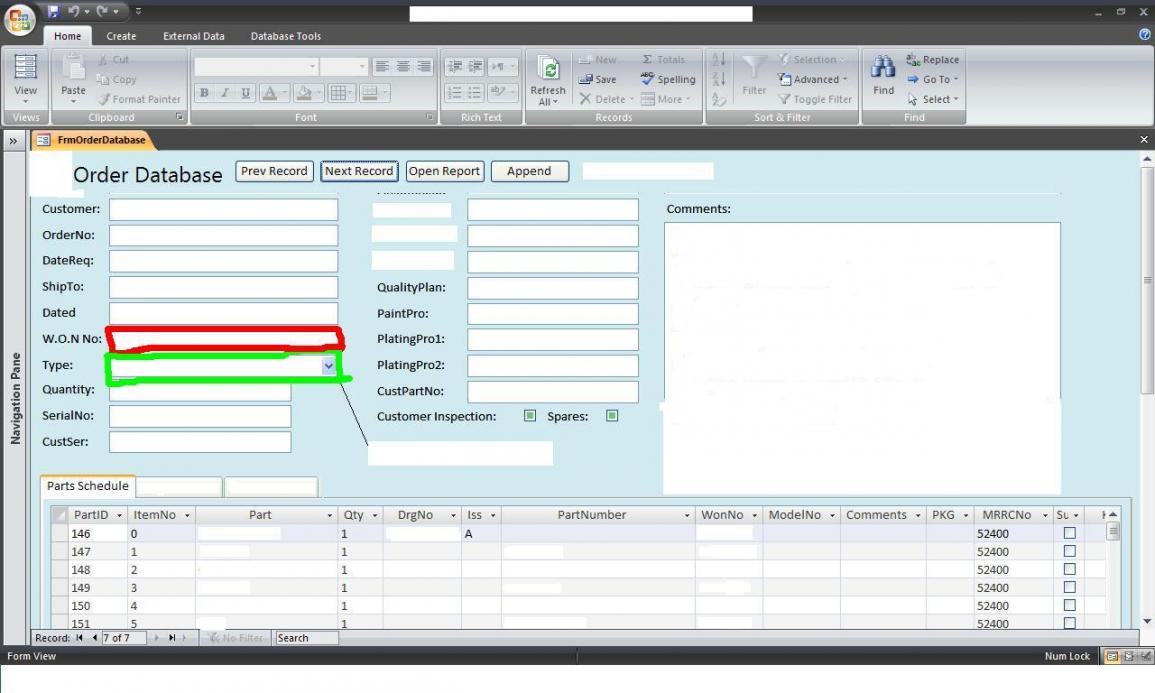
What I’m trying to do is when the user enter a value into the W.O.N No: (red outline box E.G. 12345/67) ,then the user selects a type (Green outline box E.G. 4900) The vba code in the button needs to bring over the value in the text box W.O.N No: (red outline box) and then look in TblTemplates and combine the results into the subform on the main form (FrmOrderDatabase) and the W.O.N No has to go beside each record in the subform.
My table structure.
TblTemplate
-TempPartID (PK)
-TempItemNo
-TempPart
-TempQty
-TempDrgNo
-Tempiss
-TempModelNo
-TempPartNo
-TempWonNo
-TempComments
-Tempkg
-TempMRRCNo
-TempSubcon
-TempKitBox
-TempStock
-TempDueDate
TblTemplate doesn’t contain the WonNo and MRRCNo but will still need the fields to be there
TblPartschedule
-PSPartID
-PSItemNo
-PSPart
-PSQty
-PSDrgNo
-PSIss
-PSModelNo
-PSPartNumber
-PSWonNo
-PSComments
-PSKG
-PSMRRCNo
-PSSubCon
-PSKitBox
-PSStock
-PSDueDate
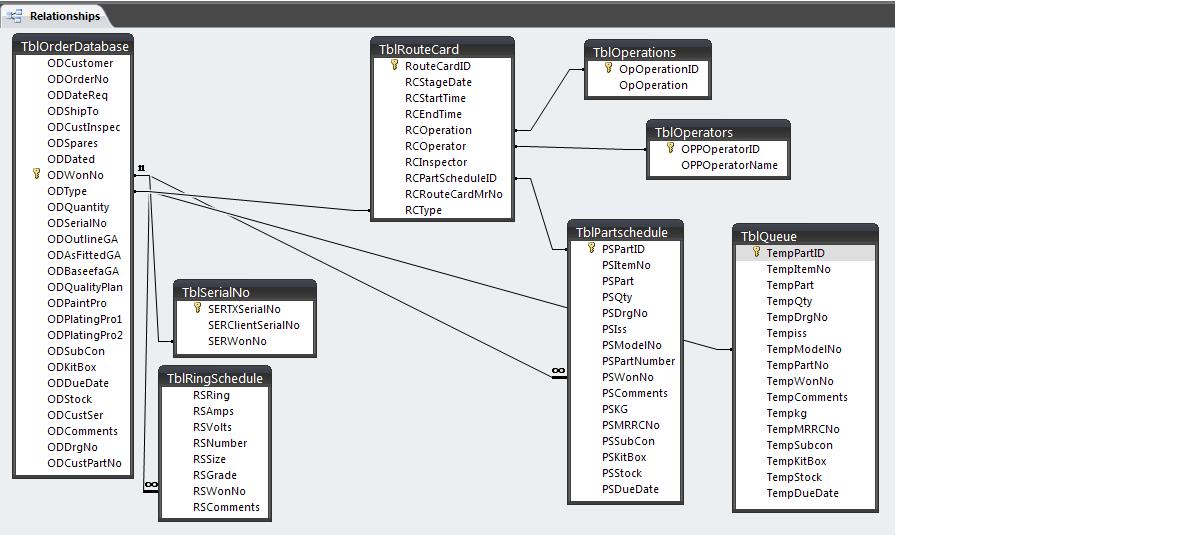
TblPartschedule contains the WonNo, and MRRCNo
The WonNo is the unique number given to an order with 1 Model between 50 and 80 parts make up one model
FrmTemplate1 is the subform made from
TblTemplate --> QryTemplate1 --> FrmPartschedule
The Append Query is made up from TblTemplate.
I have a button on my form already to use the append query and here is the code so far.
But when i change the combobox it gives me an error.
Any help is much appreciated
Thanks.
Hoping someone can help me out
What I’m trying to do is when the user enter a value into the W.O.N No: (red outline box E.G. 12345/67) ,then the user selects a type (Green outline box E.G. 4900) The vba code in the button needs to bring over the value in the text box W.O.N No: (red outline box) and then look in TblTemplates and combine the results into the subform on the main form (FrmOrderDatabase) and the W.O.N No has to go beside each record in the subform.
My table structure.
TblTemplate
-TempPartID (PK)
-TempItemNo
-TempPart
-TempQty
-TempDrgNo
-Tempiss
-TempModelNo
-TempPartNo
-TempWonNo
-TempComments
-Tempkg
-TempMRRCNo
-TempSubcon
-TempKitBox
-TempStock
-TempDueDate
TblTemplate doesn’t contain the WonNo and MRRCNo but will still need the fields to be there
TblPartschedule
-PSPartID
-PSItemNo
-PSPart
-PSQty
-PSDrgNo
-PSIss
-PSModelNo
-PSPartNumber
-PSWonNo
-PSComments
-PSKG
-PSMRRCNo
-PSSubCon
-PSKitBox
-PSStock
-PSDueDate
TblPartschedule contains the WonNo, and MRRCNo
The WonNo is the unique number given to an order with 1 Model between 50 and 80 parts make up one model
FrmTemplate1 is the subform made from
TblTemplate --> QryTemplate1 --> FrmPartschedule
The Append Query is made up from TblTemplate.
I have a button on my form already to use the append query and here is the code so far.
Code:
Private Sub Append_Click()
stDocName = "QryTemplate"

If MsgBox("Are you sure?", vbYesNo) = vbYes Then
  Docmd.OpenQuery stDocName, acNormal, acEdit
  Me.FrmQueue.Requery

Else
Cancel = True
End If
End Sub
But when i change the combobox it gives me an error.
Any help is much appreciated
Thanks.


