Clear cell depending on data validation

MLF

New member
Local time
Today, 14:14
Joined
Feb 13, 2008
Messages
6
Hi

I have a cell which has a "Yes/No" drop down as an answer to a question. If this Cell (say B1) is set to "No", then conditional formating sets C1 to grey colour and if the cell is edited an error message (through a Custom Data Validation) returns an error message - to all intents the cell is greyed out and not editable. However, if B1 is set to "Yes" C1 is not greyed out, and can be edited. All OK so far.
The problem is, if B1 is set to "Yes", and C1 has been given a value, I need a way of clearing C1 (in real time) if B1 is subsequently set to No - C1 must be set to Grey (that works) and the cell blanked.

Has anyone any ideas on how C1 can be blanked, please?
 
Last edited:
Instead of asking us to excuse you if the question has been asked a million times try doing a search and find out if it has been asked.
 
Instead of asking us to excuse you if the question has been asked a million times try doing a search and find out if it has been asked.

Thanks for this helpful reply.

I have searched this forum and the internet. I chose this forum because most people got help whereas on other forums there were loads of question with 0 replies. Any ideas on what to search for... "Blank", "Data Validation", "need formula to output to different cell to that which holds the formula so that the formula is not overwritten, but need it all to happen in real time rather than running a macro"..................

So, has anyone any ideas, please, or know where there is a related thread.
 
Well my point made perfect sense before you deleted your snotty reply to my first post in this thread.

Anyway go and do a search on change events for combo boxes.
 
Well my point made perfect sense before you deleted your snotty reply to my first post in this thread.

Anyway go and do a search on change events for combo boxes.

I deleted my reply because I thought it was snotty. Please see edit comment on first post. I did search this forum, and I could not find anything relevant - plenty that was close. I have now searched on what you suggested and again I can find nothing really relevant.
 
Create a combox using the control toolbar, not the form toolbar.

Right click on your combobox and select properties

For the listfillrange property enter the range where your values for the combobox are e.g. "sheet1!A1:A2" (without the quotes)

Close the properties window

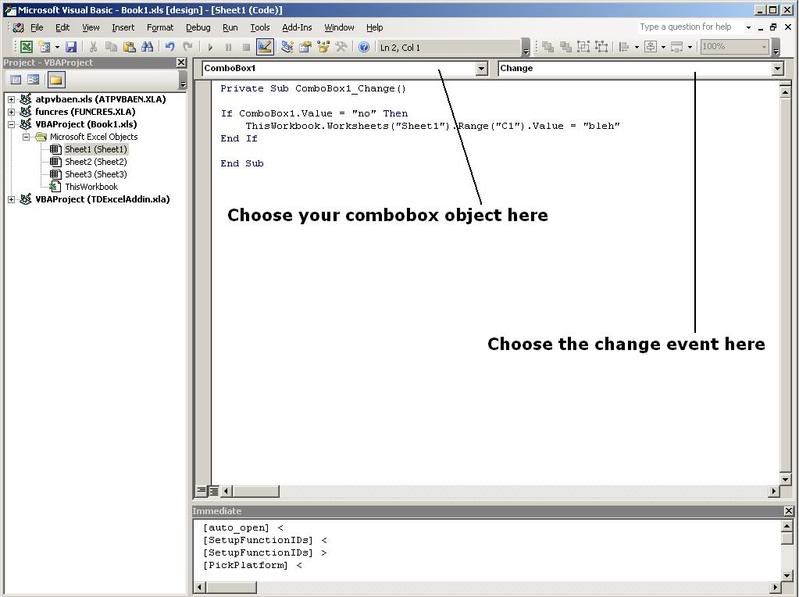
Right click on the combobox and select view code

untitled-2.jpg


Enter the following code:

Code:
Private Sub ComboBox1_Change()

If ComboBox1.Value = "no" Then
    ThisWorkbook.Worksheets("Sheet1").Range("C1").Value = ""
End If

End Sub

Close the code window

Exit design mode

See if it works
 
Chergh

Have done that and it works. I was fixed on Data Validation and drop down lists and did not register with Combo Boxes.

Thank you.
 
What the heck is wrong with people these days? What ever happened to good old-fashioned kindness to another human being? What happened to the days when people actually gave a crap about each other? chergh, get off your high horse and spend your time doing something that might actually be useful to another human being! Sorry, but your response was totally unnecessary. Try a little kindness, you might actually like it.

MLF, don't let chergh intimidate you out of using this forum. I've always gotten answers I needed here from some pretty intelligent and - OMG - HELPFUL people. Imagine THAT! Unfortunately, there's always one idiot in the crowd that has to stir things up.

Sure, definitely search for your answer before posting, but these forums are here for people to get answers, so don't worry about idiots who make nasty replies to you. Besides, sometimes you're in a real hurrry and need a quick answer. You may not always have time to search for it. Limit that as much as possible, but when you need it, this is definitely an awesome place to get help.

Anyway, I don't have a massive amount of Excel VBA experience but if you haven't figured out your problem yet, let me know and I'll see if I can find a code snippet somewhere in my automated tools for you.
 
Thanks for the kind words XLEAccessGuru

I was very surprised at the reception I received at the hands of Chergh. As you say, I was in a hurry but had been searching for an answer for some time. Generally I found that the way I wanted to do it wasn't possible. I did do a search on this forum, but at the end of the day I thought I might get a quick knowledgable answer if I just went ahead and asked. I did eventually get that from Chergh and the solution worked (I may have a problem with greying out but like all things you try to sort it yourself before going into print). The problem was I apologised before asking the question - never again.
Straight into the question and be damned!

MLF
 

Users who are viewing this thread

Back
Top Bottom