
Hi,
I am creating a database and need to produce a report that will form an itemised quotation.
There can be up to 8 items on the quotation along with their associated costs to the customer. I am trying to make the "item" field dynamically expand if necessary when longer text is entered into it and then expand the corresponding "Totals" fields to match the new size.
I have tried using the "Can Grow" property however for some reason the formatting does not cascade down to the fields below and the "Totals" fields remain the same size.
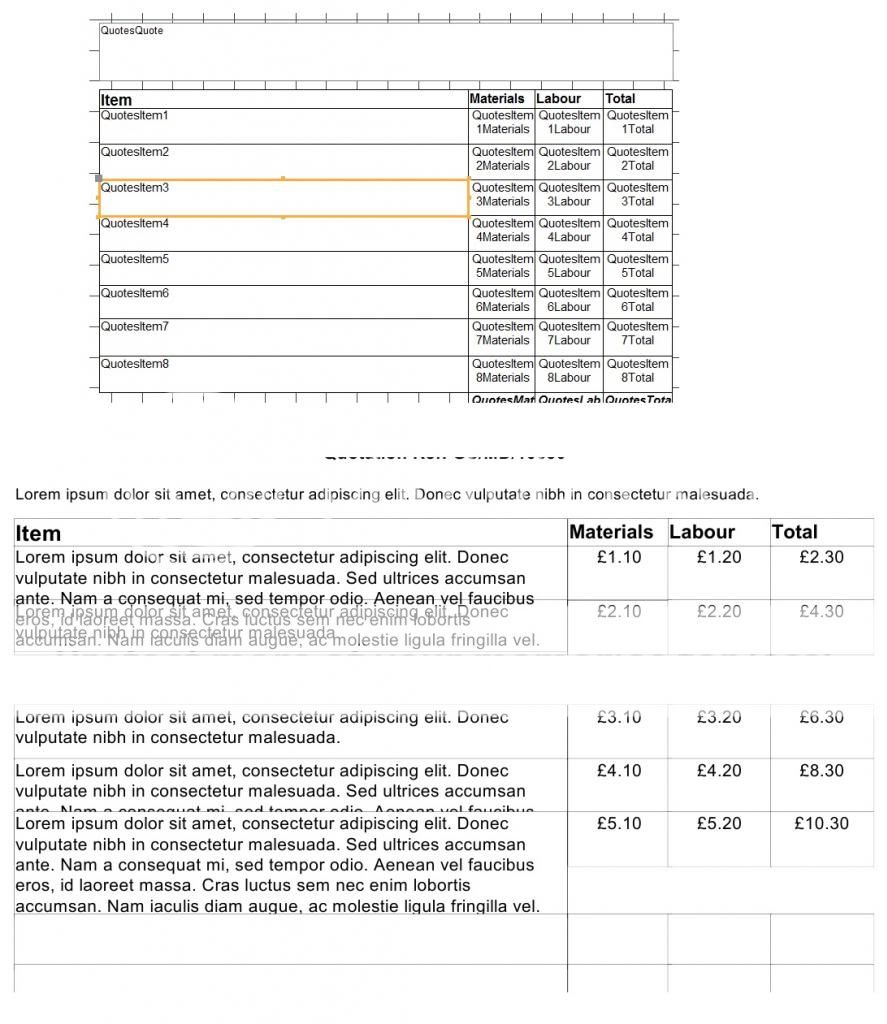
To try and explain better I have included a screen shot of the relevant part of the report and how it looks when printed. I should point out that the "QuotesQuote" box at the top of the screen is set to "Can Grow" and when that expands the boxes below automatically move to accommodate this.
Thanks in advance for your help
I am creating a database and need to produce a report that will form an itemised quotation.
There can be up to 8 items on the quotation along with their associated costs to the customer. I am trying to make the "item" field dynamically expand if necessary when longer text is entered into it and then expand the corresponding "Totals" fields to match the new size.
I have tried using the "Can Grow" property however for some reason the formatting does not cascade down to the fields below and the "Totals" fields remain the same size.
To try and explain better I have included a screen shot of the relevant part of the report and how it looks when printed. I should point out that the "QuotesQuote" box at the top of the screen is set to "Can Grow" and when that expands the boxes below automatically move to accommodate this.
Thanks in advance for your help


