Help with creating Attachments in forms

crumpet

Registered User.
Local time
Today, 18:29
Joined
Jun 20, 2007
Messages
13
Hi Guys, This is my first post and I hope to become a active member of this forum
.
Was hoping anyone could help me , i have a complaint database in which i would like the ability to attach a jpeg/document to the complaint record via the complaint form, like a "attach attachment" command button

can anyone help me in whats required to achieve this
if possible id love to be able to attach any format , i.e. jpeg, word doc, etc

my complaint form name is "complaint table subform 1" and my table where i want to store this data is called "complaint table"

really appreciate the help
 
I believe attachments in proper are possible in Access 2007, although I haven't played with it enough to be definitive in that answer.

The better solution (smaller DB) to to attach a link to the attachment. In other words, you make a central repository that stores all your various attachments, and then make that a link in your DB. For example, you have a complaint called, "John Doe Bought A Lemon", and in the link field of that complaint record, you have, "c:\Complaints\John's Lemon Picture.jpg" or whatever.

It gets difficult to maintain that if this is going to be a multiuser DB as you'll need network space, everyone will need access to that network share, etc.

What your asking for is not easy to do at all. Linking is the more manageable of the options, but neither option is for the newbie or faint of heart.
 
Hi Moniker , thanks for replying,
Ive managed to create a hyper link field in my table called attachment path so now i simple type in the path and it will provide a separate link for each record

the only issue i have is the long windedness of this , is there anyway of me having a button next to my hyper link field in the form which will allow me to browse for the file and then when i choose eg: c/temp/word.doc it will then populate my attachment path field in my table
 
Whoa, whoa, whoa!!!

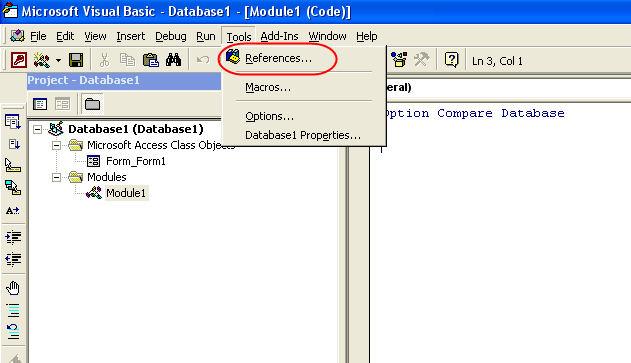
Use a FileDialog object here. (Add the Microsoft Office X.0 Object Library reference to expose the FileDialog object, found in Tools -> References.) It then looks like this (no API calls necessary):

Code:
Function fGetFileFolder As String

    Dim dlg As FileDialog
    
    Set dlg = Application.FileDialog(msoFileDialogFilePicker)
    With dlg
        .Filters.Clear
        .Filters.Add "All Files", "*.*"
        .AllowMultiSelect = False
        .Title = "Select a file to link"
        If .Show Then
            fGetFileFolder = .SelectedItems.Item(1)
        End If
    End With
    
    Set dlg = Nothing
    
End Function

.Filters are the File Types in the drop down at the bottom of the file dialog box.
.AllowMultiSelect, boolean, allows the user to either select one file at a time or multiple files. This would affect the Item() of SelectedItems, below.
.Title is the title of the file dialog box.
.Show, boolean, means the user clicked "Open" if true, or "Cancel" (or closed the dialog) if false.
.SelectedItems.Item(1) is the full path and filename of the selected file.
.InitialFilename (not shown) is the full path only, not the filename.

This will allow you to easily call a reference to this, like so:

YourLinkFieldName = fGetFileFolder

If you want to browse for a folder instead of a file, change msoFileDialogFilePicker to msoFileDialogFolderPicker.

EDIT: Bob's suggestion doesn't involve the Office Object Library reference, and that's by choice. Some of his users use the runtime version of Access, where reference availability is not always an option. My method assumes a full install of Access on the machine running the DB, where Bob's, while more complex, will work with both the full install and the runtime versions. You know your user base better than us, so use whichever fits your situation.
 
Last edited:
sorry guys im a total noob with code and i cant find the tools>refernces , im using access 2003

can you guys give me a step by idiot version step by step
 
ref1.png
 
ok the object library is already ticked, can someone show me how to get a command button to run the code that ive inputted into the module
 
ok the object library is already ticked, can someone show me how to get a command button to run the code that ive inputted into the module

In the CLICK event of the button, you would put

fGetFileFolder
 
Using attachments similar to northwind example...

Hello,

This is sort of related to this thread:

The northwind example in Access 2007 shows a very clean, clear example of the the attachment function. You can find this (if you have Access 2007!) in the "Product Details" form.

This is such a general question that might be frustrating: How can I easily replicate that exact function? It seems very easy but sure involves the use of modules.

All I would like to do is have a link to an attachment in one of my forms at the moment. If I could have a little preview of an image in the form that the user could then open in whatever appropriate editor (if it's Word, Picture Previewer, etc) that would be so helpful for my clients.

Any ideas on how to do this using that as an example?

Thank you,
Mike
 
ok now when i click on my command button it says "cant find macro fgetfilefolder"

why is it looking for a macro , i simple wrote fGetFileFolder in the on click section of the command, was this wrong ??

alternatively my module is called module 1 and if i type in fGetFilefolder in the build area for the on click event i then get a user define type not defined error
 
Last edited:
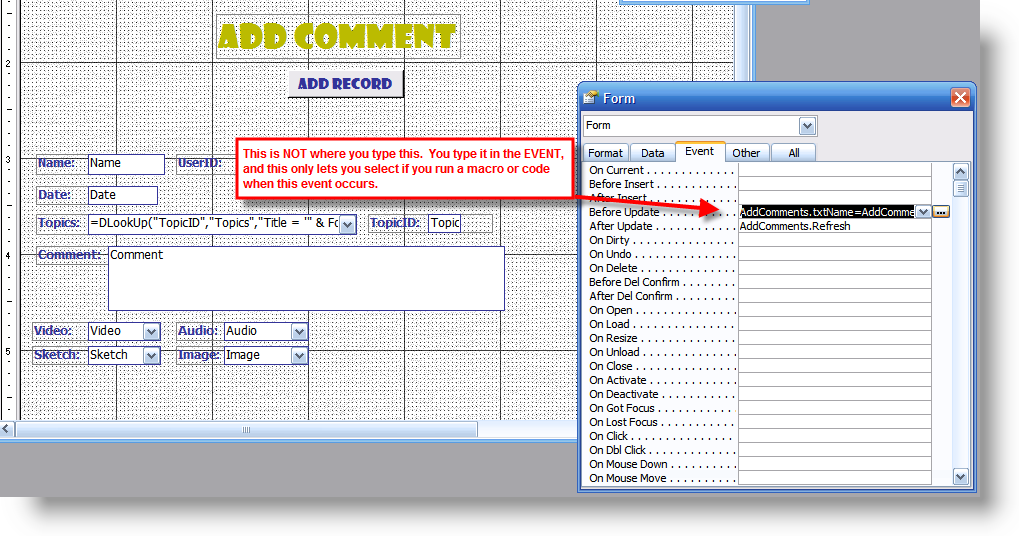
You put the code in the wrong spot. I'll use pictures to explain. Just remember that this was created for someone else so be sure to put it into the appropriate click event and not the event shown by the pics:

ev01.png


ev02.png


ev03.png


ev04.png
 
ok when i do it the way you have shown i get the "user define type not defined" and it highlights the following section

Function fGetFileFolder() As String

Dim dlg As FileDialog


Set dlg = Application.FileDialog(msoFileDialogFilePicker)
With dlg
.Filters.Clear
.Filters.Add "All Files", "*.*"
.AllowMultiSelect = False
.Title = "Select a file to link"
If .Show Then
fGetFileFolder = .SelectedItems.Item(1)
End If
End With

Set dlg = Nothing

End Function

any ideas
 
You missed MONIKER's statement, or at least didn't do it:

(Add the Microsoft Office X.0 Object Library reference to expose the FileDialog object, found in Tools -> References.)
That is done by selecting Tools > References in the menu bar when you are where you put the code.
 
when i go into references the Microsoft access 11.0 library is already ticked , what else do i have to do from this point ?

edit my bad , there 2 that look similar, ok now i get the browse screen yippee , but my final question is how do i tell it to input that results of my browsing into the hyper link field
 
when i go into references the Microsoft access 11.0 object library is already ticked , what else do i have to do from this point ?

Read it more carefully - Moniker didn't write Microsoft ACCESS object library, he wrote Microsoft Office X.0 Object Library (where X.0 is the version of OFFICE (not Access) on your machine).
 
In whatever event you want to use to call the function (like a browse button's click event, perhaps) you would put

Me.YourHyperlinkTextBox = fGetFileFolder
 
ok i tried on the lost focus secion of my command button which calls up my browse for file the following Me.Attachment Path = fGetFileFolder and it dosent work it says "method or data member not found" now from what i can tell the hyper link field name is attachment path as sated in the properties under name..
am i missing something

appreciate all your help so far
 
I think we're down to finding out if you can post a copy of your db or email it, if too large. Which version of Access and Office are you using?
 
database is too big unfortunately, im using office/access 2003 as stated i have a table which contains the field "attachment path" this is a hyper link. my form is directly based off this table i now have a command button with using your instructions allows me to select a file, problem is i need to have the results of that browse function to show the file path in the "attachment path" field.
the form name is "Complaint Table subform1"
 

Users who are viewing this thread

Back
Top Bottom