Solved I suspect this super simple query is giving me what i asked for not what I wanted

Al Kramer

Member
Local time
Today, 12:14
Joined
Jan 7, 2025
Messages
55
Hello Access Friends

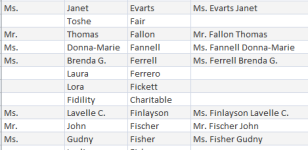
I want to concatenate three fields in my table into a new field.
When the first field in empty I do not get field2 + field3

1738095763038.png


Yeilds:

1738095810290.png


I hoped to see the last+first without the prefix

The sql looks like this:

SELECT Demo.PREFIX, Demo.FNAME, Demo.LNAME, [prefix]+" "+[fname]+" "+[lname] AS NewFld
FROM Demo;


I'm new at this & I am sure suspect I don't understand something basic to the query.

Any help appreciated.

Thanx

Al

 

Attachments

  • 1738095440351.png
    1738095440351.png
    9.4 KB · Views: 127
  • 1738095520653.png
    1738095520653.png
    10.1 KB · Views: 128
You're trying to concatenate a null. wrap [prefix] in Isnull([prefix],'')

Edit - trying to remember at the moment if IsNull is the same in Access as SQL Server - if not my code might need an adjustment.
 
IsNull() is a VBA function call and simply returns True or False, not the same thing as SQLServer IsNull() which is actually same functionality as Access Nz() also a VBA function call. In Access IS NULL is SQL.

Concatenation using + will return Null when Null is involved (null propagation - as happens in arithmetic). Concatenation using & will return string part when Null is involved (returns Null if all inputs are Null).

Try mixing them if you want to avoid extra spaces. The +'s evaluate first.

[prefix] + " " & [fname] + " " & [lname]

I would use Nz() in this case only if wanted to return something like "name not given" when field is Null.
 
Last edited:
IsNull() is a VBA function call and simply returns True or False, not the same thing as SQLServer IsNull() which is actually same functionality as Access Nz() also a VBA function call. In Access IS NULL is SQL.

Concatenation using + will return Null when Null is involved. Concatenation using & will return string part when Null is involved (returns Null if all inputs are Null).

Try mixing them if you want to avoid extra spaces. The +'s evaluate first. Assumes there is always lname value.

[prefix] + " " & [fname] + " " & [lname]
This worked perfetly, Thanx

& Vs + .... Hmmmm
Now... Where can I look / go to understand this stuff? Can you suggest a reference or tutorial?
Again
Thanx
 
Google is your best friend. You will find sites like THIS.
 
Google. I don't remember when or where I learned this. I revised my answer as you were reading. Might look at again. Think it pretty much covers the & Vs + question.
 
Well Microsoft, please update sql server to handle the concatenation of Nulls as well as Access apparently does 🤠
 
Well Microsoft, please update sql server to handle the concatenation of Nulls as well as Access apparently does
I think that's what COALESCE() function is for. Although is kinda annoying SQLServer requires a special function to do what Access SQL can simply do with operators.
 
Last edited:

Users who are viewing this thread

Back
Top Bottom