
Item not found in collection - Error 3265

RickHunter84

Registered User.
Local time
Today, 18:24
Joined
Dec 28, 2019
Messages
85
hello friends,

I need your help to spot an issue that I've tried to figure out for at least 2 hours. Im trying to export a query to a csv file based on a criteria. The code works fine until it reached the parameter to filter the query, see code below:

Code:
Public Function ExportQueryToCSV(searchCriteria As String)
    Dim db As DAO.Database
    Dim rst As DAO.Recordset
    Dim qdf As QueryDef
    Dim filePath As String
    Dim fileName As String

    Const queryName As String = "DisposetQ"
    
    
    Const exportFolder As String = "C:\Users\Megaman\CSVAccessSearch\"
    
  
    fileName = "PNstoSearch.csv"
    
    ' Combine the folder and file path
    filePath = exportFolder & fileName
    
    ' Open the query
    Set db = CurrentDb
    Set qdf = db.QueryDefs(queryName)
 
  
    qdf.Parameters("[DS]").Value = searchCriteria
    
    Set rst = qdf.OpenRecordset()
    

    If Not rst.EOF Then
        DoCmd.TransferText acExportDelim, , queryName, filePath, True
        MsgBox "Query results exported to " & filePath, vbInformation, "Export Successful"
    Else
        MsgBox "No matching records found.", vbInformation, "Export Aborted"
    End If
    
    Set rst = Nothing
    Set qdf = Nothing
    Set db = Nothing
End Function

The line that is causing the issue is qdf.Parameters("[DS]").Value = searchCriteria - i've checked the Query and the field does exist as DS. Not sure why access is telling me that is not part of the collection.

Any feedback will be greatly appreciated.
thank you in advance.
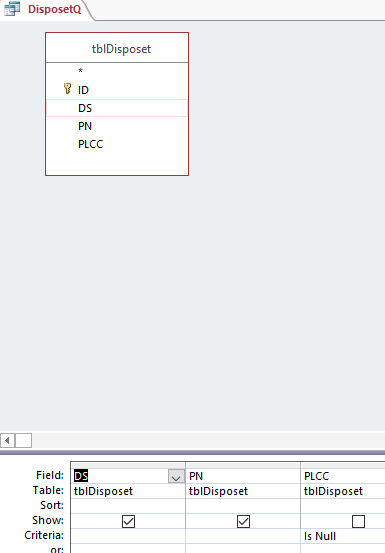
DS table example.png
 
Where is the parameter defined? A field is not a parameter.
 
Where is the parameter defined? A field is not a parameter.
Not sure how to apply that. This is my first time using QueryDef to be honest, i used a template code and slightly adjusted...any feedback on how to define it is greatly appreciated.
 
I updated my post. I hadn't looked at your query first
hey Pat,

I adjusted the code, but when i run the code i actually get the prompt from the query to enter the parameter, so searchCriteria is not being picked up by the code. The comment you made regarding the Where DS = [EnterDS] , Do I need to put this in the Query design screen (criteria field)?

Rick
 
I routinely reference the parameters collection using the index, rather than the name of the parameter, like...
Code:
qdf.Parameters(0) = searchCriteria
Here's a code sample from a system I have open on my desk right now...
Code:
    With CurrentDb.CreateQueryDef("", SQL_UPDATE_SHIPDATE)
        .Parameters(0) = Shipdate
        .Parameters(1) = Split(OrderNumber, "-")(1)
        .Execute dbFailOnError
    End With
You just need to know what order the query expects them in, and the index of the first one is zero.
 
You just need to know what order the query expects them in, and the index of the first one is zero.
There you stated a strong reason not to do as you just suggested.
I very much prefer named parameters, as they are less prone to hidden bugs. If a parameter name was changed, there will be an visible/catchable error. If just the order of parameters was changed, the code might continue to run but with incorrect results.
 
I'm not saying don't use named parameters, but in a case like this, which is common in how I code stuff...
Code:
   Const SQL_INSERT_RECORD As String = _
        "INSERT INTO tProperty " & _
            "( ParentType, Name, Description ) " & _
        "VALUES " & _
            "( p0, p1, p2 ) "
    
    With CurrentDb.CreateQueryDef("", SQL_INSERT_RECORD)
        .Parameters(0) = "Database Maintenance"
        .Parameters(1) = Sys.User.FirstName & " executed at " & Now()
        .Parameters(2) = m_msg
        .Execute
        .Close
    End With
... there is no confusion about what is going on. So if referencing the parameter by index works for you, it's an option.
 
[OT]
... there is no confusion about what is going on
But you have to look up again when reading the code to know what value needs to go in at .Parameters(1).


[Back to the topic]

When I create a parameter query, I declare the parameters including data type.

Example:
Parameter list in query editor:
ParamQuery.png

SQL:
Code:
PARAMETERS [@N] Long, [@T] Text (255);
SELECT TestTab.id, TestTab.N, TestTab.T
FROM TestTab
WHERE TestTab.N = [@N] AND TestTab.T = [@T];
 

Users who are viewing this thread

Back
Top Bottom