
Subform Not Showing Data

gbnz

Registered User.
Local time
Today, 08:48
Joined
Mar 12, 2010
Messages
63
Okay I am having one of those moments I guess. I have a Subform that is inside a Subform that its only purpose is to display some calculations but for some reason it is blank. Here is a screenshot of what I am dealing with:
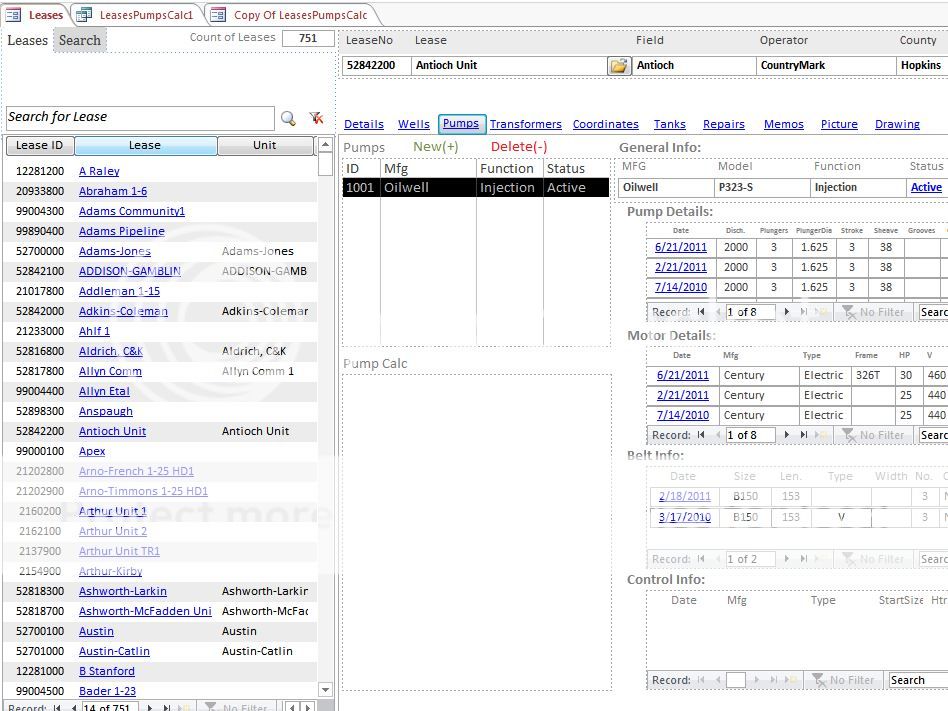

See that area under "Pump Calc" that is blank...it should have data in it:

Here is the query that drives that data:


And here is a copy of that subform running in form view:
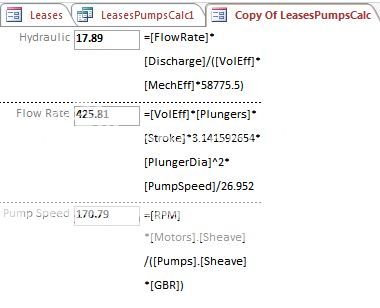

What am I missing?
 
Anyone have any ideas? No matter how insignificant you think it is. I have a feeling it is something simple I am overlooking.

The listbox that is highlighted under "Pumps" is the key.
 
Your screenshots did not attach, probably because you don't have ten posts yet. There is a sticky at the top of the forum for how to strip and zip a database for attaching.

We can do some error testing without that, though. Does it always show up blank, or just for this record? What are ALL the variables (fields) that go into this calculation on the one that is blank, and what is the formula, and what result did you expect instead of a blank record?
 
You really need to zip your file up and post it, as David suggested, if we are to be of much use to you. To be honest, screen shots of Forms, in Form View, are pretty much useless; it's like a mechanic trying to diagnose a car's stalling problem by looking at the paint job, rather than lifting the hood and inspecting the engine!

If the

Linq ;0)>
 
A form does not display any controls if the underlying dataset is empty (and records cannot be added). The fact that it does display when on its own,but not when embedded, means, most likely, that the mechanism by which you select what to show does not have proper reference to the item that determines which record to show. Anything in the form refered to from the outside of the form changes name when you embed the subform. When embedded, try to compile - I am sure it will show you what you missed.
 
@David_R I have 42 posts now 43...I don't know why you are not able to see the screenshots...but thank you for the questions

@missinglinq Sorry zipping up is unfeasible

@spikepl Thanks for the idea...I did check that. I will figure it out.
 
Yes there is always another way: I have created a function that places my calculation into textboxes. So I have done it with VBA + the calculations will change if there is more than one pump and I change to a different one.


Users who are viewing this thread

Back
Top Bottom