hi i have this problem since i created combo box with three values. Although when i select one value and press save button it saves in the table but if i want to update that specific field from the combo box on change event it throws this error while it also updates after i close this dialog box. i don't know what i am doing wrong

You are using an out of date browser. It may not display this or other websites correctly.
You should upgrade or use an alternative browser.
You should upgrade or use an alternative browser.
the value you entered is not valid for the field
- Thread starter sree0009
- Start date
hey actually, i have stated the problem below and exactly what im trying to get from it.
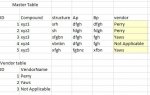
ID Compound structure Ap Bp vendor
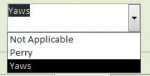
As you can see the above one has table with 25 fields in it but I could give you the first 5 fields I have a form where the data will be submitted into the database. Now vendor field has three values to select from Perry ,yaws,not applicable.
if i press the save button it saves to the database. but when i go to different records by using next button user should be able to update the vendor field by the combo box selecting value and it automatically should update it into databse
i have written an update statement in the on change event but it say the followinfg error.
Ps. while creating new records on change should not update but while viewing the records onchange should be updated with the selected value in the combo box.
ID Compound structure Ap Bp vendor
As you can see the above one has table with 25 fields in it but I could give you the first 5 fields I have a form where the data will be submitted into the database. Now vendor field has three values to select from Perry ,yaws,not applicable.
if i press the save button it saves to the database. but when i go to different records by using next button user should be able to update the vendor field by the combo box selecting value and it automatically should update it into databse
i have written an update statement in the on change event but it say the followinfg error.
Ps. while creating new records on change should not update but while viewing the records onchange should be updated with the selected value in the combo box.
Attachments
Last edited:

Master table bound to master form
i created a combo box and changed the control source to vendor( which is field name in the master table)
so i have new record button Macro which takes all the data from the combo box also and when pressed save button it saves into master table.
but when i open the form it shows all records one by one and when pressed next button it shows second record. typically its a huge form.( this is in view stage)
Task i want to update the value selected in the combo box into the table but it throws me this error that the value you entered is not valid for the Field 'ID'
but i tried my best it is pointing the ID of the vendor table.
Also code you asked looks for onchange combox is
Dim vendor As Variant
Dim strRQL As String
Dim str2 As Integer
Dim num As Integer
num = DCount("*", "Master")
If (Form_Master.ID <= num) Then
vendor = DLookup("vendor_name", "vendortable", "ID=" & Combo683.Value & "")
Set dbs = CurrentDb()
str2 = Form_Master.ID
strRQL = "Update Master set vendor="
strRQL = strRQL & " '" & vendor & "' WHERE ID=" & str2 & ";"
CurrentDb.Execute strRQL
dbs.Close
That error is poped when the the lines of code is executed but as soon as when i press the next button its shows that error. but my update was made into the table still shows the error i wonder why
Also if i click the refresh all button which is on top then the error doesn't pop weird
i created a combo box and changed the control source to vendor( which is field name in the master table)
so i have new record button Macro which takes all the data from the combo box also and when pressed save button it saves into master table.
but when i open the form it shows all records one by one and when pressed next button it shows second record. typically its a huge form.( this is in view stage)
Task i want to update the value selected in the combo box into the table but it throws me this error that the value you entered is not valid for the Field 'ID'
but i tried my best it is pointing the ID of the vendor table.
Also code you asked looks for onchange combox is
Dim vendor As Variant
Dim strRQL As String
Dim str2 As Integer
Dim num As Integer
num = DCount("*", "Master")
If (Form_Master.ID <= num) Then
vendor = DLookup("vendor_name", "vendortable", "ID=" & Combo683.Value & "")
Set dbs = CurrentDb()
str2 = Form_Master.ID
strRQL = "Update Master set vendor="
strRQL = strRQL & " '" & vendor & "' WHERE ID=" & str2 & ";"
CurrentDb.Execute strRQL
dbs.Close
That error is poped when the the lines of code is executed but as soon as when i press the next button its shows that error. but my update was made into the table still shows the error i wonder why
Also if i click the refresh all button which is on top then the error doesn't pop weird

Solo712
Registered User.
- Local time
- Today, 08:49
- Joined
- Oct 19, 2012
- Messages
- 836
Master table bound to master form
i created a combo box and changed the control source to vendor( which is field name in the master table)
so i have new record button Macro which takes all the data from the combo box also and when pressed save button it saves into master table.
but when i open the form it shows all records one by one and when pressed next button it shows second record. typically its a huge form.( this is in view stage)
Task i want to update the value selected in the combo box into the table but it throws me this error that the value you entered is not valid for the Field 'ID'
but i tried my best it is pointing the ID of the vendor table.
Also code you asked looks for onchange combox is
Dim vendor As Variant
Dim strRQL As String
Dim str2 As Integer
Dim num As Integer
num = DCount("*", "Master")
If (Form_Master.ID <= num) Then
vendor = DLookup("vendor_name", "vendortable", "ID=" & Combo683.Value & "")
Set dbs = CurrentDb()
str2 = Form_Master.ID
strRQL = "Update Master set vendor="
strRQL = strRQL & " '" & vendor & "' WHERE ID=" & str2 & ";"
CurrentDb.Execute strRQL
dbs.Close
That error is poped when the the lines of code is executed but as soon as when i press the next button its shows that error. but my update was made into the table still shows the error i wonder why
Also if i click the refresh all button which is on top then the error doesn't pop weird
If the combo box is bound to the table you don't need the procedure you are showing. Any change to the box will be kept when you save the record. Besides the OnChange event is wrong one to use. You are creating unnecessary problems for yourself.
Best,
Jiri
i removed the on change event but it is not saving automatically
Is the field bound to the control and the table bound to the form?
As you posted "Combo683.Value" I am guessing this is an unbound control. Please make sure that a field from your table is in the control source for this field.
I would also rename it so it has a meaningful name. Combo683 gives no meaning for what the control is supposed to do.
Thank you all, problem solved actually it was automatically saving the data. but i placed a validation condition in the click event of save button thats why it was not saving automatically.
i have commented the validation then it works smoothly. after that i had two issues.
1. i have so many text boxes in the form master how can i validate it.
(if i use beforeupdate then the user must click on the textbox then only it can be validated. if keept after update also similar. if user doesnt even click on any textbox and presses save button it should ask for proper input data.)
2.it automatically saves the changed value from the combo box but it is storing a id number instead of text value.
Example:1 perry,2 yaws,3 not applicable
if i select perry then it save in the table as perry (when viewed in table)
but when i kept a alert in vba code it gives me value 1.
i have commented the validation then it works smoothly. after that i had two issues.
1. i have so many text boxes in the form master how can i validate it.
(if i use beforeupdate then the user must click on the textbox then only it can be validated. if keept after update also similar. if user doesnt even click on any textbox and presses save button it should ask for proper input data.)
2.it automatically saves the changed value from the combo box but it is storing a id number instead of text value.
Example:1 perry,2 yaws,3 not applicable
if i select perry then it save in the table as perry (when viewed in table)
but when i kept a alert in vba code it gives me value 1.
Thank you all, problem solved actually it was automatically saving the data. but i placed a validation condition in the click event of save button thats why it was not saving automatically.
i have commented the validation then it works smoothly. after that i had two issues.
1. i have so many text boxes in the form master how can i validate it.
(if i use beforeupdate then the user must click on the textbox then only it can be validated. if keept after update also similar. if user doesnt even click on any textbox and presses save button it should ask for proper input data.)
2.it automatically saves the changed value from the combo box but it is storing a id number instead of text value.
Example:1 perry,2 yaws,3 not applicable
if i select perry then it save in the table as perry (when viewed in table)
but when i kept a alert in vba code it gives me value 1.
For 2, you put the lookup into your table definition so ACCESS is doing the lookup and showing what you request when viewing the table. What is really stored is the ID.
thanks mark. but when i open the table it shows perry name itself but when i write code in vba it takes 1 as value. so clearly stores ID so my question was why it is not showing 1 as in raw table data ?? why is it showing Perry ??
In ACCESS, open the table in Design View.
Go down to your Vendor field.
Click on the Lookup tab. under field properties.
You should see Combo Box in the Display Control and information in Row Source Type. This is why your table is showing the vendor's name instead of the ID when viewing the table.
Go down to your Vendor field.
Click on the Lookup tab. under field properties.
You should see Combo Box in the Display Control and information in Row Source Type. This is why your table is showing the vendor's name instead of the ID when viewing the table.
Similar threads

- Replies
- 21
- Views
- 1,557

- Replies
- 6
- Views
- 667

- Replies
- 13
- Views
- 1,248
- Replies
- 15
- Views
- 1,036

Users who are viewing this thread
Total: 1 (members: 0, guests: 1)