
VAL function do NOT work out as expected
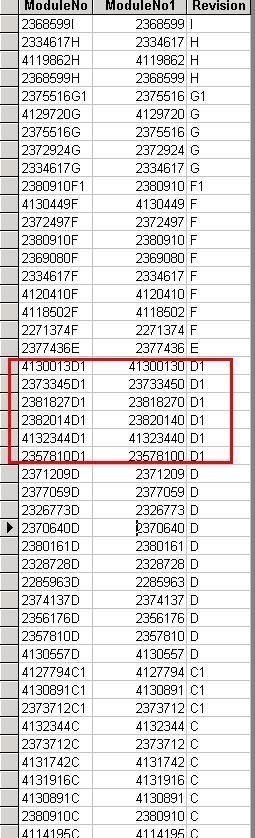
Query above show the 3 fields:-
a) ModuleNo – data extracted from original table
b) ModuleNo1 – data generated from the ModuleNo field with function val(ModuleNo)
c) Revision – data extracted from original table
As you can notice, if ModuleNo consists of the letter ‘D’ follow by a number such as 1,2, and etc as highlighted in red square, there is a number “ZERO” appear at the end under the ModuleNo1 field. Total number of ZERO appearance depends on the number from the original field, ModuleNo.
For example,
a) 12345D1 => 123450
b) 12345D2 => 1234500
c) 12345D3 => 12345000 and so on
However, you won’t see this phenomenon in other values. Kindly advise what has gone wrong to VAL function and how to overcome the problem.
Thanks
Query above show the 3 fields:-
a) ModuleNo – data extracted from original table
b) ModuleNo1 – data generated from the ModuleNo field with function val(ModuleNo)
c) Revision – data extracted from original table
As you can notice, if ModuleNo consists of the letter ‘D’ follow by a number such as 1,2, and etc as highlighted in red square, there is a number “ZERO” appear at the end under the ModuleNo1 field. Total number of ZERO appearance depends on the number from the original field, ModuleNo.
For example,
a) 12345D1 => 123450
b) 12345D2 => 1234500
c) 12345D3 => 12345000 and so on
However, you won’t see this phenomenon in other values. Kindly advise what has gone wrong to VAL function and how to overcome the problem.
Thanks
Last edited:

 ). It is similar to the E used to describe the exponent of a large number eg 155584477788 is reduced to 1.55584E11. I am guessing the D is seen by access as the distributor of the number after it. You may need to use the instr() or SPLIT functions to give you the number before the D.


