Create a Select Query Where Criteria is From One of Two Forms and Only One Form is Op

Damo1412

Registered User.
Local time
Today, 11:34
Joined
Nov 15, 2010
Messages
65
I am designing a database in Access 2013 for my boss and am stuck trying to create a specific select query.

The query will pull up data from a number of tables to produce a comprehensive update on the exactly what work has been carried out for a particular job. The idea is that the user will enter our reference number as a search criteria in one of two forms ("Search Jobs" or "Main Menu") to find the specific record.

Rather than create two separate queries (and possibly more as the database expands), is it possible to have a select query search on either input when only one form will be open?

In the select query, if I have the criteria set as:
Code:
    =[Forms]![SearchJobs]![OurReferenceNumber] Or Is Null
or
    =[Forms]![MainMenuSearch]![OurReferenceNumber] Or Is Null
If I take out the "Or Is Null" property, the query will not run until I manually enter a reference number. The query will return a value in its current configuration if both forms are open however when the database is live, only one of the two forms will be open at once. I have found a work around which is to open the other form minimized until the query has run and then close it again however I am sure that there must be a better way to do this.

Thanks in advance for your help.
 
create a function to detect if one or other form is loaded. then use an iif() to check that function and return the relevant value.

Function:
Code:
Function FormLoaded() As Boolean
FormLoaded = CurrentProject.AllForms("SearchJobs").IsLoaded
End Function

IIF() statement in query
Code:
Expr1: IIf(formloaded(),[Forms]![SearchJobs]![OurReferenceNumber].Control,_
[Forms]![MainMenuSearch]![OurReferenceNumber])
 
Hi Isskint,

Thanks for replying, unfortunately I cannot get this to work. I know that I am missing something or doing something daft but hopefully by detailing what I have done you will be able to put me back on track.

I created a module called "FormLoaded". When I created the module, Access automatically inserted the text "Option Compare Database" above a line and two drop-down boxes above it. The text in one box is "(General)" and "(FormLoaded)" is in the other one. I the code I entered is:
Code:
Function FormLoaded() As Boolean
FormLoaded = CurrentProject.AllForms("SearchJobs").IsLoaded
End Function
In the query, in the field "OurReferenceNumber" I tried entering the criteria:
Code:
Expr1: IIf(formloaded(),[Forms]![SearchJobs]![OurReferenceNumber].Control,_
[Forms]![MainMenuSearch]![OurReferenceNumber])
and received the error message "The expression you entered has an invalid .(dot) or ! operator or invalid parentheses".


I changed that to:
Code:
IIf(formloaded(),[Forms]![SearchJobs]![OurReferenceNumber].Control,_
[Forms]![MainMenuSearch]![OurReferenceNumber])
and received the error message "Undefined function 'formloaded' in expression".


I'm sure it's something daft that I've missed but I've tried playing around with this and can't see where I've gone wrong.
 
The function is correct. The syntax in the query may be the issue. Where are you putting the IIF()?

When you look at the query in design mode, below each field you place in the query you have a set of boxes. One line of those boxes is Criteria. It is in this box (below OurReferenceNumber) that you enter the IIF() statement;
Code:
IIf(formloaded(),[Forms]![SearchJobs]![OurReferenceNumber].Control,_
[Forms]![MainMenuSearch]![OurReferenceNumber])

It may also be an idea to change the module name from FormLoaded.
 
I would dynamically build the SQL. Consider the following code . . .
Code:
Function GetQueryText() As String
[COLOR="Green"]'   Encapsulates the logic to create query text on the fly,[/COLOR]
    
    Const SQL As String = _
        "SELECT * FROM Table WHERE Field1 = {0}"    [COLOR="Green"]'define the basic query text[/COLOR]
    Dim tmp As String
    
    tmp = "SomeDefaultValue"                        [COLOR="Green"]'set a default, if all else fails[/COLOR]
    If IsLoaded("SomeForm") Then                    [COLOR="Green"]'see if we can get data from source 1[/COLOR]
        tmp = Forms("SomeForm").SomeValue           [COLOR="Green"]'if so, use source 1[/COLOR]
    ElseIf IsLoaded("SomeOtherForm") Then           [COLOR="Green"]'see if we can get data from source 2[/COLOR]
        tmp = Forms("SomeOtherForm").SomeOtherValue [COLOR="Green"]'if so, use source 2[/COLOR]
    End If
    
    GetQueryText = Replace(SQL, "{0}", tmp)    [COLOR="Green"]'replace with dynamically discovered data[/COLOR]
End Function
So any consumer can call an and get the correct query text as required at that moment, because it always checks what's available. Going forward, all you need to do is edit this block of code as rules change for constructing that query.
 
Hi Isskint,

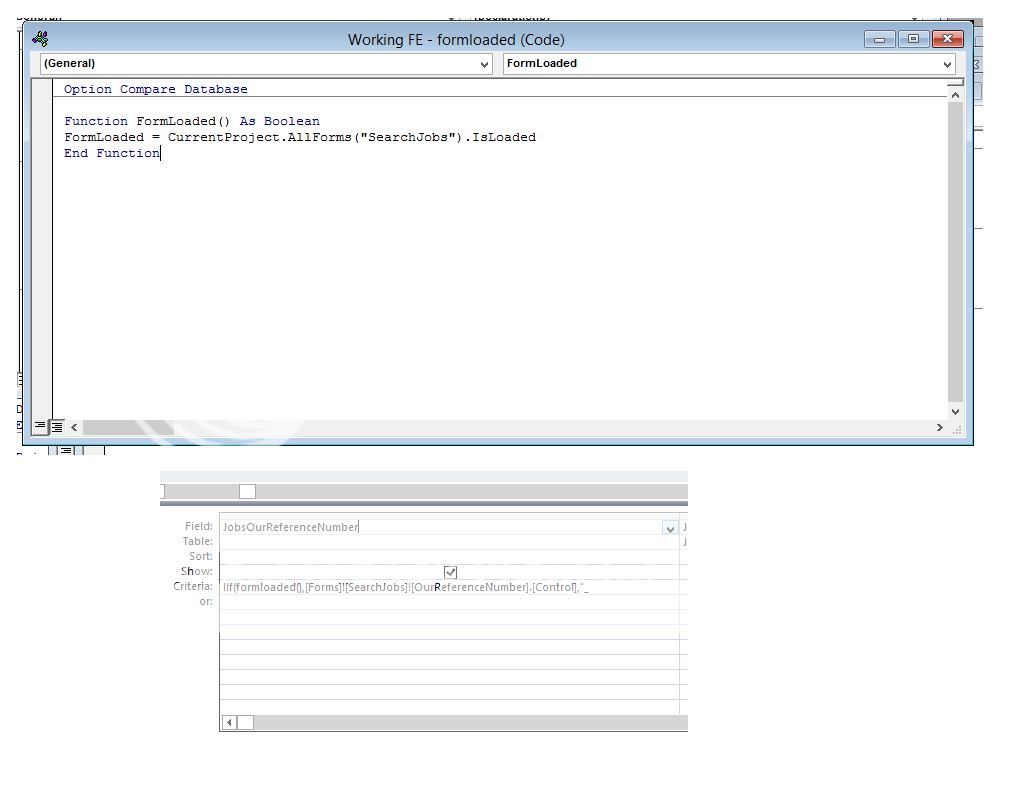
Sorry for not replying sooner. I THINK that I have the IIF() in the right place. I have attached a photo to show where I have placed the it along with the initial code. The IIF() code is on two lines so only one is showing however they are both there:
QueryandCode_zps2923e579.png


With regards to the module name, once I get it working I will change it, I am only using the name as is so I don't have to change anything in the code.

MarkK, thanks for your advice. Sorry for my ignorance but once I get this right, would I put your code in the function and then use Isskint's code as the criteria in the query?
 
You have named your module and function name the same. Use Isskint's code, but change the Module Name to mod_sampModule or anything you wish to name it, you can even name it after Issknit, like modFromIssknit just make sure it is not the same as the function name i.e. FormLoaded.
 
Hi pr2-eugin,

Thanks for your help, I think I am getting there but not quite just yet. Following your advice I have renamed the module to "modFromIssknit" which means that I am not getting the old error message however I still cannot get it to work.

When I try running the query I receive an "Enter Parameter Value" pop-up with the message: "Forms!SearchJobs!OurReferenceNumber.Control". If I try to enter a job reference number I receive the error message: "This expression is typed incorrectly, or it is too complex to be evaluated. For example, a numeric expression may contain too many complicated element. Try simplifying the expression by assigning parts of the expression to variables."

If I have the Search Jobs form open I still receive the "Enter Parameter Value" pop-up however if I enter a reference number it produces the record I have entered regardless of the vale in the Search jobs form.

To check that I had entered the correct criteria, I have tried running the query with a standard criteria ie either [Forms]![SearchJobs]![OurReferenceNumber] or [Forms]![MainMenuSearch]![OurReferenceNumber] and they work fine.
 
Try this in the criteria of the query.
Code:
IIF(FormLoaded(), [Forms]![SearchJobs]![OurReferenceNumber], [Forms]![MainMenuSearch]![OurReferenceNumber])
 
Ok, I am almost there. With pr2-eugin's amended IIF() code, when I run the query I am presented with an "Enter Parameter Value" pop-up but this time it is asking for the reference number for the form which is closed. No matter what value I enter into this box (even letters or just pressing enter) it brings up the right record.

This happens no matter which form is open, it always asks for the value of the other one.
 
Okay let's do this one last time, change the FormLoaded function to the following
Code:
Function FormLoaded() As String
    If CurrentProject.AllForms("SearchJobs").IsLoaded Then
        FormLoaded = [Forms]![SearchJobs]![OurReferenceNumber]
    Else
        FormLoaded = [Forms]![MainMenuSearch]![OurReferenceNumber]
    End If
End Function
Thenc hange the Criteria as just simply,
Code:
FormLoaded()
 
Thank you so much. That works perfectly.

Just for my reference for the future, in your code you use the line "Function FormLoaded() As String". Am I right in thinking that "FormLoaded" is the name of this particular function and I re-create the same function for a different form by simply renaming it from "FormLoaded" to something else such as "AddressSearch" so that the code would be:
Code:
Function AddressSearch() As String
    If CurrentProject.AllForms("SearchJobs").IsLoaded Then
        AddressSearch = [Forms]![SearchJobs]![AddressLine1]
    Else
        AddressSearch = [Forms]![MainMenuSearch]![AddressLine1]
    End If
End Function
and the criteria would be:
Code:
AddressSearch()
 
Thank you so much. That works perfectly.
You're welcome !
Am I right in thinking that "FormLoaded" is the name of this particular function and I re-create the same function for a different form by simply renaming it from "FormLoaded" to something else such as "AddressSearch" so that the code would be:
Sort of, when you get the hang of writing functions you will be able to resuse the same code, a bit differently. You will be able to write one single function to make what you want to achieve in 5 different functions.

Editing the SQL, as shown by MarkK is surely one such method. Good Luck ! :)
 

Users who are viewing this thread

Back
Top Bottom