Open subform to specific records based of off input from combo boxes

vbaInet thank you for your reply.
I'm sorry, I'm not explaining myself very well.
They aren't supposed to be in both forms. One form (the switchboard) is used to open another based on values in combo boxes that aren't editable. They’re in a continuous format and which every record set is yours, you click on the button to open up the main form where you can input records in the subform. They are merely there as a very crude filter. And in the second form the values in the header aren't supposed to be changed. Only in the sub form of the second form are there to be records added. But that's neither here nor there. The present layout sort of works but it’s not what I want.
What I would like is to only have two search controls to be on a tab control on the main switchboard. Which in turn opens up another form to add records too. But I don't want the form to add records to be on the main switchboard.
 
Rainlover:
I'm sorry I had it posted but decided to take it down because it had peoples names in it and didn't get there permission to post the db. I can repost if you would like for a little bit in order for you to look at it.
vbaInet and Rainlover sorry you guys are fast in your replies and I'm a little behind in my replies.
 
Rainlover:
I'm sorry I had it posted but decided to take it down because it had peoples names in it and didn't get there permission to post the db. I can repost if you would like for a little bit in order for you to look at it.
vbaInet and Rainlover sorry you guys are fast in your replies and I'm a little behind in my replies.

I will let Tony follow up on this one. If he has problems then he can sing out.
 
And in the second form the values in the header aren't supposed to be changed.
Precisely the point that's being put across. If it's not supposed to be change it shouldn't be there in the first place or if you want to show what filters are currently being used, disabled those controls.
 
vbaInet and RainLover: Thank you both for your input.
Thank you again for reading my post.
I will wait to see what Uncle Gizmo thinks I should do.
 
Is this a case of looking for something upside down or back to front.
 
Is this a case of looking for something upside down or back to front.
I'm not sure what this means?

In any case, it sounded like in Uncle Gizmo video that he was not sure what to do.
Okay, forget the way it's set up in the database. How can I have two combo boxes set the search criteria that will open up a form with the matching criteria in the subform? The header of the second form would only display the criteria. The subform to be able to add records to them. User can pick one or both combo boxes to filter from.
 
It's not that Uncle Gizmo wasn't sure what to do, he was just saying that it's odd to have such a setup but if that's how you like then it's fine.

You have two options:
1. Change the Source Object of the subform to a form who's Record Source is based on query of the table. If I remember correctly, it was bound to a table.
2. In the Open or Load event of the subform construct the Filter property
3. And set the Filter On property of the subform to True.

OR

1. Change the Source Object of the subform to a query that's based on the table.
2. In the query, set the criteria of each field to each of the relevant controls on the switchboard. An example of the criteria would be:
Code:
Forms![COLOR="blue"]FormName[/COLOR]![COLOR="blue"]ControlName [/COLOR]Or Forms![COLOR="blue"]FormName[/COLOR]![COLOR="Blue"]ControlName [/COLOR]Is Null
...amend the bits in blue.

The second method implies that the record source will be reliant on the switchboard's values so any filters you apply from within the form won't have any effect.
 
vbaInet and Uncle Gizmo -
Thank you both for your input and guidance. I will be starting to work on this again in the next couple hours. I'm sure once I do I will have many questions as to how to implement certain things that have been mentioned by both of you.
 
Quote:
Is this a case of looking for something upside down or back to front.
I'm not sure what this means?

You are looking for something in the Sub Form which is not right.

Normally you may look at the Main Form, say a street name e.g. "Long Street"
But you are looking for the Smiths who line in Long street.

If this is what you are doing then it is all wrong.

But then it could be me who's upside down. If I am right and someone writes some code for you then it will all come unstuck somewhere down the track.
 
vbaInet:
I tried the second option in #42 post. But that didn't work for me. I obviously don't think I did it correctly. But when I tried it, it give me five parameter when I try opening the form after making a selection from the switchboard. And when the form does open it doesn't display any records. Another problem is that one of the fields that is being used to filter the subform is not in the same table as the other.
 
I believe I am going about this the wrong way, as you guys have mentioned before. So...

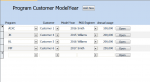
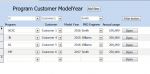
Is there a way to filter a form that's in continuous form view? I have attached a screen shot of the present form. I would like to be able to filter on Program, Customer and/or PKG Engineer. What I was envisioning was to have combo boxes above each of the respective fields and a command button to filter. The second screen shot is a mockup of what I am envisioning. I can also post the db again if you guys would like.
 

Attachments

  • Actual Form.PNG
    Actual Form.PNG
    27.2 KB · Views: 107
  • Mockup Form.PNG
    Mockup Form.PNG
    27.3 KB · Views: 105
We just said that it's an odd arrangement, but you have your reasons for doing it that way that we can't understand.

It doesn't matter what view a form is, you can filter it any way. What difficulty were you having from the suggestion in post #42 and which one did you try?
 
I don't know how to do either option. Also, there is no subform.
 
What have you tried so far? Show us what you've tried and we'll advice.
 
Ok, so far:
-There is no Source Object on the form, there's a Record Source. Do I change that to the query I created?
-Query sql code:
Code:
SELECT [Packaging information charts - Copy Of].OEM, [Packaging information charts - Copy Of].Program, [Program Customer ModelYear].PKGEngineer
FROM [Packaging information charts - Copy Of], [Program Customer ModelYear]
WHERE ((([Packaging information charts - Copy Of].OEM)=[Forms]![Program Customer ModelYear].[Form]![Customer]) AND (([Packaging information charts - Copy Of].Program)=[Forms]![Program Customer ModelYear].[Form]![Program]) AND (([Program Customer ModelYear].PKGEngineer)=[Forms]![Program Customer ModelYear].[Form]![PKGEngineer])) OR ((([Packaging information charts - Copy Of].Program)=[Forms]![Program Customer ModelYear].[Form]![Program]) AND (([Program Customer ModelYear].PKGEngineer)=[Forms]![Program Customer ModelYear].[Form]![PKGEngineer]) AND (([Forms]![Program Customer ModelYear].[Form]![Customer]) Is Null)) OR ((([Packaging information charts - Copy Of].OEM)=[Forms]![Program Customer ModelYear].[Form]![Customer]) AND (([Program Customer ModelYear].PKGEngineer)=[Forms]![Program Customer ModelYear].[Form]![PKGEngineer]) AND (([Forms]![Program Customer ModelYear].[Form]![Program]) Is Null)) OR ((([Program Customer ModelYear].PKGEngineer)=[Forms]![Program Customer ModelYear].[Form]![PKGEngineer]) AND (([Forms]![Program Customer ModelYear].[Form]![Customer]) Is Null) AND (([Forms]![Program Customer ModelYear].[Form]![Program]) Is Null)) OR ((([Packaging information charts - Copy Of].OEM)=[Forms]![Program Customer ModelYear].[Form]![Customer]) AND (([Packaging information charts - Copy Of].Program)=[Forms]![Program Customer ModelYear].[Form]![Program]) AND (([Forms]![Program Customer ModelYear].[Form]![PKGEngineer]) Is Null)) OR ((([Packaging information charts - Copy Of].Program)=[Forms]![Program Customer ModelYear].[Form]![Program]) AND (([Forms]![Program Customer ModelYear].[Form]![Customer]) Is Null) AND (([Forms]![Program Customer ModelYear].[Form]![PKGEngineer]) Is Null)) OR ((([Packaging information charts - Copy Of].OEM)=[Forms]![Program Customer ModelYear].[Form]![Customer]) AND (([Forms]![Program Customer ModelYear].[Form]![Program]) Is Null) AND (([Forms]![Program Customer ModelYear].[Form]![PKGEngineer]) Is Null)) OR ((([Forms]![Program Customer ModelYear].[Form]![Customer]) Is Null) AND (([Forms]![Program Customer ModelYear].[Form]![Program]) Is Null) AND (([Forms]![Program Customer ModelYear].[Form]![PKGEngineer]) Is Null));
 
Before you go plugging in all that criteria, have you actually tried one criteria to get it working first? I.e.:
Code:
WHERE [Packaging information charts - Copy Of].OEM=[Forms]![Program Customer ModelYear].[Form]![Customer]
 
Ok so I tried one criteria for OEM
code:
Code:
SELECT [Packaging information charts - Copy Of].OEM, [Packaging information charts - Copy Of].Program, [Program Customer ModelYear].PKGEngineer
FROM [Packaging information charts - Copy Of], [Program Customer ModelYear]
WHERE ((([Packaging information charts - Copy Of].OEM)=[Forms]![Program Customer ModelYear].[Form]![Customer] Or [Forms]![Program Customer ModelYear].[Form]![Customer] Is Null));
parameter box comes up and I enter a value that I know is there. Should of only returned 298 but returned 1192 records.
 
The parameter box is coming because it can't find the subform.

1. Is the subform open before you attempt to run the other form?
2. Is this being run on a navigation form?
 

Users who are viewing this thread

Back
Top Bottom