
On fly (VBA) Form's record source

Babycat

Member
Local time
Tomorrow, 00:40
Joined
Mar 31, 2020
Messages
291
Hi everyone.

I have seen alot DB design with table, query, form and report... The table and form are essential i think. However, do we really need to make the fixed queries (save it with a name in navigation panel)?
Instead of making a query, I usually use SQL string and and assign it to form's recordsource with VBA, for example:
Code:
        SQLsub = User_SQLTableString_SubTransDetail _
               & "WHERE TBLPRODUCT.ProductID like '" & Cbx_F_MaVT & "' " _
               & " ORDER BY TBLTRANSACTION.CreatedDate DESC ;"
    
        Forms!FrmTransDetail.Form!SubFrmTrans.Form.RecordSource = SQLsub

In this way i have maximum flexibility to change the record source on the fly (when program is running).

But I am not sure if any advantage and disadvantage when doing this. Speed, CPU resource?

Below is an example of fixed query, Then form's record source is set to query Q_ProductID in form design
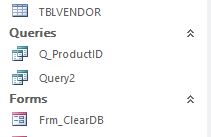
Capture.JPG


Please help to explain in detail if any difference btw these two ways.

Regards,
 
These days, in my opinion, its largely personal preference.
I usually use SQL statements as I prefer all my code to be together & visible at a glance

In theory, using saved queries should be quicker than executing SQL as Access will create a query execution plan when it is first run in order to optimise the process. However, it is unlikely that you will notice much difference in practice.
Using a query def is slower than saved queries or SQL

I did a series of speed comparison tests on this exact topic a couple of years ago which you may find interesting.
Speed Comparison Tests 6 - Mendip Data Systems
 
These days, in my opinion, its largely personal preference.
I usually use SQL statements as I prefer all my code to be together & visible at a glance

In theory, using saved queries should be quicker than executing SQL as Access will create a query execution plan when it is first run in order to optimise the process. However, it is unlikely that you will notice much difference in practice.
Using a query def is slower than saved queries or SQL

I did a series of speed comparison tests on this exact topic a couple of years ago which you may find interesting.
Speed Comparison Tests 6 - Mendip Data Systems
Thank you. In my case, the DB is pretty small and compact, I will continue with Query Def...
Thank again for your work of comparison, it is useful.

Regards.
 
Another aspect of this is complexity. Using a QueryDef is like "not re-inventing the wheel." If you have a query that comes up frequently and doesn't change, why wouldn't you store it.

For example, suppose that you have a transaction-based topic (banking and inventory are the first two possibilities that come to mind), you get the balance of something (bank account or inventory item) by summing transactions using either or both of the GROUP BY and ORDER BY clauses with a SUM aggregate function and (possibly) a date as a parameter for a WHERE clause. Once you get this query built and get accustomed to using it, why would you ever want to go to the trouble of rebuilding it each time? Just supply the parameter and invoke it.

There is such a thing as query layering, where you build a query based on another query rather than a table. In particular if you have to analyze something involving UNION queries, it is not impossible to imagine basing your analysis query on a layered UNION query. Again, if the QueryDef of the underlying query is stable, why would you want to rebuild it?

There is also the issue with Domain Aggregate functions, where you can write that function on a table but you can also write it based on a query. In that case, the query MUST exist because you can't use DLookup or DMax on an SQL statement.

The point is, that QueryDef is a tool in your tool box. Just because you don't use it often, that doesn't mean you should discard it.
 
There is also the issue with Domain Aggregate functions, where you can write that function on a table but you can also write it based on a query. In that case, the query MUST exist because you can't use DLookup or DMax on an SQL statement.
Yes, absolutely right. I have encountered with this problem. Can't use Domain Aggregate functions (Dcount, Dsum...) with SQL statement.
Thank for your detail clarification.

Regards.
 

Users who are viewing this thread

Back
Top Bottom