Solved Migrate Form to 365, sharepoint or web?

when you link from SQL to Access, Access automatically names the tables as being the remote's version of: schema_tablename (after also corrected any illegal names, because names can be in SQL that aren't allowed in Access, to a small degree). those are just local access names at that point - you can right click and rename them at any time, most people do.

as long as the drivers have any routine access to SQL, they can just be instructed to only click the 'upload' button once back at the station, or something like that.

yes, they standalone to input most of their data, then relink when have connectivity. at least they do sometimes.

you could also go totally rogue and do something really different - like if this data is relatively simple, you could have them input it on google sheets (which can be connected to a nifty mobile app for next to no cost using AppSheet), and then you could code other solutions for the IN-office personnel to get the data from google sheets into sql. (I do this by maintaining an Excel file, which is connected to a Google Sheets download/import, which is also linked to an Access database, which them uses an Insert query to insert into a linked SQL table).

many ways to skin a cat, but web rarely is one of them when Access is involved. :(
 
Wait, so you mean all this time the drivers' devices actually DO have connectivity to the SQL database? (I assume that's what you mean by "dbo master" although not really sure what that means)

If they do have connectivity to SQL Server, then you have no issues or problems in the first place, right?!

Confused...

when you link from SQL to Access, Access automatically names the tables as being the remote's version of: schema_tablename (after also corrected any illegal names, because names can be in SQL that aren't allowed in Access, to a small degree). those are just local access names at that point - you can right click and rename them at any time, most people do.

as long as the drivers have any routine access to SQL, they can just be instructed to only click the 'upload' button once back at the station, or something like that.

yes, they standalone to input most of their data, then relink when have connectivity. at least they do sometimes.

you could also go totally rogue and do something really different - like if this data is relatively simple, you could have them input it on google sheets (which can be connected to a nifty mobile app for next to no cost using AppSheet), and then you could code other solutions for the IN-office personnel to get the data from google sheets into sql. (I do this by maintaining an Excel file, which is connected to a Google Sheets download/import, which is also linked to an Access database, which them uses an Insert query to insert into a linked SQL table).

many ways to skin a cat, but web rarely is one of them when Access is involved. :(
Thanks again Isaac... and thank you for the Recordset primer here in the Info Sharing Center. VERY helpful. Question... I have a transferquery that filters only records with the archive field not set to yes. I am opening that record set and will do while <> eof. I am also opening the linked table as a record set. For each record in the transfer, how do I copy the current record without the extra field? And now that I think about it, how do I ensure that a second driver isn't locking the SQL? Sorry if this is getting long-winded.
 
The part you need to remove is "I am also opening the linked table as a record set".
Only open the local table.
For each loop iteration, do something like:

CurrentDb.Execute "insert into dbo_tablename (col1_Number, col2_Text, col3_Date) values (" & rs.fields("col1").value & ",'" & rs.fields("col2").value & "',#" & format(rs.fields("col3").value,"mm/dd/yyyy hh:mm:ss") & "#)",dbfailonerror
 
Or separate it like this for easier troubleshooting until you're used to it:

dim strSQL as string
strSQL = "Currentdb.execute..............." etc
debug.print strSQL (so you can see the result)
Currentdb.execute strSQL, dbfailonerror

You want the final LITERAL executes string to look like this, if you were inserting into 3 columns of those 3 types respectively:

insert into tablename (col1_number, col2_text, col3_date) values (2,'sometext',#01/29/2022 09:15:15#)
 
Thanks Isaac... so very helpful. If I have a date field, do I have to format the value or can I just do rs.fields("T-Date").value
Or separate it like this for easier troubleshooting until you're used to it:

dim strSQL as string
strSQL = "Currentdb.execute..............." etc
debug.print strSQL (so you can see the result)
Currentdb.execute strSQL, dbfailonerror

You want the final LITERAL executes string to look like this, if you were inserting into 3 columns of those 3 types respectively:

insert into tablename (col1_number, col2_text, col3_date) values (2,'sometext',#01/29/2022 09:15:15#)
this is hard to read but I crafted the insert string. Looks like this and I get the output below. Just learning to crawl here so I am not taking any actual actions here. It looks like I am on the correct record and the data is accurate. Now, if I understand you, I need to add a # in front date value. What about the time values?

Once I have the insert command looking correct, I can add a do while, insert, capture on dbo error and flip the archive Boolean if it succeeded.

1670460168738.png


1670460106357.png
 
Good question, I never use Time by itself, I believe it needs an octothorpe as well. Not just in front, on both sides.
Not sure about your hyphenated column names, they might need brackets, can't remember.

The safest thing is to format the date the way I showed you. if it's only time then try format(value,"HH:MM:SS")
No, do not just use the recordset value by itself, use the format function to get it in the format I showed.
That's my personal recommendation, although you might get away with some other method, that's always been the safest and best for me.

add dao. in front of Database and Recordset. You can get away with not but it involves a prioritization and an implicit operation in Access and since you don't know that stuff yet (and in my opinion always regardless), be explicit - it's dao.database as opposed to ado or another
 
Good question, I never use Time by itself, I believe it needs an octothorpe as well. Not just in front, on both sides.
Not sure about your hyphenated column names, they might need brackets, can't remember.

The safest thing is to format the date the way I showed you. if it's only time then try format(value,"HH:MM:SS")
No, do not just use the recordset value by itself, use the format function to get it in the format I showed.
That's my personal recommendation, although you might get away with some other method, that's always been the safest and best for me.

add dao. in front of Database and Recordset. You can get away with not but it involves a prioritization and an implicit operation in Access and since you don't know that stuff yet (and in my opinion always regardless), be explicit - it's dao.database as opposed to ado or another
IMO, explicit is much more desirable than implicit in the world of databases.

It's probably the opposite in the world of exposing personal relationships on social media, though.
 
Amen .... and, Amen. :)

I don't use any social media - I invite my family to send me all the pictures by text, email, and Google Photos sharing (or iCloud sharing) that they jolly well want and it works just as good as it did in 1995 or 2010. I do that because I know my own weaknesses and my enthusiasm for arguing things, I know social media would drag me down and it would beat me before I figured out how to manage it and probably long after.

Tik tok and Instagram have done a lot more harm to the younger generation than guns have ever dreamed of doing - all in the space of 5-7 years.
Destroyed a generation of girls' self esteem - sad stuff.

Ok I'm done and everyone accept my apology for that - on to work, we're getting close to Friday everyone - take heart!!!
 
Good question, I never use Time by itself, I believe it needs an octothorpe as well. Not just in front, on both sides.
Not sure about your hyphenated column names, they might need brackets, can't remember.

The safest thing is to format the date the way I showed you. if it's only time then try format(value,"HH:MM:SS")
No, do not just use the recordset value by itself, use the format function to get it in the format I showed.
That's my personal recommendation, although you might get away with some other method, that's always been the safest and best for me.

add dao. in front of Database and Recordset. You can get away with not but it involves a prioritization and an implicit operation in Access and since you don't know that stuff yet (and in my opinion always regardless), be explicit - it's dao.database as opposed to ado or another
Thanks Isaac, I am following your lead. You are the natives in this Access world, I am (currently) the immigrant.

I spent a few hours last night trying to get this to work. With such a long Insert command, I have something in there that isn't coming across right. I don't thing brackets would hurt either way so I will add that.

While I am at it, my SQL tables have a password... Simple but effective enough to cause a challenge that I don't understand. To test access, I added this. "Set rs2 = db.OpenRecordset("dbo_Trips", "MS Access;PWD=password")" But access throws an error.

I thought that might be the issue with the Insert command - Debug says it's an error 128... though I can find little help on that error.

I got to tell you guys, I have not been this deep into programming since I was 25. I am enjoying it immensely.

As an aside, I have several Social Media accounts. I park them but don't understand the fascination. As an adult with ADHD, I see them as a serious time sync and time is my most precious commodity. I don't want to give it away to some thing so useless and I totally agree with your perspective on the harm. Though, I do see hope for the future as my kids (who are adults) are turning away from it as well. But, as someone who works in the public school sector, I see more challenges than benefits.
 
Thanks Isaac, I am following your lead. You are the natives in this Access world, I am (currently) the immigrant.

I spent a few hours last night trying to get this to work. With such a long Insert command, I have something in there that isn't coming across right. I don't thing brackets would hurt either way so I will add that.

While I am at it, my SQL tables have a password... Simple but effective enough to cause a challenge that I don't understand. To test access, I added this. "Set rs2 = db.OpenRecordset("dbo_Trips", "MS Access;PWD=password")" But access throws an error.

I thought that might be the issue with the Insert command - Debug says it's an error 128... though I can find little help on that error.

I got to tell you guys, I have not been this deep into programming since I was 25. I am enjoying it immensely.

As an aside, I have several Social Media accounts. I park them but don't understand the fascination. As an adult with ADHD, I see them as a serious time sync and time is my most precious commodity. I don't want to give it away to some thing so useless and I totally agree with your perspective on the harm. Though, I do see hope for the future as my kids (who are adults) are turning away from it as well. But, as someone who works in the public school sector, I see more challenges than benefits.
BTW... not sure why but Debug.Print strSQL does not output anything. I must not understand how to use that function.
 
Your password should be stored in the connection string for the table, assuming it is already linked you shouldn't need to provide it to open a recordset on the same table..
 
OK... the Insert Into command is simply not working. I can't see what I am missing. I print the strSQL string out in a message box and it shows accurate data so it is pulling from the local query correctly. I have 16 fields and 16 sets of matching data. I am getting a syntax error in "INSERT INTO statement" as a response. I need a better pair of eyes on this.

-----------------------------
Private Sub Upload_Click()

Dim db As DAO.Database
Dim db2 As DAO.Database
Dim rs As DAO.Recordset
Dim strSQL As String

Set db = CurrentDb
Set rs = db.OpenRecordset("TransferQuery")
rs.MoveFirst

strSQL = "INSERT INTO dbo_Trips ([T-Date],VehicleID,DriverID,CodeID,[Pre-Insp],[Post-Insp],DepartTime,ReturnTime,OD_Depart,OD_Return,[Basic-Count],[Sped-Count],[HS-Count],[Walk-Count],MaxCount,Desc)" & " values (" _
& "#" & rs.Fields("T-Date").Value & "#" & "," _
& rs.Fields("VehicleID").Value & "," _
& rs.Fields("DriverID").Value & "," _
& rs.Fields("CodeID").Value & "," _
& rs.Fields("Pre-Insp").Value & "," _
& rs.Fields("Post-Insp").Value & "," _
& rs.Fields("DepartTime").Value & "," _
& rs.Fields("ReturnTime").Value & "," _
& rs.Fields("OD_Depart").Value & "," _
& rs.Fields("OD_Return").Value & "," _
& rs.Fields("Basic-Count").Value & "," _
& rs.Fields("Sped-Count").Value & "," _
& rs.Fields("HS-Count").Value & "," _
& rs.Fields("Walk-Count").Value & "," _
& rs.Fields("MaxCount").Value & ",'" & rs.Fields("Desc").Value & "')"
Debug.Print strSQL
MsgBox (strSQL)
CurrentDb.Execute (strSQL), dbFailOnError
 
You have missed the vital bit - the debug.print of a filled out version of strSQL.
How are your time fields stored?
 
You have missed the vital bit - the debug.print of a filled out version of strSQL.
How are your time fields stored?
I thought that is what the Debug.print strSQL statement did? It right above the MsgBox() statement and that works so not sure why I am not seeing what the CurrentDB.Execute command is getting but it should be this command. BTW... I added #'s around the time fields. They are actually a date/time type, just formatted to show just time. Maybe I need to modify the output to show full date time?
You are making this harder for yourself than it needs to be. Why not just use an append query? Select the rows you want from the drivers table and append them to the permanent table. ONE query handles all the rows. Plus running an append query for each row, especially one you build with VBA is as inefficient as it gets. If you want to use an append query, run ONE that does all the rows at once. If you want to use a VBA loop (always slower), at least open a recordset and use .AddNew to add each row.
 

Attachments

  • 1670872870325.png
    1670872870325.png
    9.2 KB · Views: 184
You are making this harder for yourself than it needs to be. Why not just use an append query? Select the rows you want from the drivers table and append them to the permanent table. ONE query handles all the rows. Plus running an append query for each row, especially one you build with VBA is as inefficient as it gets. If you want to use an append query, run ONE that does all the rows at once. If you want to use a VBA loop (always slower), at least open a recordset and use .AddNew to add each row.

Do you see the error in the debug print? It is at the end.

Also, please post the text you want us to examine as TEXT, not as a picture.
Tried to Pat but the Msgbox (which is the only print out I see) does not allow me to highlight and copy text. I totally understand why one would want the actual output.

WHERE should I be seeing the debug.print output? I don't see it anywhere.

Also, I took your lead on the append query. It came out like this.

INSERT INTO dbo_Trip ( [T-Date], VehicleID, DriverID, CodeID, [Pre-Insp], [Post-Insp], DepartTime, ReturnTime, OD_Depart, OD_Return, [Basic-Count], [Sped-Count], [HS-Count], [Walk-Count], MaxCount, [Desc] )
SELECT Trip.[T-Date], Trip.VehicleID, Trip.DriverID, Trip.CodeID, Trip.[Pre-Insp], Trip.[Post-Insp], Trip.DepartTime, Trip.ReturnTime, Trip.OD_Depart, Trip.OD_Return, Trip.[Basic-Count], Trip.[Sped-Count], Trip.[HS-Count], Trip.[Walk-Count], Trip.MaxCount, Trip.Desc
FROM Trip
WHERE (((Trip.UploadedFlag)=False));

This seems like what I am looking to do and your right, it sure is easier to run it this way.
 
Tried to Pat but the Msgbox (which is the only print out I see) does not allow me to highlight and copy text. I totally understand why one would want the actual output.

WHERE should I be seeing the debug.print output? I don't see it anywhere.

Also, I took your lead on the append query. It came out like this.

INSERT INTO dbo_Trip ( [T-Date], VehicleID, DriverID, CodeID, [Pre-Insp], [Post-Insp], DepartTime, ReturnTime, OD_Depart, OD_Return, [Basic-Count], [Sped-Count], [HS-Count], [Walk-Count], MaxCount, [Desc] )
SELECT Trip.[T-Date], Trip.VehicleID, Trip.DriverID, Trip.CodeID, Trip.[Pre-Insp], Trip.[Post-Insp], Trip.DepartTime, Trip.ReturnTime, Trip.OD_Depart, Trip.OD_Return, Trip.[Basic-Count], Trip.[Sped-Count], Trip.[HS-Count], Trip.[Walk-Count], Trip.MaxCount, Trip.Desc
FROM Trip
WHERE (((Trip.UploadedFlag)=False));

This seems like what I am looking to do and your right, it sure is easier to run it this way.

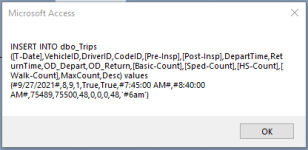
OK... I figured out how to turn on the VBA "Locals" window and found what the strSQL string was passing... well, mostly. The window does not show the entire content of the string. There must be a better way to display the actual command and I simply don't know it.

Here's what I can copy out of the window.

"INSERT INTO dbo_Trips ([T-Date],VehicleID,DriverID,CodeID,[Pre-Insp],[Post-Insp],DepartTime,ReturnTime,OD_Depart,OD_Return,[Basic-Count],[Sped-Count],[HS-Count],[Walk-Count],MaxCount,Desc) values (#9/27/2021#,8,9,1,True,True,#7:45:00 AM#,#8:40:00 AM#,75"

Sorry this is such a pain guys. I think the approach I need to do is use the Append Query... but I am super curious as to why the heck this does not work. From what I can see, it should be working.
 
Debug.print prints to the debug window. That is text. Just copy/paste.
Based on your first paste of the query - The reason your code isn't working is because you are creating a string and that string contains strings which you are not delimiting property.

Insert Into MyTable (txtfld, numfld1, numfld2, dtfld) Values("text value", 3, 45, #12/12/2022#);

Now look at the string printed by your debug.print. Do you see that you are missing the delimiters?

You have merged the select DAO method with the append query. If you really like writing code, then you can use your population statements but instead, use them to populate a second recordset. That way you don't have to worry about delimiters. you are not using a string as the intermediary. You are going from tbl1 fields directly to tbl2 fields. What you are doing with your code is taking the fields from a table and putting the values into a string and then you are running the string as an append query. This is the worst possible method.

mth1 - recordset1 to recordset2 using the DAO open recordset command and a second open recordset with an .AddNew followed by the value statements is OK but still inefficient since VBA loops are by their nature less efficient than append queries.

mth2 - your method. Recordset1 to a string, then running an append query. Has the overhead of the VBA loop PLUS has the overhead of forcing Access to create and run a separate query for every single record. When you create queries in VBA, you pass them to the query entine as a string so it needs to start from scratch by creating an execution plan. It must do this every time the query runs so if you append a 1000 records, it has to create the execution plan 1000 times and run 1000 queries

mth3 - the select/append method (what I recommended). Does not use VBA except to run the single query. The query selects specific records from tbl1 and appends them to tbl2. This query can use arguments so it knows what set of records to select. AND if you need to supply a FK because you are appending child records, you can also pass in an argument to provide the necessary FK. Execution plans are calculated and saved the first time a querydef is executed which is one of the reasons they are more efficient than embedded SQL.

INSERT INTO yourtargettable( fld1, FKfield, fld3)
SELECT yourtable.fld1, Forms!yourform!theFKfield, yourtable.fld3
FROM yourtable
WHERE yourtable.somefield = Forms!yourform!someFKfield
Thanks Pat... you are awesome. Seriously. I did FINALLY find the debug window. I realized I have issues with delimiting the fields... I just couldn't see it. I dropped that approach and followed your suggestions. It working now. I adding some checks and balances now but I used the append query approach which works great and is far more efficient. Then I modify the uploaded flag (I know, bad name) and it cruised through. I also added some feedback for the user.

I do a count prior to upload and post upload to make sure the append happened correctly. I think there is a better way to capture the dbFailOnError. I am sure Access has a Try/Catch command but I am not sure how to implement that in this case. If the append fails... like the bus driver tries to upload when not connected to the network at the station... the dbFailOnError will dump right? I think I need to figure out how to address that situation.

Don't laugh at my over-use of the msgbox but here is the current code.

Code:
Private Sub Upload_Click()
Dim db As DAO.Database
Dim rs As DAO.Recordset
Dim strSQL As String
Dim SetArchBit As String
Dim LocalDBCount As Long
Dim SQLDBCount As Long

    FindRecordCount ("dbo_Trip")
    SQLDBCount = UploadCount
    
    FindRecordCount ("TransferQuery")
    LocalDBCount = UploadCount

    MsgBox ("Local =" & LocalDBCount & " SQL = " & SQLDBCount)   

    CurrentDb.Execute ("AppendTripsQuery"), dbFailOnError   

    FindRecordCount ("dbo_Trip")

    MsgBox ("Master DB Count Prior to upload = " & SQLDBCount & " and after upload = " & UploadCount) 

    ' Check that the SQL database has increased from prior to append. implies the append worked.

    If UploadCount > SQLDBCount Then
        MsgBox ("You Successfully Uploaded " & LocalDBCount & " Trips to the Master Database!")
        ' iterate though the local DB and set the Uploaded flag to yes
        Set db = CurrentDb
        Set rs = db.OpenRecordset("TransferQuery", dbOpenDynaset)
        SetArchBit = "Update rs SET [UploadedFlag] = True"

        With rs
            .MoveFirst
            Do Until .EOF
                .Edit
                    ![Trip.UploadedFlag].Value = True
                .Update
                .MoveNext
            Loop
            .Close
        End With

        ' reset the front page records that need to be synchronized now that the records have been uploaded to the master.

        FindRecordCount ("TransferQuery")   

        If UploadCount >= 20 Then
            Me.Syncronize.ForeColor = RGB(255, 255, 0)
            'Me.Syncronize.Caption = "Records to upload = " + CStr(UploadCount)
        Else
            Me.Syncronize.ForeColor = RGB(0, 0, 0)
            'Me.Syncronize.Caption = "Records to upload = " + CStr(UploadCount)
        End If
        Me.Syncronize.Caption = "Records to upload = " + CStr(UploadCount)
    ElseIf LocalDBCount = 0 Then
        ' if the LocalDBCount was already zero - tell the user nothing to do here.

        MsgBox ("There is nothing to upload at this time.")
    Else
        ' If it didn't need to upload but the upload count wasn't zero - something happened.
        MsgBox ("Something Went Wrong. You may not be connected to the District Network. Check your internet connection and try again.")
    End If
End Sub
 
Last edited by a moderator:
You're welcome but you're not done yet:)


Not a bad name per se but the flag isn't giving you any useful information. A date/time has MUCH more informational value. I go even further. I create a log table. I log the name of the file along with its location and date/time appended. When I save the record, it generates a BatchID. I then use that value to populate a field named uploadBatchID in my append query. That gives me a clean way to identify all the rows that were uploaded from any given file. Therefore, if I need to backout the upload, I can do it cleanly and then run the upload again with a new batchID. Don't forget to update the log table to mark the old batch as removed.


It does not. That is what dbFailOnError is for.

Updating each row of the uploaded data using a VBA loop is as inefficient as it can get.

Rather than loading data using the Transfer method, use that to LINK to the import file. Then use an append query to load the data. This gives you the ability to add the BatchID at the same time and NOT require a second pass through the data. And also allows you to manipulate fields to format them if necessary.

PS - i fixed your code. It is ever so much easier to read if you bother to use the code tool.
Again Pat... thanks for the guidance with this old novice. What I have right now is an Administrative App and a Driver App. The admin side works directly with the SQL ridership tables. The driver version has a stand-alone table set because they will often be disconnected from the network but still may need to enter data. The driver tables will need to be uploaded/copied to the master and that's what the flag does. It provides a historical record and a way for the drivers to upload when they can. Maybe not today... maybe not tomorrow... but at least once a week.

Now, I am appending straight from the driver trip table to the SQL table. There may be several drivers doing this at the same time so I hope this won't be a challenge for the SQl server. I am not truncating the driver table when I do this so I know it will grow.

Just so I understand what your saying... you are suggesting when I append to the SQL table, I also dump the driver table to a log file? Or are you saying I would add a uploadBatchID field to the SQL table, and append the log file with the unique uploadBatchID?

The upload is actually a single append command. The loop I am using is modifying the local driver table... flipping the archive bit as it were. I don't know any other way to modify all the records in the transfer query.

And thanks for the pro tip on the code display. I didn't even see it here until I went to look for it. It does not have a specific option for Visual Basic or Access. What do you use to display? General?
 
What I have been suggesting all along is that the two apps be disconnected. The driver's app exports data. The primary app imports data. Having multiple drivers importing at the same time would not stress SQL server but I think it is an inferior design pattern.

VBA loops are the slowest possible way of updating a table. Action queries are ALWAYS more efficient and faster. So, exporting to a .csv and then running an update query that sets a BatchID or even a date/time data type is far superior to a VBA loop that updates a low-information flag. This process gives you both a backup of the driver's data AND an audit trail.

Think about how you could possibly audit your current process. The answer is you can't. I am trying to show you a way to connect the two apps that provides an audit trail. How are you ever going to know if a driver doesn't upload?
You make a great point... it has been one of my concerns. If the driver does not do their part, how will the admin team ever know. OK... I will look to implementing this approach. Though, as I think about it, if the driver is not doing the sync part, how would file transfer be accomplished? It would still require some form of action on the part of the driver... maybe that is more a management challenge than a programming challenge.

That said, I will start work on adding an BatchID to this system.

Quick side question. When you add an unbound object to a form like a text box, it has no type to it right? It is essentially null correct? If you bind it to a field of number type, does the bound object now act as a data type number?
 
Again, thank you Pat... your input is so very valuable to me and I really do appreciate it... and your time.

I think I am finally getting your point. BatchID's are making sense. As I am thinking through this deeper, I think I need to craft a batch ID that is unique to the device the upload is coming from. That way, I have a way not just to see if say batch 8 & 9 are missing from the 10 uploads... but also what machine the 8 and 9 might be found on. Or come up with some other way to delineate where the missing data might be located when a fault is noted.

I am thinking a simple table to record batch ID events that can be incremented with two fields BatchID and Date would help track local update events. Any suggestions on how to craft a unique Batch ID?
 

Users who are viewing this thread

Back
Top Bottom