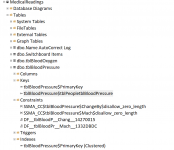
SSMA_TimeStamp field never gets updated

Here's the complete database. I removed my data. You might find it useful;)
I verified that the current version still doesn't automatically create an index on the field you identified.

That puts my mind to rest on that point.

1715470229970.png


That said, it appears from the documentation I can find, that SQL Server itself does not automatically index Foreign Keys.

One reference suggested that it is the responsibility of the DBA to add indexes manually, if and when they are deemed appropriate.

That leaves the question of why the SSMA tool doesn't include these hidden indexes. I guess we should raise the point in the email list.
 

Attachments

  • 1715469099103.png
    1715469099103.png
    68.3 KB · Views: 216
This is quirky. I want to start over fresh in the morning.
 
What I'm looking into now is how hard it is going to be to make post-migration adjustments. SSMA does generate the T-SQL scripts that create the database and tables during the migration. I haven't found a way yet to edit those scripts, but I think there should be.

Right now I'm thinking that the main reason hidden indexes on Foreign Key fields would not be created automatically is the assumption that SQL Server itself doesn't automatically do that. It would make sense to consider that the default if you look at it in a certain way. But there should be at least a way to tell SSMA to include them as an optional setting. New day, fresh coffee, I'll let you know what I see in a while.

Another part of the problem is that SSMA is not owned by the Access team; requests for changes to it have to go across the wall to whoever does own it.
 
Access never should have given up their upsizing wizard. At least it worked reliably.

There are many options in SSMA. Why not one for this if they're not going to do it automatically? My problem was that there was never a warning that these indexes were not being transferred. The scripts generated by my compare tool run to hundreds of lines. It is really hard to review them all manually. It wasn't until the day before I was supposed to send the script to the client DBA that I realized that all the FK indexes were missing. Luckily the db wasn't big so there were only 20 indexes I needed to add but I hate being blindsided by a tool I thought I could trust.
Hi Pat,

Not sure what you are talking about. I just used the SSMA and default Settings to generate an SQL Server DB from the Northwind Developer Edition Access Database Template that is available on the Access Backstage. As you can see in this snippet, it does in fact create the Foreign Keys. Primary Keys, and Indexes.

Now, if you used SSMS Generate Scripts Feature, you need to go into Advanced Settings to include FK's and Indexes, Etc....

I never experienced the problem or issue that you have described, not with either SSMA or SSMS Generate Script Feature.

1715625599927.png

1715625812072.png


1715625927617.png
 
Check for HIDDEN Indexes on Foreign Keys in Access on the NW tables and look at the corresponding tables in SQL Server. In my tests over the weekend, SSMA does a good job of any index you can see in the interface in the Index Property Sheet. It did not create the hidden index on a foreign key field, which Pat posted a screenshot of in her post. If I added a second manual index on the Foreign Key field in Access, that one did get migrated. Still SQL Server ended up with only that one, not the hidden one.

Because SQL Server does not automatically create indexes for Foreign Key fields, this behavior could be seen as internally consistent. And creating it in SQL Server is a simple script, so it's not a deal breaker in and of itself. The problem is that someone could migrate the accdb, not realizing this behavior exists, and fail to even LOOK for "missing" indexes after the migration.

The truth is that I had never noticed this and was, regrettably, skeptical until I was compelled to go beyond the surface.

I can see exposing the existence of the hidden Access instances and making it optional to give the user the chance to decide which behavior they want.
 
Check for HIDDEN Indexes on Foreign Keys in Access on the NW tables and look at the corresponding tables in SQL Server. In my tests over the weekend, SSMA does a good job of any index you can see in the interface in the Index Property Sheet. It did not create the hidden index on a foreign key field, which Pat posted a screenshot of in her post. If I added a second manual index on the Foreign Key field in Access, that one did get migrated. Still SQL Server ended up with only that one, not the hidden one.

Because SQL Server does not automatically create indexes for Foreign Key fields, this behavior could be seen as internally consistent. And creating it in SQL Server is a simple script, so it's not a deal breaker in and of itself. The problem is that someone could migrate the accdb, not realizing this behavior exists, and fail to even LOOK for "missing" indexes after the migration.

The truth is that I had never noticed this and was, regrettably, skeptical until I was compelled to go beyond the surface.

I can see exposing the existence of the hidden Access instances and making it optional to give the user the chance to decide which behavior they want.
I am not sure what a "Hidden Index" is. For the life of me, I have never heard that ever existed and when I do a search on it, all that comes up is related to MongoDb. Can you tell me how they are created and can you provide me a screenshot of a hidden index? Is this possibly what SSMS refers to as "Full-Text Indexes"?
 
See Pat's post #22 explaining and illustrating.
They are regular indexes that exist on fields designated as Foreign Keys in Access. "Full-Text Indexes" are, as the name implies, on the entire contents of a VarChar(x) field.
 
See Pat's post #22 explaining and illustrating.
They are regular indexes that exist on fields designated as Foreign Keys in Access. "Full-Text Indexes" are, as the name implies, on the entire contents of a VarChar(x) field.
Understood. Not sure why the never dawned on me.


As you can see in this snippet, the Northwind DB that Iused SSMA to create the Tables on SQL Server, that it did fact create the Index on a Foreign Key. "EmployeePrivileges$EmployeesEmployeePrivileges" below is the Index and is the FK for the ID in the Employee Table...


1715629040699.png
 
Understood. Not sure why the never dawned on me.


As you can see in this snippet, the Northwind DB that Iused SSMA to create the Tables on SQL Server, that it did fact create the Index on a Foreign Key. "EmployeePrivileges$EmployeesEmployeePrivileges" below is the Index and is the FK for the ID in the Employee Table...


View attachment 114090
The important factor is whether that index is visible in the accdb, in the Index property sheet for that table.
 
@GPGeorge What I don't understand is how you ended up with only the FK indexes you manually created in Northwind. I end up with two indexes. The hidden one and the one I create. That was how I discovered the hidden indexes. I have a documentation tool I created about 15 years ago and when I ran it, I saw two indexes for each FK. The one I manually created and the one Access created. Once I figured out that Access was "helping" me by creating these hidden indexes, I stopped creating them manually. Also, it didn't seem to matter if I created a table and created an index on the FK and THEN defined the relationship or if I created the table without the FK index, created the relationship and then created a visible index manually. Both paths led to TWO indexes.

@spaLOGICng I don't see anywhere in SSMA that last option menu (the one with the pink highlights). What version are you using? Or does that image come from SSMS?

I'm not clear on what you mean about NW2 indexes. Now that I am on the same page, though, I'll remigrate NW 2 dev and pay closer attention to the "before" and "after" picture.

The settings are from SSMA. I now have version 9.5 installed as of a few days ago.

1715634852473.png


1715635140885.png
 
The important factor is whether that index is visible in the accdb, in the Index property sheet for that table.
I have never seen or never heard of a hidden index, not in Access, and not in SQL Server.
 
I'm not clear on what you mean about NW2 indexes. Now that I am on the same page, though, I'll remigrate NW 2 dev and pay closer attention to the "before" and "after" picture.

The settings are from SSMA. I now have version 9.5 installed as of a few days ago.

View attachment 114092


View attachment 114093
There have been a lot of recent updates to SSMA, but I have been using it exclusively for years and have never seen a missed index on a FK, so long as the Index was already defined in the Access Table, regardless if it was used in a FK.

The only time I have ever changed any of the Project Settings is related to the DateTime2 setting for Dates, which is the default. I want all dates in SQL Server to be DATETIME, regardless.

The only setting related to Indexes is to create a Primary Key where a Unique Index cannot be found.

I migrated the OP's Database to SQL Servers. He did not have Indexes on the Foreign Key. I have conformed this in his Access Database. For instance, the PersonID in the Surgeries Tables is not indexed even though it is the FK from the Person Table.
 
@spaLOGICng I don't see anywhere in SSMA that last option menu (the one with the pink highlights). What version are you using? Or does that image come from SSMS?

It is in SSMS. I included this because it can generate full Database Scripts, and when you select the Dependent Object option, the Objects will be iterated in the correct order based on hierarchical order of FK's.

I use this when the migration end point is an SQL Server DB. I never use SSMA just to generate a Script. It is too convoluted.

It is on the Advance Tab in the Generate Scripts Applet. Once you are in the List, you need to scroll down.


1715635879965.png
 
There have been a lot of recent updates to SSMA, but I have been using it exclusively for years and have never seen a missed index on a FK, so long as the Index was already defined in the Access Table, regardless if it was used in a FK.
Pat's point is that if you create an index on a FK field in Access, there will actually be 2 indices on that field - one automatically created by Access when creating the relationship.

The index created by Access will not be visible in the table's Indexes dialog.

I wonder whether the order in which you index the field and create the relationship plays a part here?
 
Pat's point is that if you create an index on a FK field in Access, there will actually be 2 indices on that field - one automatically created by Access when creating the relationship.
When I create Tables, I always use Number Fields to relate Tables. Very very seldom if ever will I use a Text Field for a FK. When I create a Number Field, it automatically indexes the column.

The Primary Key will also be indexed. I typically always use the Auto-number Type. I never have problems that others have talked about regarding the Auto-number (AN) columns. I use the AN Columns from my parent table and join to the Child Table. The Target child Column already has an index.

1715647650982.png


1715647707792.png


1715647728526.png


When I migrate these Tables to SQL Server using SSMA, all indexes are created with the PK's and the FK's. so I am not quite sure what the problem is.


1715648140147.png
 
@GPGeorge if you look at the doc report, you only see a single index for each fk. Now create a new to on orders. Then run the rot a second time. You. Should see the hidden index.
I followed your instructions on your sample accdb that you provided. I finally learned what you had been trying to explain. We need to follow up again with a detailed report on the problem for Microsoft. Unfortunately, the Access team doesn't own the SSMA and I don't know how much interaction there is with the team that does.
 
@spaLOGICng you still are not understanding the issue. It has nothing to do with text indexes. If you actually want to understand the issue, follow my directions and then run the documentation to see the dup index. Your last example creates the dup index. You can only see it if you bother to follow the directions.

I am not the OP, I am a commentor and this is kind of like a sub-thread.

Someone referred to SSMA not creating "HIDDEN" Indexes. I did ask about Sql Serve "Full-Text Indexes" because I really did not know what they were, and I think that has already been answered. Not sure why it never registered in my brain, thought it was actually something else a bit obscure. However, I have been in this field for several decades and never heard about HIDDEN Indexes, so I inquired further. I was responding to @cheekybuddha where their comment was:

"Pat's point is that if you create an index on a FK field in Access, there will actually be 2 indices on that field - one automatically created by Access when creating the relationship.

The index created by Access will not be visible in the table's Indexes dialog."
Which at this point in the conversation is several comments and responses deep and is hard to follow because they do not become nested under the comment they are in response to.

I have never seen Access create a Hidden Index, I guess because it is hidden. But I have never known Access to ever create an Index on a Field when it became an FK if it was not already indexed. To the best of my knowledge, Access does not and neither does SQL Server. My test responses above and this one below negate the theory that Access or SQL Server will create "HIDDEN" indexes.

However, to respond to your comment that it created a Duplicate Indexes, yes. IN most cases they are unnecessary. As for Access, I am not sure that setting a Column as PK includes the INDEX but only the UNIQUE-ness of it, and therefore automatically creates the Index. I am guessing here. I am not sure why it does that. I can see where it could be useful where for a Query you may need to INCLUDE other Columns in an INDEX that has the PK as the Indexed Column for performance. Otherwise, it is unnecessary, confusing, and a waste of resources. My only purpose was to argue the "HIDDEN" Index comment above, and to this day I still do not know what it is. I have read that MongoDB can have a HIDDEN Index, but I have never ever heard of such a thing with Access or SQL Server.

Now I am going to locate your directions and follow them as George has does to see if I can replicate the hidden index.


In this case, the OP created an FK on Surgeries from People. The PersonID in the Surgeries Table is not Indexed.

1715689455331.png


As seen here:

1715689767882.png


I then migrated the DB to SQL Server using SSMA, and the Tables were created exactly as they were in Access

1715689887766.png


What is baffling to me, when the OP created the Column PersonID or any other Field with ",,,ID" at the end, it should have automatically indexed. This is the default setting for Access when installed. Unless otherwise changed, and Index should be created automatically. This is why I went through the exercise yesterday create two basic Tables, with basic columns, created the FK and migrated them to SQL Server using SSMA, to show that the indexes are created, both automatically and during the migration to SQL Server.

1715690345237.png
 
Whether or not the user manually adds an index on the field designated as a foreign key, Access will create an index of its own on that Foreign Key field. I was not aware of that, and argued with Pat over it until I finally tried it out for myself (advice which I have freely given to others over the years, by the way, to my own embarrassment here).

You brought up another good point in noting that the default setting is for Access to automatically add indexes for a list of field names, such as "ID". That's an additional complication here, and one that needs to be accounted for as well. I always remove that option because I prefer to control indexes. Unbeknownst to me, though, there was this additional, hidden, index being created anyway.
 
To get Access to add a hidden index, just create two tables. Then create a relationship and enforce RI. do NOT put an index on the FK. If you look at the indexes dialog, you will only see the PK for the child table. However, if you look at the indexes using code or the built in documenter report, you see it.

Design view = Only the PK index.
View attachment 114070
Documentation report shows the second index on Person which I did not create and which does not show on the field or in the indexes dialog.
View attachment 114069

Okay, I am going to follow these steps. but in a nutshell, when I run the DB documenter Report, this is baffling. I do not think it is a REAL index. I think it was an assumption by the person that developed this report for Access.


I created two ID Fields in Table Two. The first is intended to the be the FK. What baffled me is that the Index was not created automatically based on my Settings

1715691802484.png


it should have created the Index. I therefore created a second Column omitting the "_" (underscore) and it did create the Index as it should have.


1715691956925.png


1715691991677.png


I created the FK on the non-Indexed Column:
1715692081856.png


Access did NOT create an Index on the non-Indexed Column when I create the RI FK:
1715692171776.png


There is NO index visible in the the Index Dialog related to the FK Column:
1715692249018.png


And, SSMA did not create an index on the FK when migrated to SQL Server:
1715692823196.png


But when I run the DB documenter Report, this is baffling. I do not think it is a REAL index. I think it was an assumption by the person that developed this report for Access.

1715693248451.png
 
Last edited:

Users who are viewing this thread

Back
Top Bottom