Text export results in "

MCantu

Registered User.
Local time
Today, 00:45
Joined
Nov 18, 2004
Messages
62
I am exporting a table into a text file for another program to pick up and use.

The code below works fine, but the end resulted text adds character 32 " to my results:

-------------------------------------------

Private Sub Command0_Click()
'check if file is there- if so, deletes it
If Len(Dir("C:\temp\ET.txt")) = 0 Then
GoTo skipper
Else
Kill ("C:\temp\ET.txt")
End If
skipper:

'queries to fill up my table
DoCmd.OpenQuery "Stage 1_ clean"

DoCmd.OpenQuery "Stage_1_Fill"

DoCmd.OpenQuery "Stage_1_Fill_ENDENDE"


DoCmd.TransferText acExportDelim, , "Stage one", "c:\temp\ET.txt", False

'popup telling user what the next step in the process is.
MsgBox "Ok- please run SABRE script " & Chr(34) & "utkt1" & Chr(34) & Chr(13) & "Then return here and run the second stage", vbOKOnly, "Done"
End Sub
------------------------------------------------------

This is the data in my table:

O2VC88
O2VC89
O2VC91
O2VC92

This is how it come out in the text file:
"O2VC88"
"O2VC89"
"O2VC91"
"O2VC92"

Why is this quote character there? I don't want it there. How do I get rid of it?


I have tried to change the transfertext to "acExportFixed" thinking perhaps this had soemthing to do with it, but I get this error message:

"The action of method requires a Specification Name argument."

I know where this argument goes but I can't find an example of one. I remember off the top of my head something along time ago what might go there... like was it like "MS DOS" or "DOS TEXT" I can't remember and I can't find an example.

My other program can't use the " I just want to get rid of that.
 
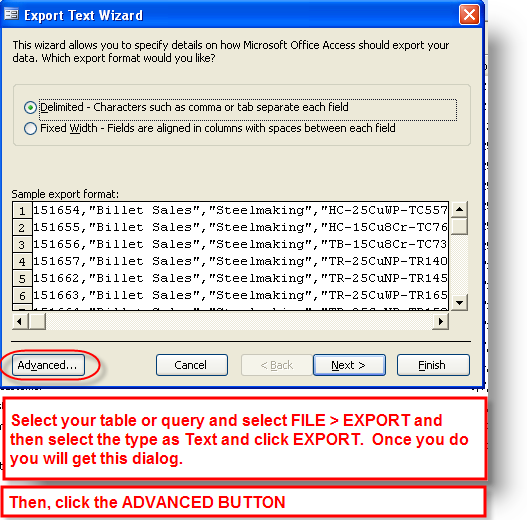
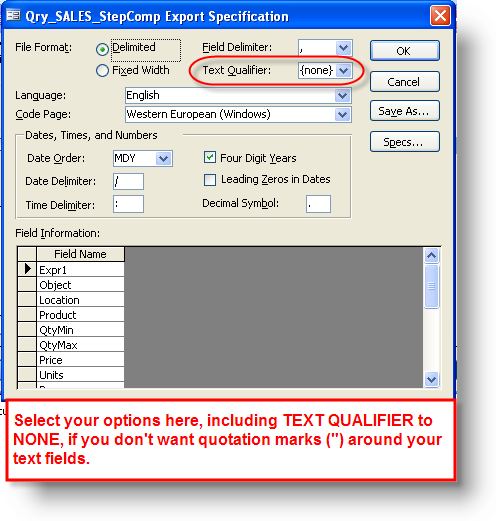
You need to create an Export Specification (same as an Import Spec) which specifies to not use the "" as a text delimiter.

Then your code to export would be:

DoCmd.TransferText acExportDelim,"YourExportSpecNameHere" , "Stage one", "c:\temp\ET.txt", False
 
yes, I know,, but

Do you have an example?

Looking through the forums and help files, I know it goes here, but I cannot find a list of possible, acceptable arguments that it likes.

It doesn't like the way I format it.


Thanks for your help, I really appriciate it :)
 
exportspec01.png


exportspec02.png


exportspec03.png
 
Nope.

I high-light my table

From menu: File>Export>popup: "Export Table 'Stage one' to...."


No wizard, no "advanced" button.

It seems it's not installed?

I'm in the office. No control over getting wizard installed.

Ok- going back to banging my head against my desk.

(I was getting a good rhythm going there.)

Unfortunately my problem was not solved. I think I will export my file in Excel, and re-script the other program that reads it to look for an excel file instead of a text file. (I hope it likes excel)

Thanks for responding anyway!!!!

-MC
 
update

well- my other program did NOT like Excel.

I just told my other program to start at the 2nd character and only take 7 characters., for my entries that were 6 characters long, I added a space to the end.


bubblegum and twine.


Thanks again!!!!
 
I high-light my table

From menu: File>Export>popup: "Export Table 'Stage one' to...."


No wizard, no "advanced" button.

It seems it's not installed?

I'm in the office. No control over getting wizard installed.

Ok- going back to banging my head against my desk.

(I was getting a good rhythm going there.)

Unfortunately my problem was not solved. I think I will export my file in Excel, and re-script the other program that reads it to look for an excel file instead of a text file. (I hope it likes excel)

Thanks for responding anyway!!!!

-MC
Let me take a quick stab at this, did you do this:

exportspec01a.png
 
yup

I sure did. then I get the popup saying my wizard is not installed.


I followed the pop-ups instructions to go to :

Help>about microsoft>disabled items

the response in the box is "no disabled items"

so the wizard is just not installed.

The thing is- is that I am building this for someone else.... I dont' know who will end up using it, and on what computer- so I have to find a way to do with without have the user modify these settings.

**sigh**

Still- thank you anyway
 
I sure did. then I get the popup saying my wizard is not installed.


I followed the pop-ups instructions to go to :

Help>about microsoft>disabled items

the response in the box is "no disabled items"

so the wizard is just not installed.

The thing is- is that I am building this for someone else.... I dont' know who will end up using it, and on what computer- so I have to find a way to do with without have the user modify these settings.

**sigh**

Still- thank you anyway

If you can find someone who DOES have it installed, you could have them create the export spec for you and you can actually import that from another database. Just another suggestion to get around your limitation. Sorry you don't have the wizard installed. I guess your install must have been the "Typical" which leaves out important things like that (and also like the VBA help file).
 
Brainstorm

HEY!

what if I write directly to the text file in VBA?

Run through the record set and send it right to the text file.....

I remember doing that in excel.....


Hummmmmmm........
 
HEY!

what if I write directly to the text file in VBA?

Run through the record set and send it right to the text file.....

I remember doing that in excel.....


Hummmmmmm........

Yes, you can do that. In fact I just posted sample code for someone (not for exactly the same thing) but taking a pipe delimited text file and turning it into a tab delimited text file. So, it is really easy. Just remember that if you use the WRITE #1, LineToWrite command you will get quotes around your text but if you use the PRINT #1, LineToWrite you won't.
 
Bwaaaa hahahahahah (evil laugh)

I think I found a winner

Dim filepath As String
Dim FileNum As Integer
filepath = "c:\temp\et.txt"

FileNum = FreeFile ' next free filenumber
Open filepath For Append As #FileNum

Print #FileNum, Now() & vbTab & "test" & vbTab & "test"

Close #FileNum
 

Users who are viewing this thread

Back
Top Bottom