Subform not linking with master form possibly due to query or relationship

sandy6078

Take a deep breath
Local time
Today, 17:58
Joined
Jul 17, 2007
Messages
135
Good morning all, I hope someone can help me.

I stepped away from this database for awhile and now I am able to get back into it. I am building an engineering / part number tracking database. The database has a program which has many part families. Each part family has many assemblies. Each Assembly has many sub assemblies and components. Each sub assembly has many components and may have many sub-subassemblies. Each sub-subassembly will have many components. The database will be searched by the first seven characters of the part number in order to see major revisions of the part. I have re-vamped the table design and relationships many times and I think (I hope) I am finally on the right track.

I created a table called part number because components, subs and sub-subs could possibly be part of many assemblies and assemblies can cross-over into different part families.

When I tried entering test data into MainformSubAssembly (master form and subform for link of Asm (FGID)and SubAsm (FGID)) I am getting the following error: The object doesn't contain the automation object jAsm_SubAsm.

I have tried changing the query but still get variations of the error. I am attaching the relationships, the error, and the query. I hope someone will give me some help with this problem.
 
Any takers on my problem?

I was wondering if anyone had the time to look at my problem. I really could use the help.
 
Hello!!! Is anybody home?

Still wondering and waiting anxiously if there is anyone who can help with this problem. I would be eternally grateful for any help. Is the database completely fubarred or is there hope.:eek:
 
Sandy,

if people don't respond, it might be too complicated and too tedius.

I don't know if I can do anything, but I will take a look.
 
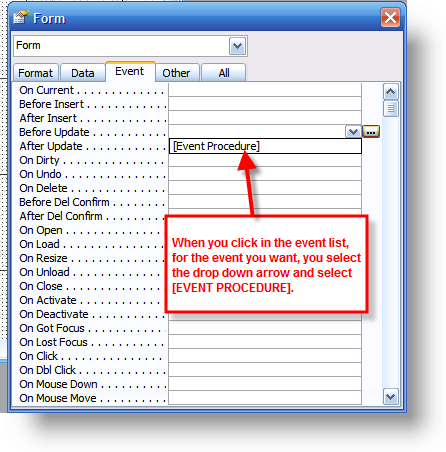
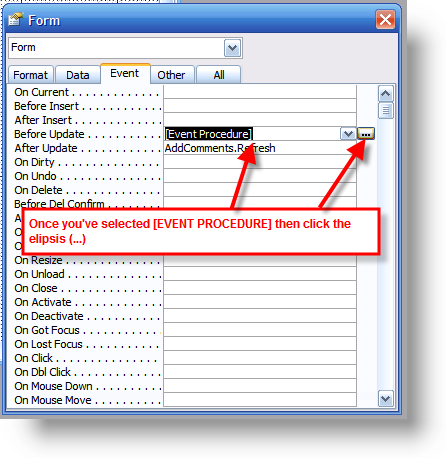
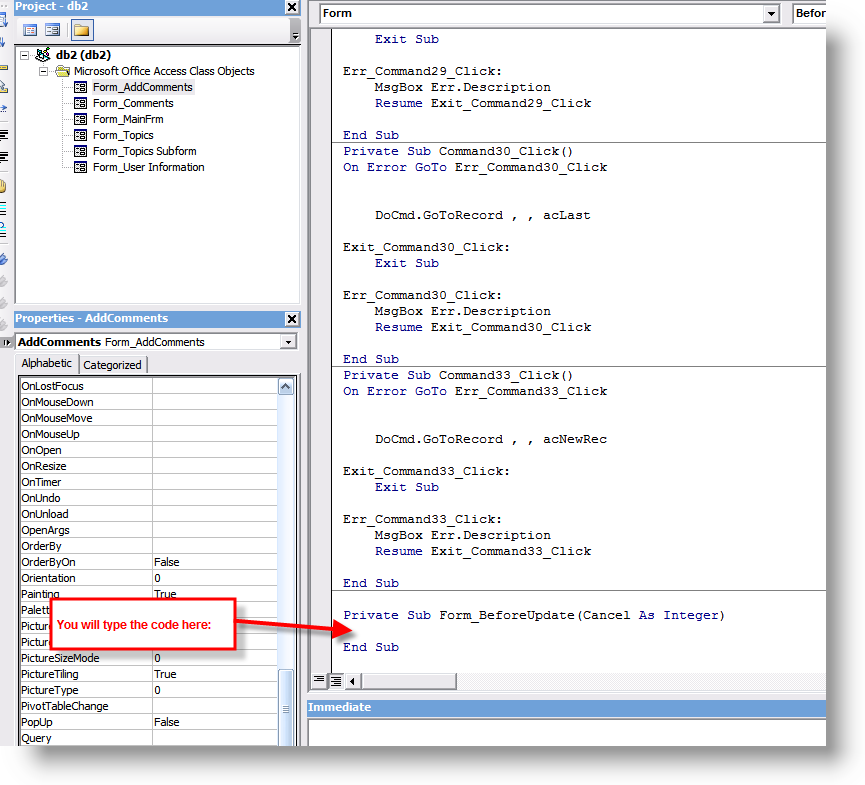
99% of the time that error occurs it is because the person has tried typing code into the event property on the property dialog and not in the VBA code window itself.

Check out these screenshots to verify you have put your code in the right spot:

ev01.png


ev02.png


ev03.png


ev04.png
 
Bob,

Thank you for taking a look. I am attaching the database.

I have tried different queries but I am not getting results. I probably have not explained the purpose of the database well so I will try once again.

Most jobs are in a program so the tier goes like this:

1) Program
2) Part Family
3) Assemblies
3a) Assembly Component
3b) Sub Assembly
3b-1) Sub Assembly Component
3b-2) Sub-SubAssembly
3b-2a) Sub-SubAssembly Component

A component can go into many sub-sub's, sub's, or assemblies
A sub-sub can go into many sub's
A sub can go into many assemblies
An assembly can go into more than one part family

The engineer or program manager will want to be able to search for a part number and know all the different places that part number shows up.

The MainformAssembly form works but when I click on the command button for MainformSubAsm form I get the error I talked about in the first post. I started looking at the queries and trying different variations of the query but I still am not able to find the solution.

Once again, thanks for taking a look.
 

Attachments

The MainformAssembly form works but when I click on the command button for MainformSubAsm form I get the error I talked about in the first post.
I tried opening up the subform from the mainform command button and it worked just fine. I didn't get the error message that I saw in your first attachment.

As far as the second command button on your mainform, you cannot pull up the form it is referencing because it DOESN'T exist. There is no form in your database with the name "fMainFormAsmComponent"
 
I know, I deleted a lot of forms and queries so that I could post the database. The error occures when entering the data. The parent/child link is not working and when entering another record or saving the record I get the attached error. (I also had to resestablish the data source for the SAID field on the subform)
 

Attachments

  • 0710016-1.gif
    0710016-1.gif
    64.8 KB · Views: 150
Look at the control SAID in the design view of the subform. It has an invalid controlsource. That's the way it is in mine anyway, but I have a stripped version of it.

Is it still invalid, or did you change that with the data source change??

You got a lot of stuff goin' on...especially in the relationship window. Anything else relevant here that you couldn't fit into the posting of the file??
 
I changed the control source to qSubAssembly1.SAID. I did not get an error, however the FGID control and the SAID control remained blank and the only record that is saved is to tPartNumber. No record goes to tAssembly or tSubAssembly or jAsm_SubAsm
 
Sandy,

Are you trying to enter data into the subform (as in records), and have that data (after entry) be reflected in the underlying table??

Also, changing the controlsource to qsubassembly1.SAID?? That is an autonumber field that is being queried by a table. I don't think that'll really work.
 
Yes. The data does not even reflect in the query used as the record source. As for the qSubAssembly!.SAID it does not work.

The problem, as far as I can tell is in the recordsource for the subform.

The query used for the record source for MainformAsm works but the query for the subform of MainformSubAsm which is designed pretty much the same either gives me an error or if I change which "SAID" record source I use lets me enter data but does not retain any data.

I originally had the tables set up like this
tAssembly
FGID = PKey
PFID = FK for Part Family table
Part number
Description
etc...

jAsm_Sub = junction table for Assembly and SubAssembly tables
FGID
SAID

tSubAssembly
SAID = PKey
Part Number
Description
etc...

jSubAsm_SubSubAsm = junction table for SubAsm and SubSubAssembly
SAID
SSAID

tSubSubAssembly
SSAID = PKey
Part Number
Description
etc...

tComponent
CID = Pkey
same as other tables

However, I didn't know how I would be able to easily search all the tables for a part number and make sure that no numbers were duplicated. So, I created the PartNumber table and linked each of the above tables to the PartNumber table as seen in the relationship view. Adding the PartNumber table I think completely normalized the database but that is when I started having problems with the forms and queries.
 
Sandy, you might want to check this...

** Recordsource of subform = qSubAssembly 2

** Fields queried FROM qSubAssembly 1 (by qSub2) = Fields IN qSubAssembly 2

** Fields queried FROM tSubAssembly & tPartNumber (by qSub1) = Fields IN qSubAssembly 1

** PNID field queried by qSubAssembly 1 has a source table of CHILD in a Master/Child Relationship

** tSubassembly.SAID in "qSub 1" is also queried from the CHILD table.


Cannot add a child record to a query or table before adding a related master record.

Maybe some of that can help you. I think that explains some of the problems you are having anyway. Check out the data trail :rolleyes:
 
Thanks AJETrumpet for taking the time helping me. Let me see if I understand. Because I have the lPartNumber.PNID in both the query for the master form and for the subform the queries do not work. Is this due to the way I have the tables and relationship set up? If you wouldn't mind, would you look at the relationship (attached) to see if this is the source of the problem. If it isn't then I don't know how to set the queries so that they will work.
 

Attachments

Not sure about this Sandy, but it's worth a gander.

It's just a visual of my last post, but maybe you can detect the problem with it.
 

Attachments

Thanks for taking a look. I had an epiphany this morning. I am in the process of testing what I hope is a fix. Access does not like that I have tables with just PK's and FK's so, I moved the field named "Current" from the PartNumber table into each of the other tables and made the default "yes". Seems to be working in the queries and the first 2 forms that I have revised.

Once again thanks for helping out. :D
 
Access does not like that I have tables with just PK's and FK's
This is a completely erroneous statement. It isn't that there are tables with just PK's and FK's. It is due to the circular references you have. You have fields tied together that complete a circle and that is NOT how it needs to be. That is probably the most major problem you have. The links should move outward and terminate at an ending point. Not, wind up with a couple of big circles.

Unfortunately, I am right in the middle of a major update to our software release and I can't spare the time necessary to help you redesign this. But, based on the diagram it is in serious need of design changes.

Uncle Gizmo is on the track for this, so listen to him and work on getting the entities correct and linked correctly.
 
Bob,

Your comments make me wonder how many people actually try to use the Access program to serve a purpose that it can't really compliment.

Access is great, but it sure can't do a lot of thing that other software programs can do, even other database programs. Think that's a bit of the problem here?? I don't really think so, but it's possible.
 

Users who are viewing this thread

Back
Top Bottom