Table view problem

John Sh

Active member
Local time
Today, 22:17
Joined
Feb 8, 2021
Messages
672
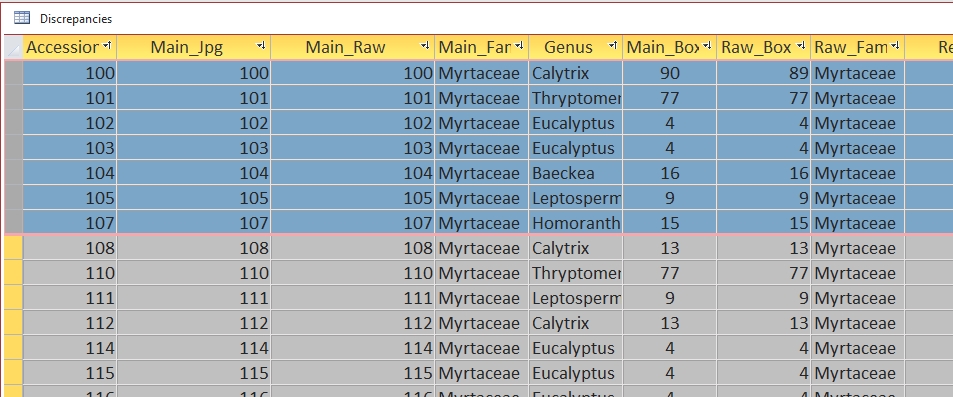
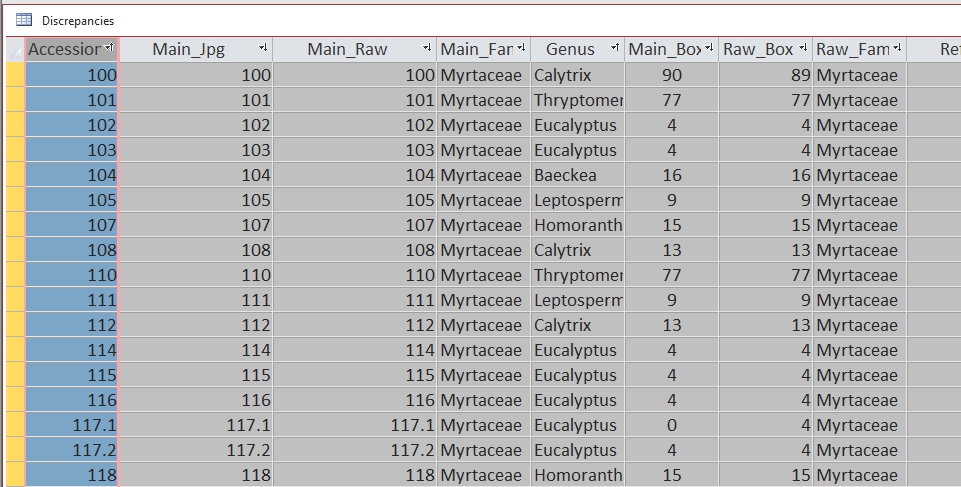
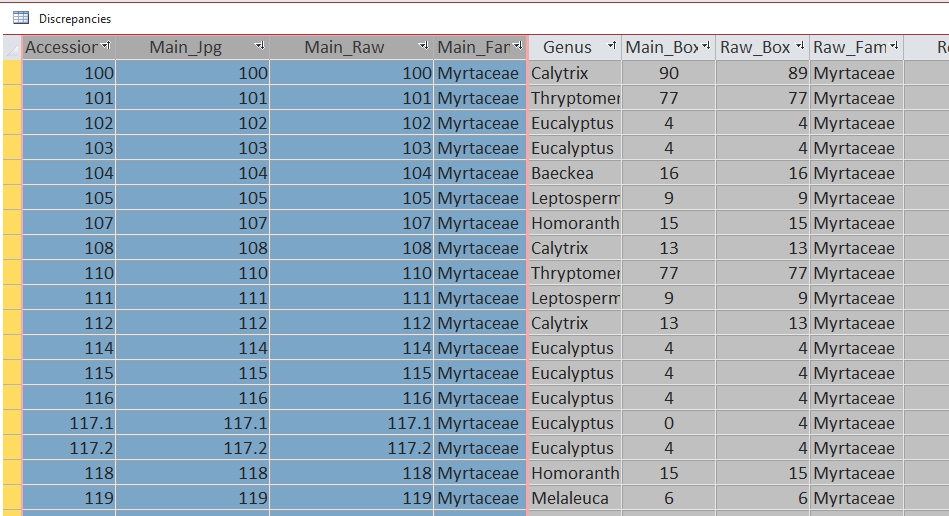
From time to time, in table view. I get this strange behaviour.
I am running Access 2019 and still on W10.

First image, Open table view. The first field is already highlighted.
Second image, select "Main_Family". All fields to the left are highlighted.
Third image, select record 107. All records above are highlighted.
It's as if I were holding down the "Shift" key.
If I try to sort a field, it is always the left most highlighted field that controls the sort.
If I restart Access this behaviour disappears for a while but will eventually return.

Why is it so and how do I stop it?
Screenshot_28.jpg
Screenshot_29.jpg
Screenshot_30.jpg
 
I think I have experienced this sometime in the distant past.

Possible corruption of database or Access?
 
I think I have experienced this sometime in the distant past.

Possible corruption of database or Access?
I do a compact and repair on close so corruption is unlikely.
Also everything else is working as expected.
It just starts for no apparent reason and sometimes just stops doing it.
Usually restarting Access fixes it for a while.
Just a nuisance really, especially when trying to sort a field.
 
Did you by any chance ever exit or save the table, and then exit the accdb while those fields and records were highlighted?.. This reminds me of not removing code breaks in the VBE editor and exiting the accdb. Then itza real PITA to remove those sticky Gremlins 👹

The easiest solution I suggest is to open the affected table, highlight and unhighlight the same field/records, save the table and exit the accdb. If that doesn't work, try importing the accdb into a new blank accdb.
1} No.
2) The test accdb is regularly replaced with the active file, although I don't delete one and paste in the other.
The behaviour has persisted over multiple copies of the accdb.

I have to replace my very old cpu with one compatible with W11.
I'll see if that makes a difference when the new cpu arrives.
Thank you both.
John
 
Sometimes some extrange behaviors have happened because of non printable characters on some fields. Nowadays it's common to copy and paste data from some webpages and it's common to copy non printable characters to de database and then...
- Some comboboxes don't populate properly.
- Some reports raise errors or don't print the expected data.
- Some data is not displayed in the forms.
- Etc.
I sanitize the data from time to time to avoid these issues.
 
Last edited:
It's as if I were holding down the "Shift" key.
Do you have "Sticky Keys" turned on in the Windows Accessibility ("Ease of Access" in Win10) settings?
If yes, pressing [Shift] twice will activate a "holding down [Shift]"-mode in Windows until you again press [Shift] twice.
This will cause exactly the behavior you are describing. However, it will not be limited to Access but will apply to all applications.

This happened to me sometimes when still on Windows 8, as there holding [Shift] for several seconds (as one might do deliberately as bypass key when opening an Access file) turned on "Sticky Keys". From Windows 10 onward "Sticky Keys" is (de)activated by pressing [Shift] 5 times consecutively, which is much less likely to happen accidentally.
 
Do you have "Sticky Keys" turned on in the Windows Accessibility ("Ease of Access" in Win10) settings?
If yes, pressing [Shift] twice will activate a "holding down [Shift]"-mode in Windows until you again press [Shift] twice.
This will cause exactly the behavior you are describing. However, it will not be limited to Access but will apply to all applications.

This happened to me sometimes when still on Windows 8, as there holding [Shift] for several seconds (as one might do deliberately as bypass key when opening an Access file) turned on "Sticky Keys". From Windows 10 onward "Sticky Keys" is (de)activated by pressing [Shift] 5 times consecutively, which is much less likely to happen accidentally.
Lots to ponder here.
I only use CR on close, on my development environment.. My live software is all accde and the backend is backed up after every use.
I do have a mouse issue when the batteries are a bit low but that is mainly erratic movement and I have just replaced them without affecting the problem. I have just, mid sentence replaced the keyboard batteries and the problem did not go away.
I will replace them both with spares and see what happens.
I do not have "Stickey Keys" turned on.
I have had issues with NPC's in the past but none of my code, or data, is downloaded, except for the odd code snippet from this forum.
I am now using a different mouse and keyboard and the behavior remains the same.
If nothing else, I now have fresh batteries.
Thanks to all. I will advise of a solution, when I find it.
John.
 
Have you tested that accdb on another computer to see if it also happens there? What kind of keyboard and mouse drivers are you using? 3rd-party software, like a utility program, a keyboard driver, or even an anti-virus suite can interfere with how Access registers mouse clicks and keyboard states, leading to that sporadic range-selection issue.
I only have one machine with MS Office, so unable to test here but I can test it at the Uni tomorrow.
The drivers are probably standard windows drivers, I have never had cause to question them and I am using Windows Defender as my only AV software.
Re the CPU update.
All this hoo haa about throwing a way good computers, I have an AMD X370 motherboard which is old but fully compatible with W11.
A Ryzen 5 5600 cpu, for about AUD120 brings the system up to W11 standard. All indications are that W11 has pretty much come of age, so we'll see.
John
 
From time to time, in table view. I get this strange behaviour.
I am running Access 2019 and still on W10.

First image, Open table view. The first field is already highlighted.
Second image, select "Main_Family". All fields to the left are highlighted.
Third image, select record 107. All records above are highlighted.
It's as if I were holding down the "Shift" key.
If I try to sort a field, it is always the left most highlighted field that controls the sort.
If I restart Access this behaviour disappears for a while but will eventually return.

Why is it so and how do I stop it?
View attachment 121971View attachment 121972View attachment 121973
I have two fields in my table named OwnerLastName and OwnerFirstName. If I open the table in Datasheet view and sort First by OwnerLastName and then by OwnerFirstName ACCESS will retain that sort even after closing and reopening the table. If I open the table in Design View, you can see the sorts that were last used. ACCESS retains those sorts.
1761669476720.png

What you are experiencing is more than likely normal behavior when opening tables directly and sorting fields. I never do this and don't know why you are doing it, but ACCESS automatically retains the latest sort. At least that has been my experience.

This sort will still be retained and applied even if I re-sort only by OwnerLastName. I needed to open the table in Design View again and then physically delete the Order By property of the table in order for it to release the last sort like shown below
1761670088202.png

Now I can start a new sort.
 
Wow, I totally forgot about the sorting. I didn't see those tiny ewok icons next to the field names. That will certainly cause the persistent highlighting if you sort and close the table. Filters will also behave the same. Good catch!
1) I need to open the files during their construction. It helps me see if the sql strings are doing there thing.
2) This behaviour happens on un-indexed and unfiltered files.

I didn't get a chance to test at the uni today, so no results there.
John
 

Users who are viewing this thread

Back
Top Bottom