thanks, nice idea. I did as per your advise but no success. the code was:
Private Sub Completed_AfterUpdate()
Dim ctlChk As Control
Dim ctlChkT As Control
Dim intCounter As Integer
Dim intCounterTrue As Integer
For Each ctlChk In Me.Controls
If ctlChk.ControlType = acCheckBox Then 'Find check boxes only
intCounter = intCounter + 1
End If
Next ctlChk
For Each ctlChkT In Me.Controls
If ctlChkT.ControlType = acCheckBox = True Then 'Find check boxes only
intCounterTrue = intCounterTrue + 1
End If
Next ctlChkT
If intCounter = intCounterTrue Then
MsgBox ("all tasks are completed, please enter the EndDate above")
End If
End Sub
what happens is that the message box appears after each task checkboc is checked regardless of whether all tasks are checked.
I did, still same thing, the message box appears regardless if all tasks check or not. hereis the updated code:
Private Sub Completed_AfterUpdate()
Dim ctlChk As Control
Dim ctlChkT As Control
Dim intCounter As Integer
Dim intCounterTrue As Integer
For Each ctlChk In Me.Controls
If ctlChk.ControlType = acCheckBox Then 'Find check boxes only
intCounter = intCounter + 1
End If
Next ctlChk
For Each ctlChkT In Me.Controls
If ctlChkT.ControlType = acCheckBox Then 'Find check boxes checked only
If ctlChkT.Value = True Then
intCounterTrue = intCounterTrue + 1
End If
End If
Next ctlChkT
If intCounter = intCounterTrue Then
MsgBox ("all tasks are completed, please enter the EndDate above")
End If
Dim ctl As Control
Dim intFalse As Integer
For Each ctl In Me.Controls
    If ctl.ControlType = acCheckBox Then
        If ctl = False Then
            intFalse = intFalse + 1
        End If
    End If
Next ctl

If intFalse = 0 Then
    MsgBox ("all tasks are completed, please enter the EndDate above")
End If
So, where did you put the code? Can you post the database or email it to me? I know it worked on my test, so I'm very, very curious to find out why it won't work on yours.
What is happening is that it is only seeing one checkbox as being there as it is the same checkbox (just different records) so we'll have to come up with another method. I may not get to it right away, so hopefully someone else might be able to. It will require iterating through the recordset, I'm pretty sure.
1) Create a summary query that groups by the records that you have on your subform, and COUNTS them in a new field.
2) Copy this into another query (with a different name!) and add a 'where' option for 'completed=true'
3) Create another query that contains all of the relevant fields (or use the one you may already have), and add in the two count fields from (1) and (2) above. You will have to define relationships to join your new queries' fields properly. If you want, define another field to be the difference between the two counts.
4) In the AFTERUPDATE of the subform control, requery the above query and refresh your main form.
5) Compare the counts. You are done when the two counts are the same. Trigger your messagebox
Okay - got it. Oh, I renamed your checkbox to chkCompleted too so it didn't have the same name as the field. And then I put this in the AfterUpdate event of the checkbox:
Code:
    Dim rst As ADODB.Recordset
    Dim strSQL As String
    Dim intFalse As Integer
    strSQL = "SELECT tbl_OrderDetails.OrderID, tbl_OrderDetails.Completed " & _
            "FROM tbl_OrderDetails " & _
            "WHERE (((tbl_OrderDetails.OrderID)=" & [Forms]![Frm_Orders]![sFrm_OrderDetails].[Form]![OrderID] & "));"

    Set rst = New ADODB.Recordset

    rst.Open strSQL, CurrentProject.Connection, adOpenForwardOnly, adLockReadOnly
    DoCmd.RunCommand acCmdSaveRecord

    Do Until rst.EOF
        If rst("Completed").Value = 0 Then
            intFalse = intFalse + 1
        End If
        rst.MoveNext
    Loop

    If intFalse = 0 Then
        MsgBox ("all tasks are completed, please enter the EndDate above")
    End If
rst.Close
Set rst = Nothing
As an additional suggestion I would suggest setting your keys properly though. It would appear that in the orders you don't have a primary key set and in the orders details table you don't have a primary key for that table at all (just the foreign key for the orders table).
Thanks for the efforts and time, appreciate it. I will try it
As for the keys, I believe I have a primary key for the orders table (OrderID). for the orderdeatils table, I did not know what to do because I have there the OrderID field linked to the OrderID field of Orders table.
Should I define it also as a primary key in the OrderDetails table? or should I add another field e.g. OrderDetailsID and in this case it will not be linked to any where in my database (and so I am not sure of its value or need).
in the Norhwind example, I saw the OrderID and ProductID (both are available as primary keys in Order and Products tables) are defined as keys but did not undestand how to defibe 2 keys in one table.
appreciate your insight on that (key dfinitions) of my database, thanks
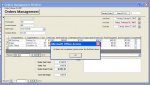
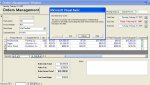
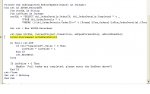
I tried the code after renamingthe check box. It gave me the error as per attached photos/ Also attached a photo of th code I pasted in the afterupdate event of the check box.
Sorry I pasted the code in beforeupdate by mistake, it works great, you are a genius. the sad thing is that I do not understand the code yet, I wull try to figure it out.
would appreciate answering me on the Keys issues in the above reply of mine
The SQL string is put in (we just needed the OrderID and the Completed fields as we only need to match up the completed with the current order id) and in the "Where" clause, since we are referring to an item on the subform, we need to concatenate in the form item. Also, notice where there are spaces at the end of the lines and then the & _ which extend the lines so that you can make it more readable.
Code:
Set rst = New ADODB.Recordset
You have to use the Set command to initialize the recordset variable
Opens the recordset by using the SQL statement in strSQL and sets the connection to the current database's connection. The adOpenForwardOnly is for speed since we're really only needing to look at the records, not manipulate them. The same goes for adLockReadOnly as we aren't making any changes, just reading records.
Code:
DoCmd.RunCommand acCmdSaveRecord
Even though the AfterUpdate event of the last checkbox has triggered, the form's AfterUpdate event hasn't. So, we need to save the record after clicking the checkbox so that it's true value will show up when we go through the recordset.
Code:
    Do Until rst.EOF
        If rst("Completed").Value = 0 Then
            intFalse = intFalse + 1
        End If
        rst.MoveNext
    Loop
Just a quick loop to move through the recordset to see if the "Completed" field has a value (which would be -1 if selected). If it has a value of 0, then it counts as FALSE and so we increment the intFalse variable so we can know later that there are still records that haven't been marked as completed.
Code:
    If intFalse = 0 Then
        MsgBox ("all tasks are completed, please enter the EndDate above")
    End If
If the variable's value is zero that means that we didn't run across an uncomplete during our loop through the recordset and that would mean that all are complete.
Code:
rst.Close
Set rst = Nothing
When using variables like this you should close the recordset and then set the variable to nothing so that the memory space it takes up on the computer will be cleared and released back to the operating system.
I hope that helps explain things. I'll work on answering your other questions in a bit.