append/delete queries

gobeav3rs297

Registered User.
Local time
Today, 11:16
Joined
Jun 5, 2007
Messages
17
I got these two append and delete queries in my database that i want to run on startup. I was wondering if there is a way to not have the msg that pops up to ask if you are sure you want to append/delete 0 record to table if there isn't any record that matches the condition set. I'm sure there is a way because if there isn't any record that matches the condition set in the queries then i don't want to have to click "No" everytime the database starts.

thanks,
Vincent
 
2 ways -

1. Use CurrentDb.Execute "QueryNameHere"

or

2. Use DoCmd.SetWarnings False

If you use the DoCmd.SetWarnings False, remember to set them True again and IMPORTANT! - Put DoCmd.SetWarnings True in the first line of your Error Handler (make sure you do have error handling on that sub, or you might find yourself without any warnings whatsoever if something fails before the normal SetWarnings True.
 
Hi bob,

wow thanks for the really quick reply, but i'm still a fairly newbie with access so if you could explain it a little more. I've those two queries run by a macro call autoexec so it starts at running both one after the other when i open the DB file. Now you say i should do either one of those option you mention to fix my "problem" but i don't think i have any sub function running, how would i go about doing that?. Sorry if i'm not making any sense.

Vincent
 
Create a Standard Module and save it with the name of modAutoExec and then create a Function:
Code:
Public Function Autoexec()
   CurrentDb.Execute "YourAppendQueryNameHere"
   CurrentDb.Execute "YourAppendQuery2NameHere"
End Function

And then change your AutoExec Macro to RunCode and put in Autoexec() for the function.
 
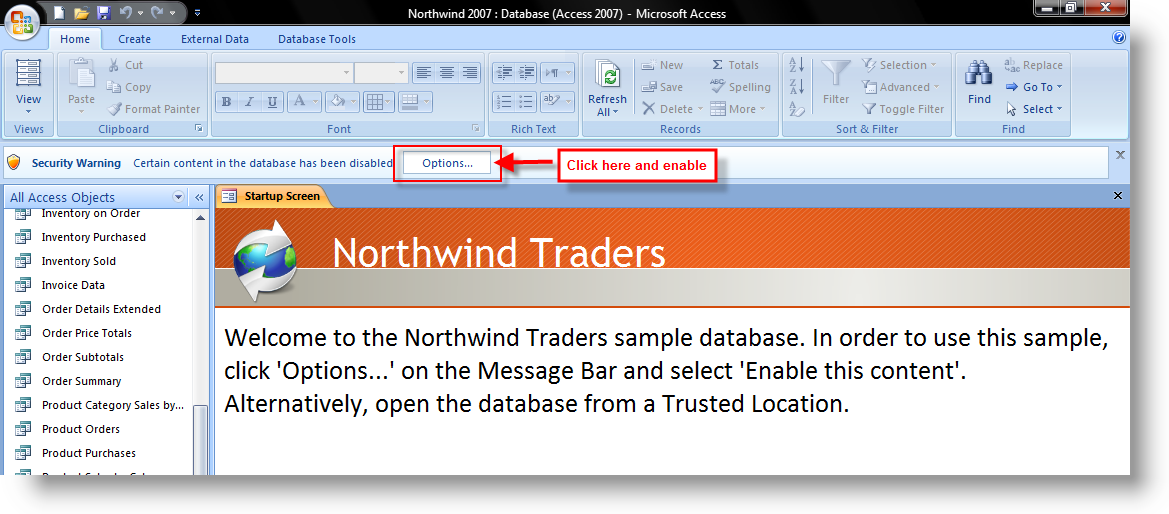
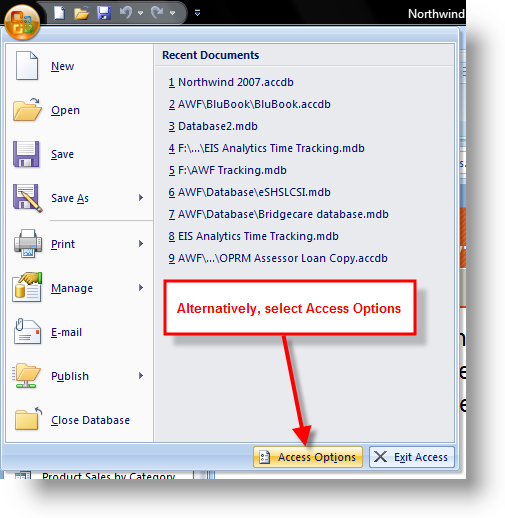
Thanks Bob, I have Access 2007 and so becuase of the new security implementation the autoexec failed to run the function. Is there any way around that? Other that it work perfectly after i have to manually "enable the content" option and then run it, but then it isn't really auto executing anymore :-).

Edit:

Nvm, figured it out, have to make a trust folder and put all the proj in there that way the security msg won't come up, thanks for all the help
 
Last edited:
Hey bob,

acutally i got a quick question, i posted this question in a different thread but haven't got any reply back yet but i thought since you might be checking this i might as well ask. This is about teh same project, its working fine and dandy but once i make the db file into an accde or mde file every goes haywire. None of my queries would work anymore, my search form no longer does anything, giving error msg of "Undefine function in expression". So why can't the query find the function inside my module when i saved it as an accde or mde file?
 
Edit:

Nvm, figured it out, have to make a trust folder and put all the proj in there that way the security msg won't come up, thanks for all the help

Yep, and just for anyone who might see this and want more info:

enable01.png


enable02.png


enable03.png


enable04.png
 
Hey bob,

acutally i got a quick question, i posted this question in a different thread but haven't got any reply back yet but i thought since you might be checking this i might as well ask. This is about teh same project, its working fine and dandy but once i make the db file into an accde or mde file every goes haywire. None of my queries would work anymore, my search form no longer does anything, giving error msg of "Undefine function in expression". So why can't the query find the function inside my module when i saved it as an accde or mde file?


First in the code window go to DEBUG > COMPILE and see if it compiles and, if not, fix any spots that don't compile first. Since with A2K7, you just change the file name to ACCDE instead of ACCDB, it doesn't go through the same compilation as if you make an MDE file, so maybe it just needs to fix some compile errors.
 
Okay i just went through the debug and it compile without any errors and the project ran fine when in normal format. Made it into an accde file and also into an mde file, and as soon as i run it give me that message again, can't find function within the expression. Queries don't work and the autoexec macros you just helped me with doesn't work either. I'm at a lost
 
The only thing I can suggest is to post the database so I can play with it.
 
Sure thing, thanks for all the help bob. :D

-Vincent
 
Last edited:
Well, the error when running in MDE is due to the function. So, I moved the queries to the form load event and got rid of the autoexec macro and modAutoExec module.

Code:
Private Sub Form_Load()
    On Error GoTo ErrHandler

DoCmd.SetWarnings False
   DoCmd.OpenQuery "makeAppendRecordToArchive"
   DoCmd.OpenQuery "makeDelExpireRecord"
   DoCmd.SetWarnings True
   
Exit Sub

ErrHandler:
   DoCmd.SetWarnings True
   MsgBox Err.Description, vbExclamation, "Error Number: " & Err.Number
   Exit Sub

Also, in your butGO_Click event on the search form I added a requery to make it work.

Code:
hits.RowSource = strSQL
        'added this
        hits.Requery

But, I'm not sure why, but the queries don't seem to run right anyway.
 
So the query isn't working? which one is it? That's weird becuase it seems to work fine on my system. The problem as i mention before is only when i made it into MDE file. The query just can't seem to find the functions inside the module. So these changes that you posted will fix the problem or are they just minor changes that i should do but it won't fix the original problem?

Its too bad you can't seem to figure what was wrong w/ it.
 
The changes will help, in fact here's the database with my changes. But I put in some test data to see if it would archive it and it worked once but didn't seem to work again. Maybe I'm just missing something and it really will work. Take a look.
 

Attachments

yea with the changes you made the autoexec of the queries does not bring up an error anymore while in MDE format but like you said it really doesn't work all that well, did a few test and sometime it would work and other time it doesn't. The search form just doesn't work at all, it still can't seem to find the function in the module when in MDE format. Oh well, i guess i will have to live with the regular file format because everything work while its in that format so...Hey thanks for all your great help bob.

Vincent
 

Users who are viewing this thread

Back
Top Bottom