
You are using an out of date browser. It may not display this or other websites correctly.
You should upgrade or use an alternative browser.
You should upgrade or use an alternative browser.
Audit Trail
- Thread starter libby32
- Start date
china99boy
Registered User.
- Local time
- Today, 15:05
- Joined
- Apr 27, 2006
- Messages
- 161
Hi guys, I know this is an old post, but I have been using the audit trail coding for a couple years now, and just noticed that after the intial record is entered and further changes are made, the audit trail repeats the previous date,time and user. It doesn't reflect current date, time and user. It does show the correct information changed, but not the date/time and user ID. Does anyone know why this is so? Below is an example of what is recorded in the audit trail. Today, I made a change to this record and as you can see it doesn't reflect the correct date,time, or user.
New Record added on 3/2/2010 5:06:21 PM by s16028n;
DATE IMAGED: Was Previoulsy Null, New Value: 3/10/2010
IMAGE SYSTEM: Changed From: 0, To: -1
tbAuditTrail: Changed From: New Record added on 3/2/2010 5:06:21 PM by s16028n;
DATE IMAGED: Was Previoulsy Null, New Value: 3/10/2010
IMAGE SYSTEM: Changed From: 0, To: -1, To: New Record added on 3/2/2010 5:06:21 PM by s16028n;
DATE IMAGED: Was Previoulsy Null, New Value: 3/10/2010
IMAGE SYSTEM: Changed From: 0, To: -1
BrNo: Changed From: 40, To: 43
New Record added on 3/2/2010 5:06:21 PM by s16028n;
DATE IMAGED: Was Previoulsy Null, New Value: 3/10/2010
IMAGE SYSTEM: Changed From: 0, To: -1
tbAuditTrail: Changed From: New Record added on 3/2/2010 5:06:21 PM by s16028n;
DATE IMAGED: Was Previoulsy Null, New Value: 3/10/2010
IMAGE SYSTEM: Changed From: 0, To: -1, To: New Record added on 3/2/2010 5:06:21 PM by s16028n;
DATE IMAGED: Was Previoulsy Null, New Value: 3/10/2010
IMAGE SYSTEM: Changed From: 0, To: -1
BrNo: Changed From: 40, To: 43
Sir,
I tried your sample audit trail and it work perfect but only problem i have is when my form are on top of tab control it does not work. I have five form and i use tab control to use page by page. what are setting for tab control able to do audit. Thanks
I am also interested in how this can be set up for tab control. Works great on a single form.
Thanks!
ranjeewaf9
Registered User.
- Local time
- Today, 19:05
- Joined
- Aug 23, 2010
- Messages
- 18
Hi,
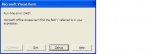
When I put the code in the following thread by irish634 I get the error, "Microsoft Office Access can't find the macro 'Call AuditTrail(Me.'. I've also attached a screenshot of the error.
http://www.access-programmers.co.uk/forums/showthread.php?t=157566
What should I do to rectify this? There are no other modules in the database and it works fine. I need to have an audit trail (prefarably on another table) so that I can track who changes its records when and what has been changed. Thanks for the help.
When I put the code in the following thread by irish634 I get the error, "Microsoft Office Access can't find the macro 'Call AuditTrail(Me.'. I've also attached a screenshot of the error.
http://www.access-programmers.co.uk/forums/showthread.php?t=157566
What should I do to rectify this? There are no other modules in the database and it works fine. I need to have an audit trail (prefarably on another table) so that I can track who changes its records when and what has been changed. Thanks for the help.
Attachments


boblarson
Smeghead
- Local time
- Today, 12:05
- Joined
- Jan 12, 2001
- Messages
- 32,025
Sounds like you put the code in the event PROPERTY and not the VBA window where it should be. See here for where to put code for events.Hi,
When I put the code in the following thread by irish634 I get the error, "Microsoft Office Access can't find the macro 'Call AuditTrail(Me.'. I've also attached a screenshot of the error.
http://www.access-programmers.co.uk/forums/showthread.php?t=157566
What should I do to rectify this? There are no other modules in the database and it works fine. I need to have an audit trail (prefarably on another table) so that I can track who changes its records when and what has been changed. Thanks for the help.
ranjeewaf9
Registered User.
- Local time
- Today, 19:05
- Joined
- Aug 23, 2010
- Messages
- 18
Hi Bob,
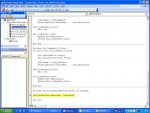
Thanks for the reply. When I put the VB code VB Editor I get a runtime error 2465. Pls. see the attached image. When I click debug it goes to the VB editor but I can't find anything wrong in the expression. I've attached an image of the Code as well. This was the code mentioned in the link too.
Thanks for the reply. When I put the VB code VB Editor I get a runtime error 2465. Pls. see the attached image. When I click debug it goes to the VB editor but I can't find anything wrong in the expression. I've attached an image of the Code as well. This was the code mentioned in the link too.
Attachments
ranjeewaf9
Registered User.
- Local time
- Today, 19:05
- Joined
- Aug 23, 2010
- Messages
- 18
Hi Bob,
Thanks again. What do you mean by field name here? In the table created for Audit Trail (i.e. tbl_AuditLog) RecordID is the primary key. As all records in all tables are captured in the Audit Trail I thought this should be the field name. Pls. correct me if I'm wrong. Thanks for the help again.
Thanks again. What do you mean by field name here? In the table created for Audit Trail (i.e. tbl_AuditLog) RecordID is the primary key. As all records in all tables are captured in the Audit Trail I thought this should be the field name. Pls. correct me if I'm wrong. Thanks for the help again.
boblarson
Smeghead
- Local time
- Today, 12:05
- Joined
- Jan 12, 2001
- Messages
- 32,025
Hi Bob,
Thanks again. What do you mean by field name here? In the table created for Audit Trail (i.e. tbl_AuditLog) RecordID is the primary key. As all records in all tables are captured in the Audit Trail I thought this should be the field name. Pls. correct me if I'm wrong. Thanks for the help again.
If RecordID is the name of your primary key in your table then you would use
Me!RecordID
or
Me.RecordID (if referring to the control that houses the primary key on the form).
ranjeewaf9
Registered User.
- Local time
- Today, 19:05
- Joined
- Aug 23, 2010
- Messages
- 18
Hi Bob,
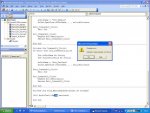
When I put "Call AuditTrail (Me. Me!RecordID), I get a compile error: Method or Data Member Not found. Also RecordID (wording) automatically gets converted to lowercase and reads as recordid. But in the table, the field is labeled as RecordID.
When I put "Call AuditTrail (Me. Me!RecordID), I get a compile error: Method or Data Member Not found. Also RecordID (wording) automatically gets converted to lowercase and reads as recordid. But in the table, the field is labeled as RecordID.
Attachments
ranjeewaf9
Registered User.
- Local time
- Today, 19:05
- Joined
- Aug 23, 2010
- Messages
- 18
Hi Bob,
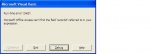
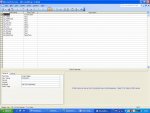
When I put a comma it gives me the same run time error as before saying access can't find the field "recordid" referred to in your expression. The table has that field and it is the primary key of the table. The only difference is the case of letters (RecordId - in the table and recordid in VBA). This automatically changes so I can't do anything to it. I've given a screenshot of the design view of tbl_AuditLog.
When I put a comma it gives me the same run time error as before saying access can't find the field "recordid" referred to in your expression. The table has that field and it is the primary key of the table. The only difference is the case of letters (RecordId - in the table and recordid in VBA). This automatically changes so I can't do anything to it. I've given a screenshot of the design view of tbl_AuditLog.
Attachments
boblarson
Smeghead
- Local time
- Today, 12:05
- Joined
- Jan 12, 2001
- Messages
- 32,025
Yes, RecordID is in your table. But is it in the FORM'S recordsource or on the form itself? Can you upload a copy of your database with all of the data removed? (if you need a quick tool to do that, you can use my free database reset tool which can strip the data).
ranjeewaf9
Registered User.
- Local time
- Today, 19:05
- Joined
- Aug 23, 2010
- Messages
- 18
boblarson
Smeghead
- Local time
- Today, 12:05
- Joined
- Jan 12, 2001
- Messages
- 32,025
Hi Bob,
I've uploaded the database.
Okay, I'll try not to get too frustrated. You are trying to use an ID which does not exist for the form's recordset.
For Form frm_NewBrnh you would need to use:
Call AuditTrail(Me, Me![Branch ID]) ' NOT RECORDID

You need to use the ID of the form's recordset (which I had stated over and over again).
So, try substituting
Call AuditTrail(Me, Me![Branch ID])
in your form's Before Update event and see what happens.
ranjeewaf9
Registered User.
- Local time
- Today, 19:05
- Joined
- Aug 23, 2010
- Messages
- 18
Hi Bob,
Thanks a lot. It is working. I was breaking my head on this for so long.
Thanks a lot. It is working. I was breaking my head on this for so long.
ranjeewaf9
Registered User.
- Local time
- Today, 19:05
- Joined
- Aug 23, 2010
- Messages
- 18
Hi,
I'm still having an issue with the code. Though the code works perfectly the information logged in the AuditLog table is wrong only for some fields. I have some combo boxes in the form. The table fields bound to them are indexed (with no duplicates). So if I try to select a value that's already there in the table it gives me the error in access that "this will create duplicate values and therefore I cannot save the record now". When I click yes to this message the field doesn't get updated. Yet in the tbl_AuditLog it shows an entry as this field has been changed to the selected value from the combo box when it's really not. How could I overcome this. Thanks for all the help
I'm still having an issue with the code. Though the code works perfectly the information logged in the AuditLog table is wrong only for some fields. I have some combo boxes in the form. The table fields bound to them are indexed (with no duplicates). So if I try to select a value that's already there in the table it gives me the error in access that "this will create duplicate values and therefore I cannot save the record now". When I click yes to this message the field doesn't get updated. Yet in the tbl_AuditLog it shows an entry as this field has been changed to the selected value from the combo box when it's really not. How could I overcome this. Thanks for all the help
ranjeewaf9
Registered User.
- Local time
- Today, 19:05
- Joined
- Aug 23, 2010
- Messages
- 18
Hi,
Could anyone help me please? I have uploaded a copy of the database few posts before. In tables some fields are indexed with no duplicates. When the field is changed to a value already present in the table via form the user gets the error as the change is not commited because if would create duplicate values. Still in the AuditLog table this shows as being changed which is not right. The whole point of having an AuditLog is of no use if changes not committed are recorded as changed. How could I resolve this please? I would appreciate if someone could help me. Thanks.
Could anyone help me please? I have uploaded a copy of the database few posts before. In tables some fields are indexed with no duplicates. When the field is changed to a value already present in the table via form the user gets the error as the change is not commited because if would create duplicate values. Still in the AuditLog table this shows as being changed which is not right. The whole point of having an AuditLog is of no use if changes not committed are recorded as changed. How could I resolve this please? I would appreciate if someone could help me. Thanks.
boblarson
Smeghead
- Local time
- Today, 12:05
- Joined
- Jan 12, 2001
- Messages
- 32,025
Hi,
Could anyone help me please? I have uploaded a copy of the database few posts before. In tables some fields are indexed with no duplicates. When the field is changed to a value already present in the table via form the user gets the error as the change is not commited because if would create duplicate values. Still in the AuditLog table this shows as being changed which is not right. The whole point of having an AuditLog is of no use if changes not committed are recorded as changed. How could I resolve this please? I would appreciate if someone could help me. Thanks.
I think you would need to upload another version as the last one doesn't have the code you are currently using. It could be that you don't have your call to the audit log in the right place in the Before Update event OR you need to put validation in your form's Before Update event to check for duplicate values FIRST and cancel the update (Cancel = True) if a DCount of the records shows that field would be duplicated.
ranjeewaf9
Registered User.
- Local time
- Today, 19:05
- Joined
- Aug 23, 2010
- Messages
- 18
Hi Bob,
Thanks for all your help. I'm new to programing. I've uploaded a copy of the database with this. I would appreciate if you could guide me how to do it. Just show me at least for one field so that I can do the same to other fields too where I don't want duplicate entries. Also one more thing, when using the code to check for duplicates should I still use table properties to use indexing with no duplicates or should I remove them? Thanks again.
Thanks for all your help. I'm new to programing. I've uploaded a copy of the database with this. I would appreciate if you could guide me how to do it. Just show me at least for one field so that I can do the same to other fields too where I don't want duplicate entries. Also one more thing, when using the code to check for duplicates should I still use table properties to use indexing with no duplicates or should I remove them? Thanks again.
Attachments
Similar threads


- Replies
- 1
- Views
- 689
- Replies
- 22
- Views
- 1,259
- Replies
- 29
- Views
- 1,902

Users who are viewing this thread
Total: 1 (members: 0, guests: 1)