Audit Trail

pls note previous post was edited at 5:16 on June 22/06. I had left some test code in which is now rremoved

 
ghudson said:
Here is the new and improved version of my Audit Trail sample. Please post back if you have any suggestions. Thanks!
Good example.
 
Let me get this right.


In order to log updates, addtions, changes, etc., I need to have the AuditTrail memo field in the subform as well?

The main form will not log changes from the subform so a new field on each subform record is needed?

So, the main form and subform will both have an AuditTrail memo field.

Correct?
 
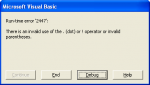
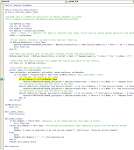
I am trying to get this Audit Trail to work, I am using the code from this thread. I have a quick find combobox on my form, when I filter the form to just show what is selected in the quickfind box, I get this error (see attached). When I debug, it takes me to the highlight code. If anyone can help in this, that would be great.
 

Attachments

  • RTERROR2447.png
    RTERROR2447.png
    7.2 KB · Views: 334
  • AuditTrail.png
    AuditTrail.png
    35.9 KB · Views: 356
I've been looking at this, and it seems to be what I'm looking for.

I haven't seen it mentioned yet, but could this be used in a report?

So say I want to run a report that displayed all entries with changes in the past month, could I use this to display what the change was for each entry?

Also would it be possible for this report to only display the last change (instead of all changes)?
 
Thanks for replying, I'm looking at both versions of the audit trail, but not sure which one would work better.

I would like to have a report, that would list any records with changes. Then on the report for each record it would have a field with a summary of changes. I think I would only want the summary of changes to include the last revision. Not all past revisions.

so something like

Report Header
Field 1...Field 2....Changes
XX.........YX.........1/22/07: Field 1 was AB now XX: Field 2 was CD now YX

I was able to do something similar with this audit trail, but it lists out all the changes ever made for the record. Which isn't what I need it to do, is there a way in the code to make it either only save the latest change, or way for the report to only display the latest?
 
I tried the audit trail. It's working for me in some ways but I'm getting this error message "3251 operation is not supported for this type" whenever I go to the next record or I guess whenever I try to leave the current record. I tried changing some records and some will show what I changed with the date, and the others will just show date. How do I fix the problem? Does it also matter whether I change the IME Sentence Mode to Phrase Predict or not? My form only contains list boxes, combo boxes, and text boxes.

Thank you.
 
I used the first one. It saves to a memo field from GHudson I believe. It's really driving me crazy. I can't figure out why whenever I change this one field, it shows both the date and whatever I changed, so somewhat working(ofcourse I still get the error message) but as far as the other fields go, only the date. Ugh! Could anyone help me with this issue? Thank you.
 
Last edited:
I think I followed all the steps correctly, but I can't get it to work with my DB. My error message is something to the extent of "Invalid Outside Procedure". Anyone have an answer to this?
 
strange audit problem

ghudosn's audit trail is fantastic - so thanks to that guy
strange problem occuring when i run it.
on one of my combo boxes - when i change the data it lists it twice in the audit trail text box like below

Changes made on 23/02/2007 12:50:15 by Admin;
Category: Changed From: 1, To: 2
What is the Risk: Changed From: Crush injury, To: Trip
catagory: Changed From: 1, To: 2


this only happens on the category combo box and not on any other.
i was wondering why this was?
anybody any ides?

thanks
 
Thanks for this wonderful utility! I really appreciate your work!

But i have a 2 questions about it because i miss something:

I am using unbound txtboxes and SQL Script to update my tables thru forms. This gives me 2 problems:

The Audittrail record is always in the first row of the table and not in the corresponding row.

The Audittrail record only contains


Changes made on 12/04/2007 10:08:41 by 1002;

but not the details.


I would be very thankful if someone could give me some help here!
 
I run thr following code for this:

Code:
Public Function Audit_Trail()
On Error GoTo Err_Audit_Trail
    
'ACC2000: How to Create an Audit Trail of Record Changes in a Form
'http://support.microsoft.com/default.aspx?scid=kb;en-us;197592
    
    Dim MyForm As Form
    Dim ctl As Control
    Dim sUser As String
    Set MyForm = Screen.ActiveForm
'    sUser = "User: " & UsersID 'You need to identify your users if you are not using Access security with workgroups.
    sUser = CurrentUser
    
    'If new record, record it in audit trail and exit function.
    'If MyForm.NewRecord = True Then
     '   MyForm!AuditTrail = MyForm!AuditTrail & "New Record added on " & Now & " by " & sUser & ";"
     '   Exit Function
    'End If
    
    'Set date and current user if the form (current record) has been modified.
    MyForm!AuditTrail = MyForm!AuditTrail & vbCrLf & vbLf & "Changes made on " & Now & " by " & sUser & ";"
    
    'Check each data entry control for change and record old value of the control.
    For Each ctl In MyForm.Controls
    
    'Only check data entry type controls.
    Select Case ctl.ControlType
    Case acTextBox, acComboBox, acListBox, acOptionGroup, acCheckBox
        If ctl.Name = "AuditTrail" Then GoTo TryNextControl 'Skip AuditTrail field.
            'If new and old value do not equal
            If ctl.Value <> ctl.OldValue Then
                MyForm!AuditTrail = MyForm!AuditTrail & vbCrLf & ctl.Name & ": Changed From: " & ctl.OldValue & ", To: " & ctl.Value
            'If old value is Null and new value is not Null
            ElseIf IsNull(ctl.OldValue) And Len(ctl.Value) > 0 Or ctl.OldValue = "" And Len(ctl.Value) > 0 Then
                MyForm!AuditTrail = MyForm!AuditTrail & vbCrLf & ctl.Name & ": Was Previoulsy Null, New Value: " & ctl.Value
            'If new value is Null and old value is not Null
            ElseIf IsNull(ctl.Value) And Len(ctl.OldValue) > 0 Or ctl.Value = "" And Len(ctl.OldValue) > 0 Then
                MyForm!AuditTrail = MyForm!AuditTrail & vbCrLf & ctl.Name & ": Changed From: " & ctl.OldValue & ", To: Null"
            End If
    End Select
    
TryNextControl:
    Next ctl
    
Exit_Audit_Trail:
    Exit Function
    
Err_Audit_Trail:
    If Err.Number = 64535 Then 'Operation is not supported for this type of object.
        Exit Function
    ElseIf Err.Number = 2475 Then 'You entered an expression that requires a form to be the active window
        Beep
        MsgBox "A form is required to be the active window!", vbCritical, "Invalid Active Window"
    Else
        Beep
        MsgBox Err.Number & " - " & Err.Description
    End If
    Resume Exit_Audit_Trail
    
End Function

I get a

Run-Time Error '3020'

Update or CancelUpdate without AddNew or Edit.

I have a quickSearch on this form that seems to be conflicting with the Audit Trail.

Can Someone please help????
 
here is in code:

Code:
Private Sub QuickSearch_AfterUpdate()

        Dim rs As Object
        
    Set rs = Me.Recordset.Clone
    rs.FindFirst "[Claim #] = " & str(Me![QuickSearch])
    Me.Bookmark = rs.Bookmark
    
    Me.txtSSN = Me.QuickSearch.Column(1)
End Sub

When you click on record in the list box it populates the rest of the form with all the info pertaining to that record selected.
 
Rem that line out and I still get the same error message.

here is where it is getting stuck:

Code:
Private Sub QuickSearch_AfterUpdate()

        Dim rs As Object
        
    Set rs = Me.Recordset.Clone
    rs.FindFirst "[Claim #] = " & str(Me![QuickSearch])
    Me.Bookmark = rs.Bookmark
    
    'Me.txtSSN = Me.QuickSearch.Column(1)
End Sub

Me.Bookmark = rs.Bookmark

Any ideas?
 
Then the whole form is locked on the current record. When I click on a record in the search list box it doesn't change to that record.
 
I just used this and it works great ghudson!

One question though:

We share the DB on a network drive. All users are recorded as "Admin" in the audit trail field. Is there a way to pull the windows user name for each user?

thanks!
 
thanks - one other question since I am pretty poor at VB. Do I paste this in the current VBA code that GHUDSON provided.

below is his code which is really niuce

Public Function Audit_Trail()
On Error GoTo Err_Audit_Trail

'ACC2000: How to Create an Audit Trail of Record Changes in a Form
'http://support.microsoft.com/default.aspx?scid=kb;en-us;197592

Dim MyForm As Form
Dim ctl As Control
Dim sUser As String
Set MyForm = Screen.ActiveForm
' sUser = "User: " & UsersID 'You need to identify your users if you are not using Access security with workgroups.
sUser = CurrentUser

'If new record, record it in audit trail and exit function.
If MyForm.NewRecord = True Then
MyForm!AuditTrail = MyForm!tbAuditTrail & "New Record added on " & Now & " by " & sUser & ";"
Exit Function
End If

'Set date and current user if the form (current record) has been modified.
MyForm!AuditTrail = MyForm!tbAuditTrail & vbCrLf & vbLf & "Changes made on " & Now & " by " & sUser & ";"

'Check each data entry control for change and record old value of the control.
For Each ctl In MyForm.Controls

'Only check data entry type controls.
Select Case ctl.ControlType
Case acTextBox, acComboBox, acListBox, acOptionGroup, acCheckBox
If ctl.name = "tbAuditTrail" Then GoTo TryNextControl 'Skip AuditTrail field.
'If new and old value do not equal
If ctl.Value <> ctl.OldValue Then
MyForm!AuditTrail = MyForm!tbAuditTrail & vbCrLf & ctl.name & ": Changed From: " & ctl.OldValue & ", To: " & ctl.Value
'If old value is Null and new value is not Null
ElseIf IsNull(ctl.OldValue) And Len(ctl.Value) > 0 Or ctl.OldValue = "" And Len(ctl.Value) > 0 Then
MyForm!AuditTrail = MyForm!tbAuditTrail & vbCrLf & ctl.name & ": Was Previoulsy Null, New Value: " & ctl.Value
'If new value is Null and old value is not Null
ElseIf IsNull(ctl.Value) And Len(ctl.OldValue) > 0 Or ctl.Value = "" And Len(ctl.OldValue) > 0 Then
MyForm!AuditTrail = MyForm!tbAuditTrail & vbCrLf & ctl.name & ": Changed From: " & ctl.OldValue & ", To: Null"
End If
End Select


thanks!!!!
 
Change this part:
Code:
Dim MyForm As Form
Dim ctl As Control
Dim sUser As String
Set MyForm = Screen.ActiveForm
' sUser = "User: " & UsersID 'You need to identify your users if you are not using Access security with workgroups.
sUser = CurrentUser
to
Code:
Dim MyForm As Form
Dim ctl As Control
Dim sUser As String
   Set MyForm = Screen.ActiveForm
    sUser = [B]Environ("currentuser")[/B]
 

Users who are viewing this thread

Back
Top Bottom