Automatic date change

steve711

Registered User.
Local time
Today, 10:59
Joined
Mar 25, 2004
Messages
166
I have a query that allows the user to see how many hours we've flown, sorted by month for the current year.

Problem is that in the query I have to manually put in the criteria "january 2007" or "february 2007" or etc....

What I would like it to be able to do is based on the current year (2007 for instance) set the criteria by itself. Someday I might not be around to reset the year in the criteria so therefore it should be automated.

Anybody have an idea what I'm talking about and a simple solution a hack of a programmer could figure out?

Thanks.
 
You can do it a few different ways. You could create a form to run the query from and have a place where a user could type in a year. Or, if you truly just want the current year, you can set the criteria of your query to be
Format("yyyy",Date())
 
The way it is now is on the switchboard form they click a button which then opens a small form that displays the results of the query in a list box.

January 2007 128.3
February 2007 229.4 (assuming it was actually next month)

But you get the idea. So I put your suggestion in the criteria of the query but am having no luck. Just so you know I am terrible with queries and setting them up.

So be gentle but more specific please.
 
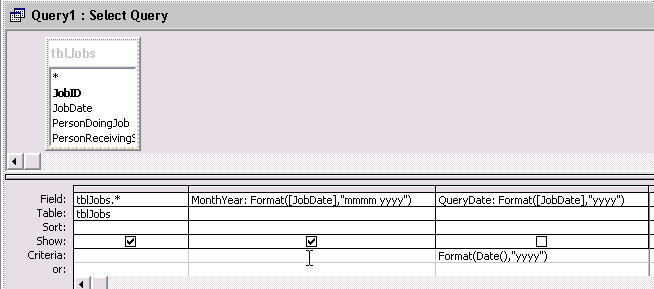
Sorry, you would have to create an extra field in your query, like this example:
QueryDate: Format([YourDateFieldNameHere],"yyyy")

and then in the criteria of QueryDate put Format(Date(),"yyyy")

I sort of had the format syntax backwards too.
 
Maybe it would help if I showed you what I have now:

Field:
Format$([tblEntry].[tblDate],'mmmm yyyy')

Criteria:
"january 2007" or "february 2007" etc..
 
Ok I continued to tinker with what you sent and I used:

Format(Date(),"mmmm yyyy")

And all is working great. Thanks for the help Bob.
 
Except I need it to show ALL months in this year and not just the current month and year. Back to the drawing board.
 
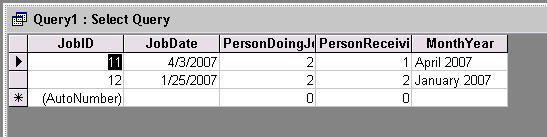
Use the code EXACTLY as I showed you. You need the extra field in the query to just come up with a year. It doesn't have to be visible. You can create your own month/year field as well, but you MUST have the year ONLY field. Then use the criteria I supplied on the YEAR only one.
 
Here are a couple of screenshots for examples

DateQuery01.jpg


DateQuery02.jpg
 
Ugh. I really wish I understood queries better.

Bob you're a genius, it works especially when I follow what you say EXACTLY. Thanks.
 

Users who are viewing this thread

Back
Top Bottom