Solved Can I Hide Empty Fields in Search Form ?

Local time
Today, 20:45
Joined
Oct 31, 2021
Messages
42
Hello Everyone,
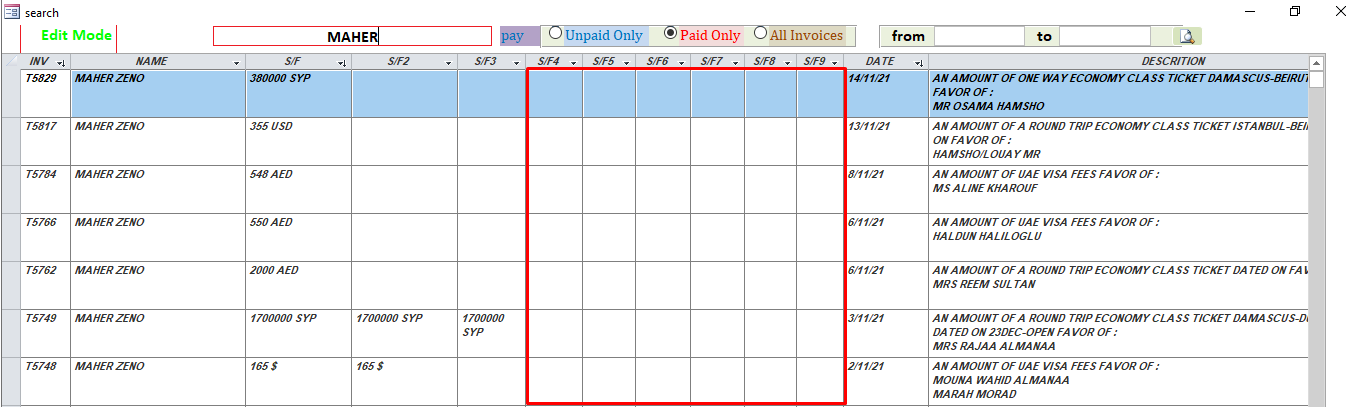
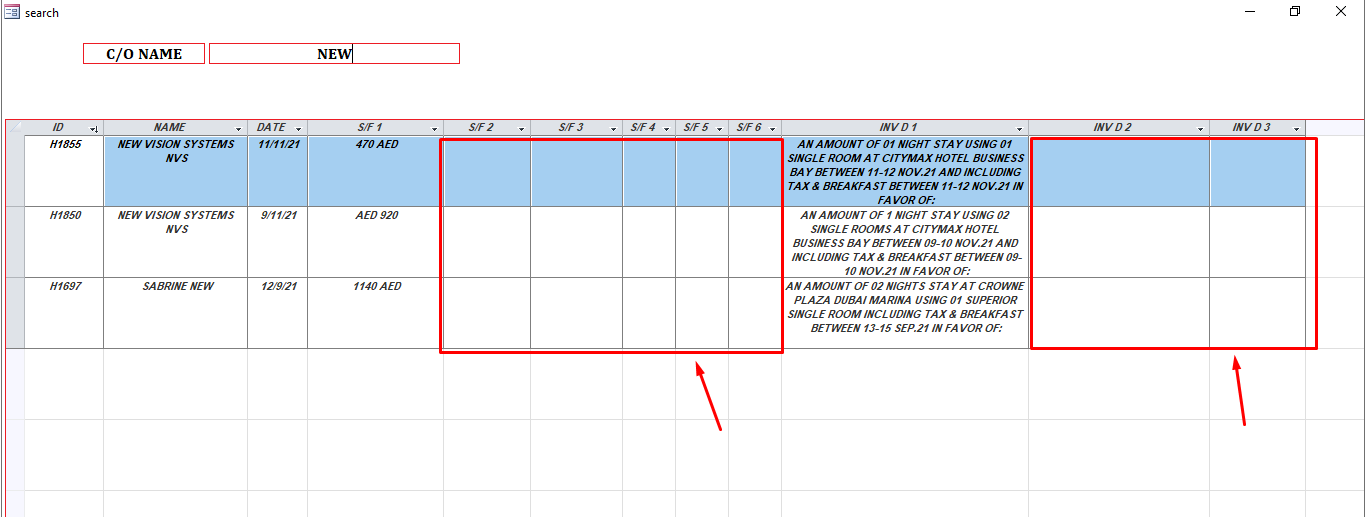
Can i hide empty fields in search form
Example if s/f 2,34,5,6 ( empty not contain any data ) ?


1637134430845.png


1637134104716.png
 
Form in datasheet view, use ColumnHidden property.

Me.[S/F 2].ColumnHidden = True

Strongly advise not to use spaces nor punctuation/special characters in naming convention.
 
Or since it appears the datasheet is a subform and if code is in main form:

Me.subformcontainername.Form.[S/F 2].ColumnHidden = True
 
I can see the next question coming :)

"How do I determine that the column is empty?"
 
Or since it appears the datasheet is a subform and if code is in main form:

Me.subformcontainername.Form.[S/F 2].ColumnHidden = True
i try to but below code in on current subform
i dont know how do Form in datasheet view, use ColumnHidden property.

Me.subview.Form.[S/F 2].ColumnHidden = True
Me.[S/F 2].ColumnHidden = True

1637140841856.png
 
If form (or subform) is not in datasheet view, then there are no columns to hide. Set a form for datasheet view with DefaultView property. If you don't know how to do this, then why does your image look like datasheet?

Can't use both versions of code in the same place. One example is for behind main form and one for behind subform.

Hiding column with OnCurrent event won't hide just for that record - it hides for ALL records.

Is subform container control named subview or sebview?

Really should have Option Explicit at top of every code header.
https://docs.microsoft.com/en-us/of...User-Interface-Help/option-explicit-statement
Will have to manually type into existing modules but can set Access to automatically include this for new modules.
On the VBA editor menu > Tools > Options > check Require Variable Declaration

 
If form (or subform) is not in datasheet view, then there are no columns to hide. Set a form for datasheet view with DefaultView property. If you don't know how to do this, then why does your image look like datasheet?

Can't use both versions of code in the same place. One example is for behind main form and one for behind subform.

Hiding column with OnCurrent event won't hide just for that record - it hides for ALL records.

Is subform container control named subview or sebview?

Really should have Option Explicit at top of every code header.
https://docs.microsoft.com/en-us/of...User-Interface-Help/option-explicit-statement
Will have to manually type into existing modules but can set Access to automatically include this for new modules.
On the VBA editor menu > Tools > Options > check Require Variable Declaration

I'm trying on it

Thank you
 

Users who are viewing this thread

Back
Top Bottom