
Solved Concatenate a query group. Is it possible?

Romio_1968

Member
Local time
Today, 23:57
Joined
Jan 11, 2023
Messages
126
I have the following table structure and relationships
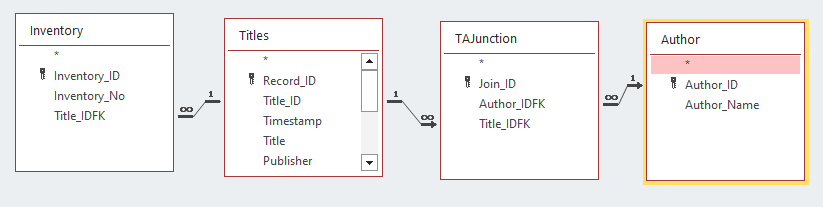
1675933886354.png


I created a query that extracts data from the above tables. The SQL code for this Query is:

Code:
SELECT Titles.Title_ID, Titles.Title, Author.Author_Name, Inventory.Inventory_No
FROM
  (Titles INNER JOIN Inventory ON Titles.Title_ID = Inventory.Title_IDFK)
  LEFT JOIN
    (Author RIGHT JOIN TAJunction
    ON Author.Author_ID = TAJunction.Author_IDFK)
  ON Titles.Title_ID = TAJunction.Title_IDFK
ORDER BY Titles.Title_ID, Inventory.Inventory_No;

The output of the query is:
1675934377503.png


So for the first Title, I have one Title_ID, two Authors and also two copies, each one with its own inventory
The second one have Title_ID 2, no author, and inventory No.2

I need to obtain an output like this:

Title_ID 1 # Some Book # Dere, John; Doe, John; # Inventrory_No 1, 2
Title_ID 2 # Other Book # # Inventrory_No 3

So I need for each Title to merge somehow dte data in column.

If anybody can help,
Thank You


____________________________________________________________________
RESOLUTION

The solution for this thread is offered by ebs17 in his answer
Tested and worling
 

Attachments

  • 1675936338059.png
    1675936338059.png
    9.7 KB · Views: 252
Last edited:
Code:
' in a standard module
Public Function SQLListe(ByVal AnySQL As String, _
                         Optional ByVal SepF As String = ";", Optional ByVal SepR As String = ";", _
                         Optional ByVal NoNullFields As Boolean = True) As String

    Static db As DAO.Database
    Static rs As DAO.Recordset
    Dim i As Long, Res As String, Tmp As String

    If db Is Nothing Then Set db = CurrentDb
    Set rs = db.OpenRecordset(AnySQL, dbOpenSnapshot, dbReadOnly)
    With rs
        Res = ""
        Do While Not .EOF
            Tmp = ""
            For i = 0 To .Fields.Count - 1
                If Not (NoNullFields And IsNull(.Fields(i))) Then Tmp = Tmp & SepF & .Fields(i)
            Next
            If Tmp <> "" Then Res = Res & SepR & Mid(Tmp, Len(SepF) + 1)
            .MoveNext
        Loop
        .Close
    End With
    If Len(Res) > 0 Then Res = Mid(Res, Len(SepR) + 1)

    SQLListe = Res
End Function

Then the approach for the query:
Code:
SELECT
   T.Title_ID,
   T.Title,
   SQLListe(...) AS [Inventory Numbers],
   SQLListe(...) AS [Author Names]
FROM
   Titles AS T

Now the function for composing the values needs to get its arguments:
SQL:
SELECT
   T.Title_ID,
   T.Title,
   SQLListe("SELECT Inventory_No FROM Inventory WHERE Title_IDFK = " & T.Title_ID, ", ") AS [Inventory Numbers],
   SQLListe("SELECT A.Author_Name FROM Author AS A INNER JOIN TAJunction AS J ON A.Author_ID = J.Author_IDFK
WHERE J.Title_IDFK = " & T.Title_ID, ", ") AS [Author Names]
FROM
   Titles AS T
 
Code:
' in a standard module
Public Function SQLListe(ByVal AnySQL As String, _
                         Optional ByVal SepF As String = ";", Optional ByVal SepR As String = ";", _
                         Optional ByVal NoNullFields As Boolean = True) As String

    Static db As DAO.Database
    Static rs As DAO.Recordset
    Dim i As Long, Res As String, Tmp As String

    If db Is Nothing Then Set db = CurrentDb
    Set rs = db.OpenRecordset(AnySQL, dbOpenSnapshot, dbReadOnly)
    With rs
        Res = ""
        Do While Not .EOF
            Tmp = ""
            For i = 0 To .Fields.Count - 1
                If Not (NoNullFields And IsNull(.Fields(i))) Then Tmp = Tmp & SepF & .Fields(i)
            Next
            If Tmp <> "" Then Res = Res & SepR & Mid(Tmp, Len(SepF) + 1)
            .MoveNext
        Loop
        .Close
    End With
    If Len(Res) > 0 Then Res = Mid(Res, Len(SepR) + 1)

    SQLListe = Res
End Function

Now the function for composing the values needs to get its arguments:
SQL:
SELECT
   T.Title_ID,
   T.Title,
   SQLListe("SELECT Inventory_No FROM Inventory WHERE Title_IDFK = " & T.Title_ID, ", ") AS [Inventory Numbers],
   SQLListe("SELECT A.Author_Name FROM Author AS A INNER JOIN TAJunction AS J ON A.Author_ID = J.Author_IDFK
WHERE J.Title_IDFK = " & T.Title_ID, ", ") AS [Author Names]
FROM
   Titles AS T

Holly ...
It actually works

So SQLListe does the concatenation of the fields in two separate subQueryes.
Then you have a simple query based on a Titles table, with the concatenated strings as calculated fields.
What a charm!

Thank you
 
Pat, you are right. Record_ID does not have a obvious reason to exist.
The most important key is Title_ID. It is unique and hanndled by code, not by user. There is still something. The Title_ID is a little bit "cleaner", at least on the last record. He take it's value on an +1 increment, so if the last record is deleted, the Title_ID goes back. There is some bureaucracy attached to the project, as for every missing Inventory_No must exist a documented reason. It will be annoying to write in the ledger something like "computer glitch". That doesn't mean that I cannot uset the Title_ID in the same way, but not as an Autonumbrer
Yet, while working on the architecture, for reason I do not really understood that time (neither now i don-t get it), everybody adviced to have that Autonumber PK, but not to use it as join key. When I asked why, the answer was "You don't want your join field to be Autonumber". Quite clear, so ... I don't want that. Moreover, I am working for some time on this, i posted the tables schema few times and nobody seemed to bother on that useles field :)
Anyway, there is no action linked to that key.
Probably i will delete it at the end.
As usual, your advice is pertinent at it was noted.
Most of your recommendations are in the code, now.
If it will not be too much, when I am ready to close the job, I will post the final version of the project.
 

Users who are viewing this thread

Back
Top Bottom
