

MajP
You've got your good things, and you've got mine.
- Local time
- Today, 05:42
- Joined
- May 21, 2018
- Messages
- 10,070
I will look at the code. But thinking about the union query that is a better approach and I personally would do something like this.
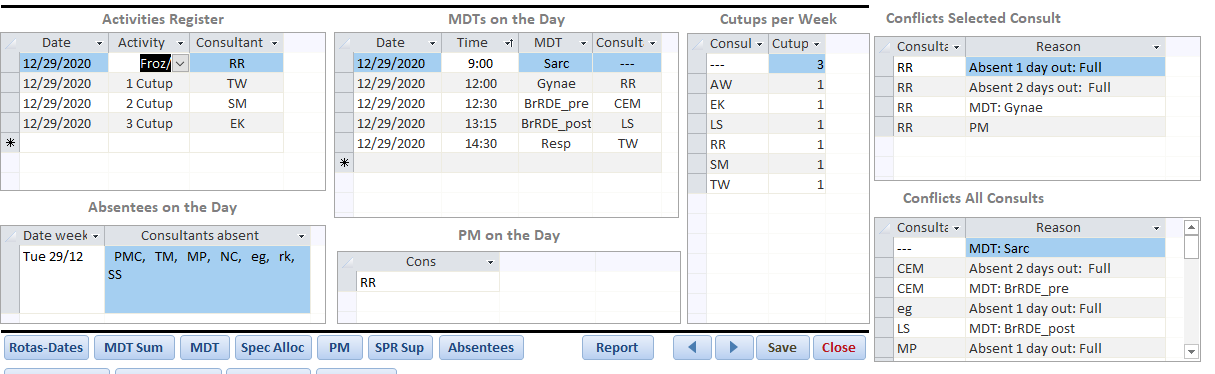
This uses the union query and shows more details. The first subform just filters to the active person in the activities subform. The second shows all conflicts for all consultants for that date. FYI, I added some records to RR so I can test. Either way you can use the union query to Alert, Conditional format, build a subform as shown, or multiple. I may need to modify the code a little for refreshing the subforms on new records. I did not try that yet. But if this idea makes sense, I can update.
The union query is built on some other queries starting with q_Conflict. You can use your concatenate on the union to concat the conflicts as well.
This uses the union query and shows more details. The first subform just filters to the active person in the activities subform. The second shows all conflicts for all consultants for that date. FYI, I added some records to RR so I can test. Either way you can use the union query to Alert, Conditional format, build a subform as shown, or multiple. I may need to modify the code a little for refreshing the subforms on new records. I did not try that yet. But if this idea makes sense, I can update.
The union query is built on some other queries starting with q_Conflict. You can use your concatenate on the union to concat the conflicts as well.
Code:
Public Function GetConflicts(Cons_ID As String, DtmDate As Date) As String
  GetConflicts = ConcatRelated("ConflictReason", "q_Conflict_Reasons", "Cons_ID = '" & Cons_ID & "' AND ConflictDate = #" & Format(DtmDate, "mm/dd/yyyy") & "#")
End Function
Attachments
Last edited:


