I created a form in datasheet view and it works as it should. However, when I call it from a Form Menu, it reverts to the form view. How can I make the datasheet view stick? I turned off "Allow form View', in the Datsheet form, but it does no good.

You are using an out of date browser. It may not display this or other websites correctly.
You should upgrade or use an alternative browser.
You should upgrade or use an alternative browser.
Datasheet View?
- Thread starter pepegot1
- Start date

rainman89
I cant find the any key..
- Local time
- Today, 18:11
- Joined
- Feb 12, 2007
- Messages
- 3,013
there is a default view option that u set to datasheet in the form properties.
right click your form and go to properties. then select form from the drop down. you should see a default view option that u set to datasheet
right click your form and go to properties. then select form from the drop down. you should see a default view option that u set to datasheet
Datasheet view
In properties: default view:datasheet
allow datasheet view
This is what's in properties and still-no soap!
I ditched the delete key and created a button, on the menu, form that open the datsheet view sucessfully. However, if I first open the menu form with the datasheet button and do it repeatedly, everything works fine. However, when I open another option button, after that, and the return to open the datasheet button again, the option button menu appears on top of the datasheet button, very frustrating. How can I get the datsheet button to always make the menu from be in the background, not foreground?
In properties: default view:datasheet
allow datasheet view
This is what's in properties and still-no soap!
I ditched the delete key and created a button, on the menu, form that open the datsheet view sucessfully. However, if I first open the menu form with the datasheet button and do it repeatedly, everything works fine. However, when I open another option button, after that, and the return to open the datasheet button again, the option button menu appears on top of the datasheet button, very frustrating. How can I get the datsheet button to always make the menu from be in the background, not foreground?
Last edited:

missinglinq
AWF VIP
- Local time
- Today, 18:11
- Joined
- Jun 20, 2003
- Messages
- 6,417
When calling a form in datasheet view from another form youu have to explicitly call it in datasheet view, i.e.
DoCmd.OpenForm "YourFormName", acFormDS
regardless of how you have the form set up.
DoCmd.OpenForm "YourFormName", acFormDS
regardless of how you have the form set up.
Datasheet view
Here is the code and it has what you suggested:
Private Sub dvCommand38_Click()
On Error GoTo Err_dvCommand38_Click
Dim stDocName As String
Dim stLinkCriteria As String
stDocName = "Datasheet"
DoCmd.OpenForm stDocName, acFormDS, , stLinkCriteria
Exit_dvCommand38_Click:
Exit Sub
Err_dvCommand38_Click:
MsgBox Err.Description
Resume Exit_dvCommand38_Click
End Sub
The problem is: the datasheet form overlaps the menu form, under certain conditions: When another form is opened from the menu form and then the datasheet button is pressed, the ovelap occurs. If I, at first continually click the datasheet button, the datasheet form opens correctly. Please help.
Here is the code and it has what you suggested:
Private Sub dvCommand38_Click()
On Error GoTo Err_dvCommand38_Click
Dim stDocName As String
Dim stLinkCriteria As String
stDocName = "Datasheet"
DoCmd.OpenForm stDocName, acFormDS, , stLinkCriteria
Exit_dvCommand38_Click:
Exit Sub
Err_dvCommand38_Click:
MsgBox Err.Description
Resume Exit_dvCommand38_Click
End Sub
The problem is: the datasheet form overlaps the menu form, under certain conditions: When another form is opened from the menu form and then the datasheet button is pressed, the ovelap occurs. If I, at first continually click the datasheet button, the datasheet form opens correctly. Please help.
Datasheet view
I entered the code and this is what occurs:
Dataview opens, but with calling menu on top. I close calling menu and now can get at datasheet view form. When I close datasheet view form, the program ends. Why is the calling menu on top? I have another option that calls the same form, but in form view and it works as it should.
The default view on datasheet form is datasheet view, both datasheet view and form view are marked as allowed.
I entered the code and this is what occurs:
Dataview opens, but with calling menu on top. I close calling menu and now can get at datasheet view form. When I close datasheet view form, the program ends. Why is the calling menu on top? I have another option that calls the same form, but in form view and it works as it should.
The default view on datasheet form is datasheet view, both datasheet view and form view are marked as allowed.
missinglinq
AWF VIP
- Local time
- Today, 18:11
- Joined
- Jun 20, 2003
- Messages
- 6,417
I suspect the Popup Property of your "Menu" form is set to Yes. This causes the form to always be on top! Check it and change it to No if need be.
rainman89
I cant find the any key..
- Local time
- Today, 18:11
- Joined
- Feb 12, 2007
- Messages
- 3,013
in the on click of the button you could set the menu form so that it minimizes on the click.. then when u close the datasheet view u can maximize it.
Code:
Private Sub dvCommand38_Click()
On Error GoTo Err_dvCommand38_Click

Dim stDocName As String
Dim stLinkCriteria As String

stDocName = "Datasheet"

[B]DoCmd.Minimize[/B]
DoCmd.OpenForm stDocName, acFormDS, , stLinkCriteria

Exit_dvCommand38_Click:
Exit Sub

Err_dvCommand38_Click:
MsgBox Err.Description
Resume Exit_dvCommand38_Click

End SubDatasheet view
If I minimize or close the overlapping menu form I get the Datasheet view, but when I close it, it does not return to the calling form(the menu form)-it just exits the program completely. Something thay should as simple as the other option menu items is just plain recalcitrarnt
If I minimize or close the overlapping menu form I get the Datasheet view, but when I close it, it does not return to the calling form(the menu form)-it just exits the program completely. Something thay should as simple as the other option menu items is just plain recalcitrarnt
rainman89
I cant find the any key..
- Local time
- Today, 18:11
- Joined
- Feb 12, 2007
- Messages
- 3,013
Something thay should as simple as the other option menu items is just plain recalcitrarnt
Lost me on that one. But if u have a button that closest the datasheet view u can simply maximize the menu form, or if that doesnt work do a openform command on the menu

boblarson
Smeghead
- Local time
- Today, 15:11
- Joined
- Jan 12, 2001
- Messages
- 32,040
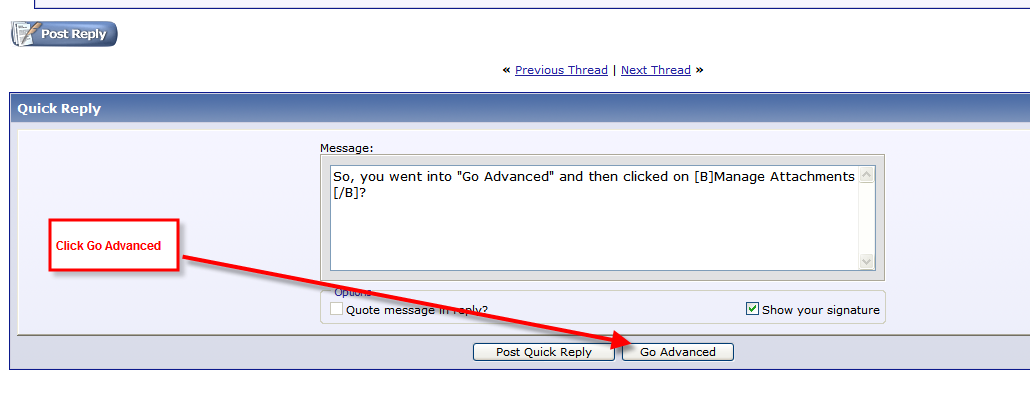
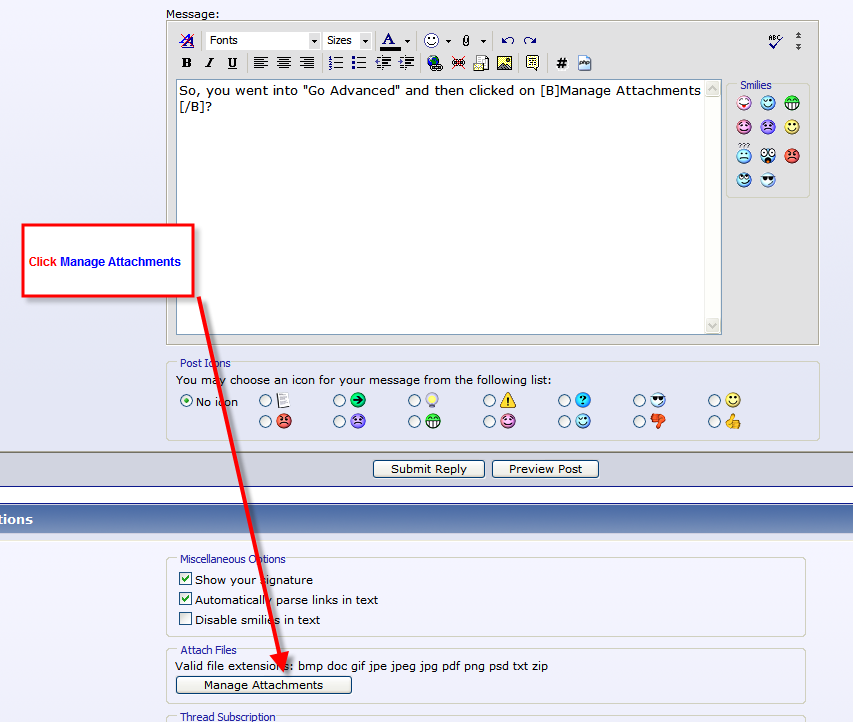
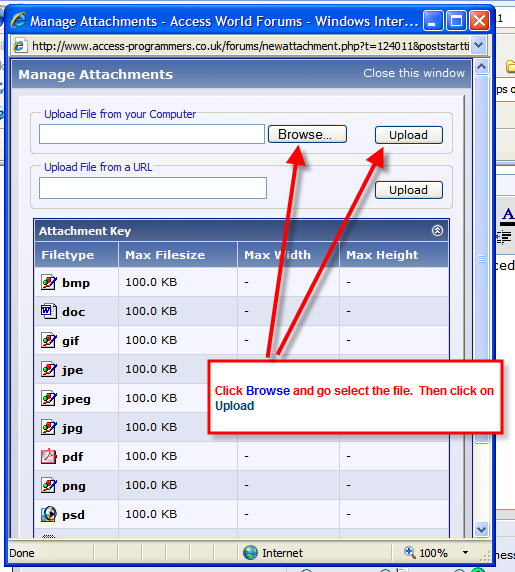
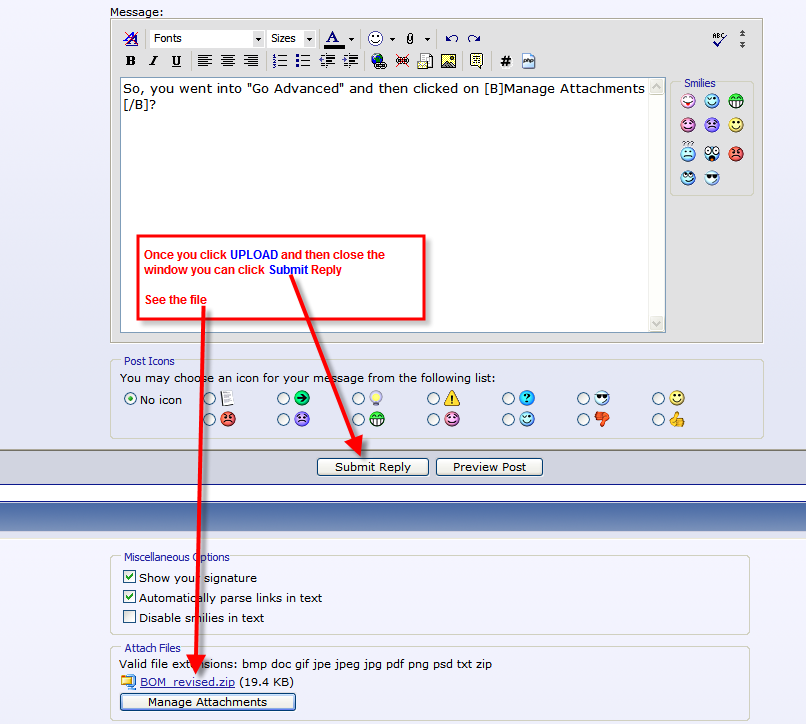
You can upload an mdb file if you ZIP it first. If you have Windows XP it has a feature where you can right-click on the file and send to compressed folder (same thing). If you don't and need a zip utility you can use UltimateZip for free (http://www.ultimatezip.com)

Similar threads


Users who are viewing this thread
Total: 1 (members: 0, guests: 1)