Error 2427 "You have entered an expression that has no value."

bulrush

Registered User.
Local time
Today, 08:49
Joined
Sep 1, 2009
Messages
209
A2003 on WinXP.

I have a report I run. In the PageHeaderSection_Format routine I do this:
Call CheckQuoteFields(Me!txtCommGrp)

But I get this error when that line tries to execute: "2427 You entered an expression that has no value." It is referring to Me!txtCommGrp. Doing "? Me!txtCommGrp" in the debugger gives me the same error.

Me!txtCommGroup is a text box in a group named GroupHdrComm. I opened the query the report is based on and the field CommGrp that is linked to txtCommGrp always has a value. So it's not like I'm getting a null value. I think txtCommGrp might be out of scope.

How do I fix this error?
 
If txtCommGroup is in the detail section then you would need to use the DETAIL'S On Format event instead. The page header isn't going to do it.
 
Last edited:
Based on the value in txtCommGrp, I need to hide columns, along with their column headers in the Page Header. So doing "Call CheckQuoteFields(Me!txtCommGrp)" in the PageHeaderSection_Format is actually what I need.

So I was wondering if I was addressing txtCommGroup incorrectly in PageHeaderSection_Format. Code with error is below.

Private Sub PageHeaderSection_Format(Cancel As Integer, FormatCount As Integer)

Call CheckQuoteFields(Me!txtCommGrp) ' Hide/display quote fields towards right of page. ERROR HERE.

End Sub
 
Based on the value in txtCommGrp, I need to hide columns, along with their column headers in the Page Header. So doing "Call CheckQuoteFields(Me!txtCommGrp)" in the PageHeaderSection_Format is actually what I need.

Have you tried using it in the details section? For one - you can't get a value if it isn't there yet. The On Format (and On Paint for the new Report View in 2007 and 2010) in the Details section is the only place (that I am aware of) to check a value for each record in a control that is in the details section in order to hide things.
 
...and you would be better of using Me!CommGrp, the field name instead of the control name.
 
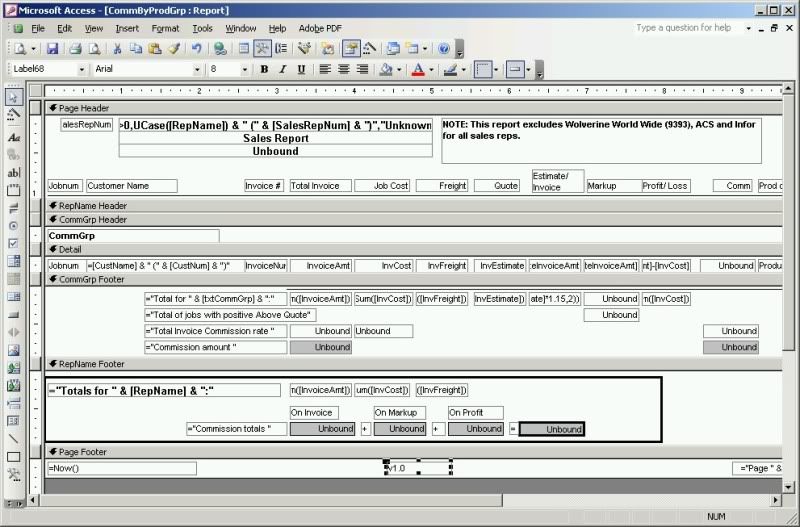
First, here is a pic of my report in design view.
salescomm1.jpg


This report calculates sales commissions for each sales rep (person).

A little explanation. "CommGrp" is a field in a query, it is a commission group. Not all column headers are displayed for each commission group, so I must hide both the text boxes in the detail level of the report and the column headers in the page header of the report. Thus, CheckQuoteFields checks to see if the commission group needs to show or hide the fields towards the right hand side of the report.

I moved
Call CheckQuoteFields(Me!CommGrp) ' Hide/display quote fields towards right of page. ERROR HERE.
to the GroupHdrComm_Format event (labeled "CommGrp Header" in the pic) and now use the field name instead of the control name: Me!CommGrp.

Now I get the error "2465: MS Office Access can't find the field 'CommGrp' referred to in your expression."

Is CommGrp simply not available at all in the GroupHdrComm_Format event? Does my call to Checkquotefields absolutely have to go in the Detail_Format event?

It seems to me that since CommGrp is a field defined in GroupHdrComm, that it should be available for formatting.

Thanks.

p.s. "GrouopHdrComm" is the name of the group object shown as "CommGrp Header" in the pic.
 
Last edited:
If you're doing it in the GroupHeader then you need to use the control name. But make sure it's not the same name as the field so call it something like txtCommGrp. Then you can use Me.txtCommGrp
 
First, here is a pic of my report in design view.
Does my call to Checkquotefields absolutely have to go in the Detail_Format event?
It needs to go in the on format event of whatever section the field is in. And like vbaInet said, on a report you need to ensure that your controls are not named the same as your fields if you want to use them in calculated controls or functions, etc.
 
Ok, using the period format like this: Me.txtCommGrp is actually incorrect. I checked the MS help file. I should be using an exclamation point to reference the text box control: Me!txtCommGrp.

Anyway, no matter what I use I still get an error. Anyone have any other ideas? I cannot post the db because it has confidential information.

EDIT:
Anywhere in the report I look at Me.txtCommGrp or Me.Controls!txtCommGrp I get the error "2427 You entered an expression that has no value." I thought the "Me" object was global to the report. Am I wrong?

What is going on here? It is critical that I fix this, or the application will not be usable.
 
Last edited:
Now I put code in my Report_Nodata event, to show a message if there is no data. It is showing that there is no data. Yet when I directly open the query the report is based on, I show 1100+ records. What is going on?

The query is modified by a form, then the filter of the report is changed, and the report is opened in preview mode. I wonder if my filter is causing zero records to be shown.

EDIT: Yep, my filter was removing all records, resulting in no records shown on the report preview. I adjusted my filter and now it's working. Who woulda thunk? :)

Thanks for your help.

As an afterthought, we should always put a message box in the Report_Nodata event.
 
Last edited:
Ok, using the period format like this: Me.txtCommGrp is actually incorrect. I checked the MS help file. I should be using an exclamation point to reference the text box control: Me!txtCommGrp.
So you're saying in my years of using Me. I have been referencing controls incorrectly? There's always a big discussion about Me. and Me! so I won't going into it. Perhaps you can provide us with an excerpt from that help file text?

Glad to know you found the culprit.
 
Ok, using the period format like this: Me.txtCommGrp is actually incorrect. I checked the MS help file. I should be using an exclamation point to reference the text box control: Me!txtCommGrp.
Debatable and I don't use the bang when referring to controls regardless of what anyone else says. I use the dot for intellisense.

I thought the "Me" object was global to the report. Am I wrong?
ME refers to the current class object, regardless of whether it is a report or a form, or a class module.
 

Users who are viewing this thread

Back
Top Bottom