
Solved Form ID value not update when created.

jgcns

New member
Local time
Today, 21:43
Joined
Dec 31, 2020
Messages
12
Good day to every One..

I must start to thank you all for this amazing content and know how that you share.

i have been creating a requisition form with multiple item choice. The problem started when I decided to create a button to delete records. I searched and i found some Recordset code that run in error when setting un edit mode.

Mean while i gave up on that code because i am not confident in my skills.

Now i have some problem to troubleshoot.. When I start to wright on the form the ID does not show up ( but it is created in the table) (yes i know that i could requery but that would just "macgyver" it ) . I actually not sure if the problem comes from "recordset " or not but i'm in a struggle now

I am also dealing with some MS Lists as you can see.

Thank you for your time
Best regards,

João Santos
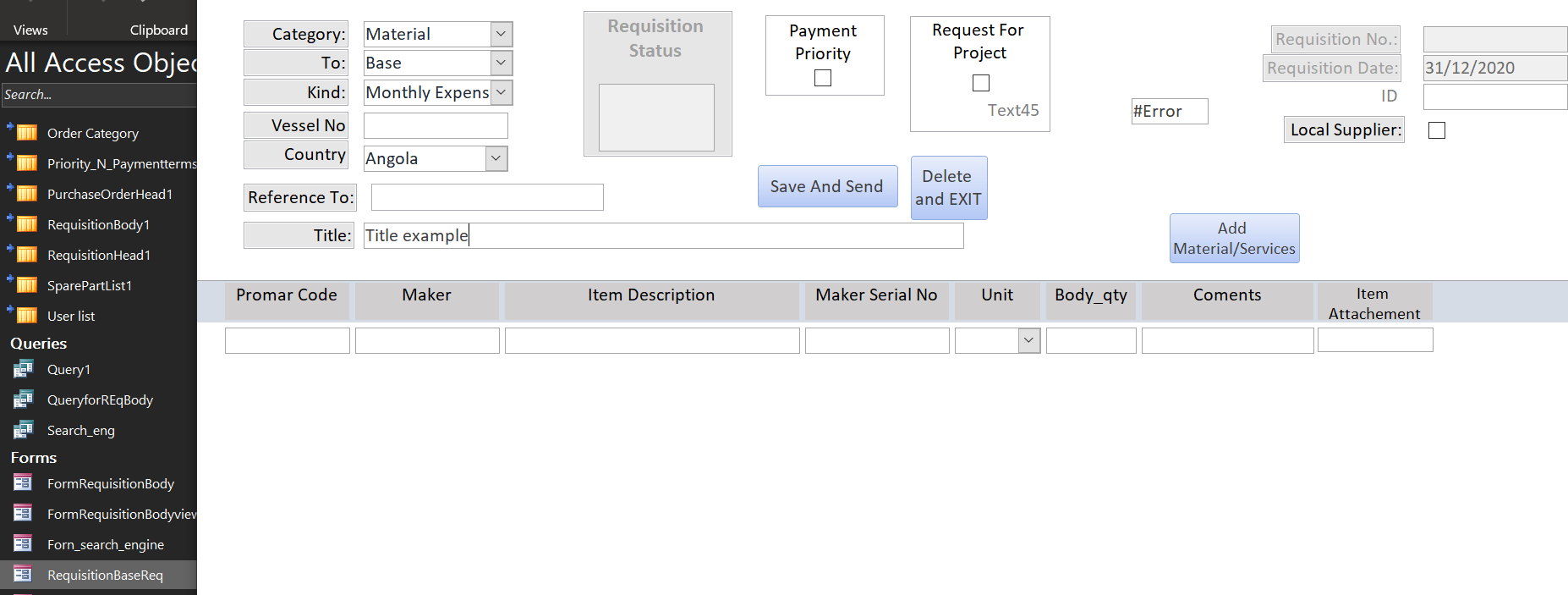
1609424738806.png
 
The only time I ever displayed the autonumber PK on any of my tables for my Navy databases was so that if someone wanted to report an issue, they could provide the PK number. But they understood the number was internal only and had nothing to do with any project number or security notice number. It was just "report this number if you are reporting an error.)
 
When the BE is Jet/ACE, Access generates the autonumber as soon as you dirty the record.
When the BE is ODBC, the identity column is not generated until you save the record (as Ranman mentioned). To see the ID, add a save button to the form so you can force the save without leaving the record. Or don't worry about it. The user shouldn't have to see the autonumber in any case so I rarely even show it to him. When I display it on forms, it is usually for my convenience.
Good Evening,

Thank you all for you quick reply.

Yes, it won't be displayed, just for a matter of troubleshoot, i inserted it...

I figured it out by myself until the part of access's autonumber creation. So I've already this code on the button "Add Material/Services":

Private Sub Add_Material__Services_Click()
DoCmd.Save acForm, "RequisitionBaseReq"
DoCmd.OpenForm "Forn_search_engine", whereCondition:="[ID]=" & Me.[ID], WindowMode:=acDialog, OpenArgs:=Me.[ID]
End Sub

This is actually the issue. When I click on this button, it seems that I don't save, and trigger a ERROR when running Cmd comand due to lack of [ID].

I have some code bellow that changes Dirty status of this form, do you think that's can be connected?

Best regards,

João Santos
 
DoCmd.Save acForm xxx is saving the form object, NOT data. You would never do this in an application since the users do not change the design of a form.

DoCmd.RunCommand acCmdSaveRecord saves the current record

If you are opening a popup form to enter "child" records, YOU MUST add code to populate the record's foreign key. Access only does this automatically for subforms where the Master/Child links are set correctly. You are not using a subform so Access has no way to do this for you.

PS, using "ID" as the name of all your primary keys is just confusing and poor practice. Give primary keys a name that relates to the table they are the PK for. It just makes things easier to see without always having to reference the Relationship Diagram.

So for tblStudents, use StudentID, for tblCustomer, use CustID. "ID" as a suffix in my databases always means an autonumber. Num and CD are used for other types of IDs. The foreign key keeps the same name as the PK it is pointing to so in tblRoster, RosterID is the pk and StudentID is the FK that points to tblStudents.

Good naming standards will save a lot of time and errors.
Good evening,

I have tried and works fine! For sure that I do not have good knowledge of Access.. but I'm on the right path. Thank you so much for these tips! i believe that i cannot change these ID anymore... too much code and links..:s

Do you have any idea for some way to delete these records? I have 2 tables one for headers and one for items. So it has to delete on line on one side and look for all lines one other table and delete.

Thank you!
 
Good day,

The option of enforce RI was inactive (grey) even when I deleted all records.. Is it possible to enforce it with ms Lists?

I don't know if it's posssible...

Ok you convinced me... i'll take some time to change all of it, thanks!

Thank you once again,

Best regards
 
I am very sorry for my ignorance! But i look for it and it called a lookup field on SP list. Very nice indeed! Thank to Pat Hartman, what an amazing tool you showed me.

Thanks once again!
 
Probably... but I did not found anything else when looking for enforcing RI and Allowing delete cascade ..
 
I am sorry but i do not understand clearly those technical terms. I am using Microsoft Share Point List as DB to my Project
 

Users who are viewing this thread

Back
Top Bottom