GoToRecord on a subform

petko

Registered User.
Local time
Today, 19:55
Joined
Jun 9, 2007
Messages
89
I'm trying to do the following:

I have a form, let's say Orders. I have a subform with the order articles, called OrdersSubform.

I'd like to go to a new record on the subform from a Visual Basic code and give a value to the new record.
While I can easily use the GoToRecord on single main forms I don't know how to target the subform at the ObjectType and ObjectName parameters.

Could you please help with some advice or example?

Thanks in advance

Peter
 
Here's some information that might help you get to the answer, as well as cement some knowledge about subforms:

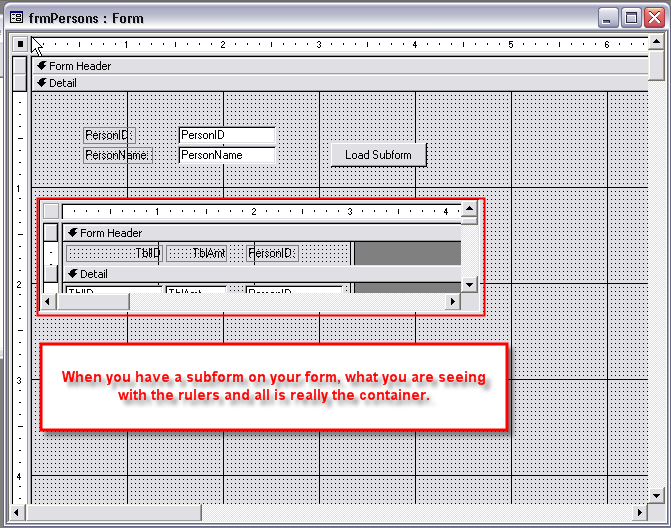
1. When you are dealing with subforms, you are actually dealing with two parts - the subform CONTAINER (that which houses the subform on the main form) and the subform itself.

2. The subform and subform container can be named the same, but are not necessarily so. You need to check before writing the code. If they are the same then it simplifies things but it doesn't really matter if it is, or isn't, because you just have to refer to the container.

3. When you are doing things like requerying the subform, you are not really requerying the container, as it doesn't have a requery method, but the subform itself does. So, when you are referring to a property, or method, on the actual subform (not the container), you need to have the subform container name and then .Form. between the container name and the method, or property, so Access knows you want to refer to the form's method or property and not the container's method or property.
 
What you wrote sounds logical but I need a practical double check...

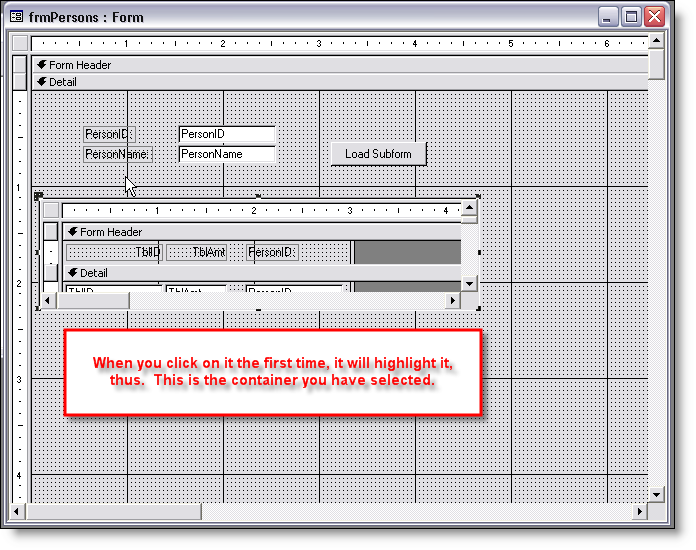
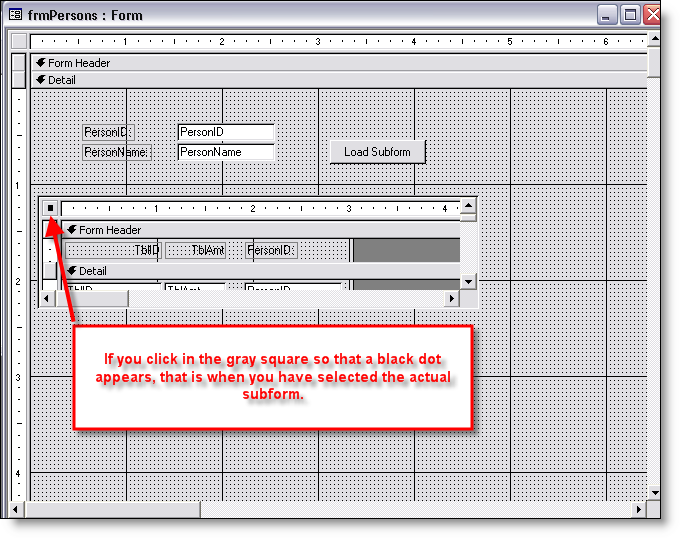
Where can I see this container? Do I give its name or it is generated somehow? I observed that when I click to a subform once in edit mode than I have different properties from the one I have after the second click. The property windos head is 'subform' at the first time and 'form' at the second time and offers different parameters. Is this what you mean?

It is a little hard to apply what you wrote into practice. What I'm trying to do is to carry out a GoToRecord action on a subform:

DoCmd.GoToRecord acDataForm, "OrderSubform", acNewRec

If I put the subform's name that it gives an error message saying it is not opened.
Probably I need that container's name you wrote about but I need to know where it is phisically.

thanks

Peter
 
Actually, here you go:

Me.YourSubformContainerNameHere.Form.Recordset.AddNew


sf01.png


sf02.png


sf03.png
 

Users who are viewing this thread

Back
Top Bottom