
have a report print from current record

Maclain

Registered User.
Local time
Today, 19:15
Joined
Sep 30, 2008
Messages
109
Hi everyone.

Please excuse my somewhat limited knowledge on this one!

We have quite a large split multi user database. It is utilised by a number of forms.

What I would like to do is create a report that outputs a page based on the details of a current record within a form. IE I would like a button on the form, lets say Print WIP and it run and print the report for the current record only.

I know how to create the query with the information, and build the report based on the query. My question is, how do I get the query to only pull the data from the current record?

Hope i've explained my problem properly, and would appreciate any answers in laymans terms!

TYVM :)
 
There are several way to achive this.

If your report uses a stored query as its recordsource then simply filter the query and open the report. Set a criteria and refrence your form and a control on that form you wish to filter on. ex in the criteria for CustomerID in the query:

Forms!MyForm!CustomerID

Another way is to use some code and apply the filter directly to the report.

Code:
Private Sub MyButton_Click()
Docmd.OpenReport "MyReport",,,"[CustomerID] =" & Me.CustomerID
End Sub

Hope this get you going.

JR
 
Thanks for the quick response!

Can I explain a little more in the hope of getting a more tailored answer?

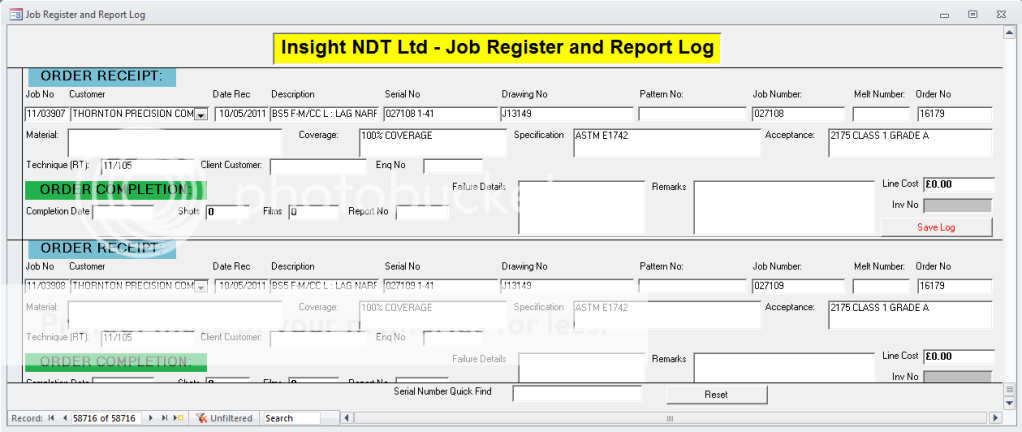
The form we use is shown here:

MAINFORM1.png


The data is built from two tables, a customers table and a Job register and report log table. Don't ask me why it's named that way, I have no idea.

We have serval customers that all have unique serial numbers. What I'm after is another button shown next to save log that would run the report, but select the record on which the button was pressed.

Perhaps i should make a start by creating a query with the info I want on the report. Then creat the report before looking at applying the filters?

TIA
 
Perhaps i should make a start by creating a query with the info I want on the report. Then create the report before looking at applying the filters?

Yes that will be a start.

It looks like you uniqe refrence would be [Job No]

So include this field in the query and in the criteria row put:

Forms![Job Register and Report Log]![Job No]

JR
 
If you are using a normal Select query to source the Report, you just need to set a Criteria on the Serial No field in the Query like

=[FormName]![SerialNumberFieldName]

This should limit the Query's output to the required record ...
 
Yes that will be a start.

It looks like you uniqe refrence would be [Job No]

So include this field in the query and in the criteria row put:

Forms![Job Register and Report Log]![Job No]

JR

Thanks a lot for this, I've finished off the query and report and everything works lovely.

I had to use the Job No as the unique reference as the serial no field can be duplicated many times i nthe same table.

So, problem solved, onto the next one!

Thanks a lot gents.
 

Users who are viewing this thread

Back
Top Bottom