Help with locking fields after update. Beginner.

shanecmc

New member
Local time
Today, 18:14
Joined
Apr 4, 2007
Messages
9
I have a simple database the is only used by 16 people. However, one of them keeps changing correct fields on me. I need to let the users create a new record and enter the data, and as soon as the data is entered in the field I would like to lock the field. I am a complete beginner when it comes to Access so any help would be greatly appreciated. Thanks.

Update: I guess I need to clarify that I do not want to lock all fields. There are a few fields that I would like the users to be able to update. So I need to lock some fields after data entry and all some fields to be changed at any time.
 
Last edited:
i think turning off the allow edits wil solve your problem, but i may be wrong
 
Rainman89. Do you know if there is a way to do this per field? I would still like some fields to be edited.
 
In the form's properties set

AllowEdits = NO

And then to allow edits in the form, put an edit button and set it to:

Me.AllowEdits = True

And then in the On Current event of the form, put
Me.AllowEdits = False

So that way when they move to the next record it will not allow edits again.
 
oops, missed the part about locking only a few fields.

In the tag property of the control you want locked put something like LF

Then, use:
Code:
Dim ctl As Control
   For Each ctl in Me.Controls
      If ctl.Tag = "LF" Then
         ctl.Locked = True
      End If
   Next ctl
You can put that on your AfterUpdate event, but then to set it for existing records, put it in the On Current event of the form, with one change:

Code:
Dim ctl As Control
If IsNull(Me.YourTextBoxNameHere) Or Me.YourTextBoxNameHere <> "" Then
   For Each ctl in Me.Controls
      If ctl.Tag = "LF" Then
         ctl.Locked = True
      End If
   Next ctl
End If

Change the part that says YourTextBoxNameHere to a control name of a field that is required on your form so that it wouldn't possibly be empty if there was an actual control. Then, this will lock the appropriate fields when you move between records, but if it is a new record it won't.
 
In the form's properties set

AllowEdits = NO

And then to allow edits in the form, put an edit button and set it to:

Me.AllowEdits = True

And then in the On Current event of the form, put
Me.AllowEdits = False

So that way when they move to the next record it will not allow edits again.

Will this allow me to lock specific fields all the time and only allow updates in other specific fields? Also, I'm not sure where the "On Current event" is located in the form. Sorry for the elementary question I just need a little clarification.
 
Will this allow me to lock specific fields all the time and only allow updates in other specific fields? Also, I'm not sure where the "On Current event" is located in the form. Sorry for the elementary question I just need a little clarification.

Check my post after that one as I tell you how to lock individual fields.

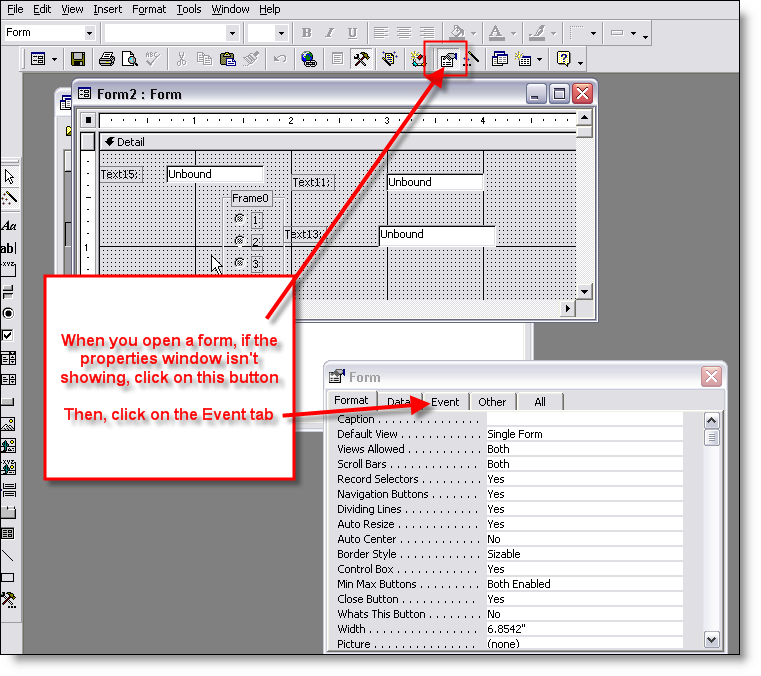
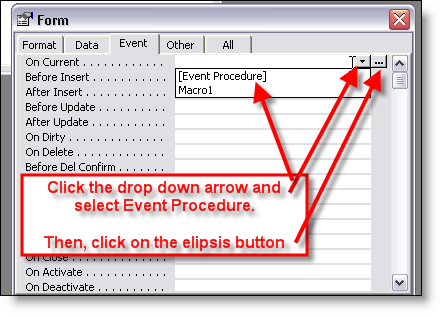
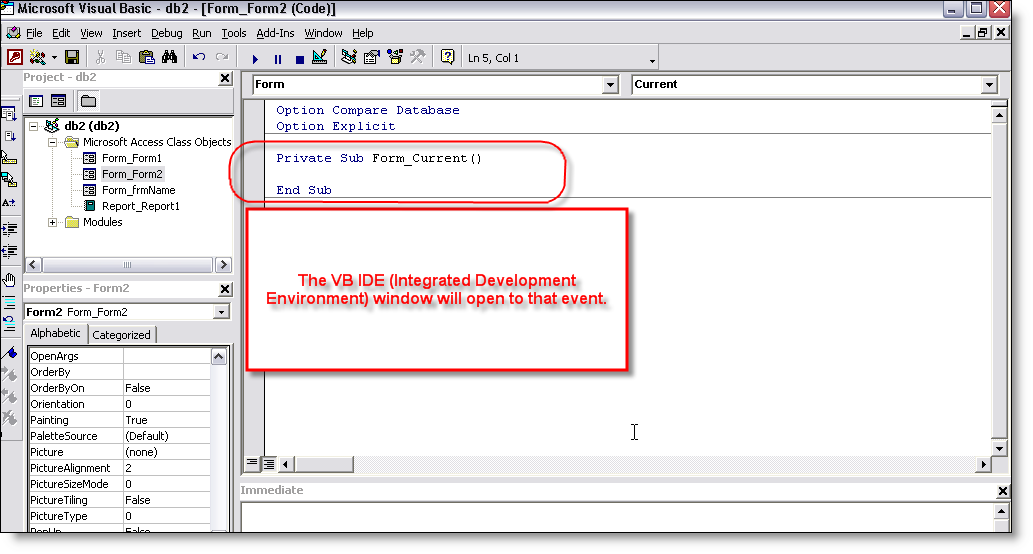
As for the events:

events01.png


events02.png


events03.png
 
OK. Thanks so much for your help. I do have one more question. Is there a way to lock every field on a form except one. Maybe by setting allow edits to "No" then placing some code on the one field that edits would be allowed?
 
You can "lock" the fields so they cant be edited.. that is also in the form properties
EDIT
sorry i meant the txt box properties

Side note. bob how do u embed the image?
 

Attachments

  • locked.jpg
    locked.jpg
    41.3 KB · Views: 186
Last edited:
Read again my second post (5th overall post) in the thread here. I showed you how to use the tag property to identify which controls you wanted locked and then you use that For each ctl code to go through each and lock/unlock them.
 
You can "lock" the fields so they cant be edited.. that is also in the form properties

My problem is that I need the users to be able enter all the data in each field of the form, then after it is entered, lock every field except one. This field (it is a check box field) won't be used for a while but when it is needed I need the users to be able check the box and then not be able to edit it again.
 
Then use bobs sample code. it will work. to that for all except your field that u need to change
 
Okay, I think that your problem is that the on current event is not fired you prob want the user to do something else... looking at the form :p . Kidding.

Now,

Couple of choices...
Take the code you have been told and:

1.Determine which one is the last box they are filling and in the OnExit event paste the code.

2. Add a Save button to your form and OnClick event do the same

3. For each control you have on the form, on it's OnExit event type: If Not IsNull(Me.ControlName) then Me.ControlName.Locked = True

4. I would advise to loop trough all the controls if you do not want to use the tag but gets more complicated as you have to determine which control have lock property etc...

Remember that the user will not see the code and you want to to something elegant so nothing is easy and don't be lazy...;)

Paul
 
Okay, I think that your problem is that the on current event is not fired you prob want the user to do something else... looking at the form :p . Kidding.

Now,

Couple of choices...
Take the code you have been told and:

1.Determine which one is the last box they are filling and in the OnExit event paste the code.
Not necessary - the code goes on the AfterUpdate event of the form AND in the On Current event. The AfterUpdate event of the form will fire after the record is saved and the On Current event will fire when moving from record to record.
 
yeah true, but seems that this is not happening as the record is saved only when you leave the curent record and move to the next or by dooing it programatically... the requierement seems to be to lock the controls automatically after the user has entered the data, so the user will stay on the form's current record and these events are not fired.

my 3rd option will doo it and also can change the color of it to be more obvious that is locked.
 
If they want to lock the controls after entering data in but before it is saved, it really doesn't make sense. But, if necessary to do it, then you would want to put the code into a Sub in a standard module and then modify it to pass the form name and control name and call it from each of the CONTROL's afterupdate events. Sounds suspicious to me, though. I think it would cause a big headache to do that because, that would also make it so if the user left the text box and had not typed it correctly, they would not be able to go back and make changes before saving the record.
 

Users who are viewing this thread

Back
Top Bottom