I have the time function on it, so when you first load the switchboard it shows the time it was loaded. Is there some way that I could have it update each minute or to reload so to speak? When I say clock, I mean a digital reading of the time, not a graphic clock.
This is really a waste of system resources, but if you absolutely MUST do it then you would set the form's Timer Interval to 1000 and then in the On Timer Event you would put:
"The expression on timer you entered as the event property setting produced the following error: The object doesn't contain the Automation object 'Me'."
I trie dit with the code builder and expression builder. I double checked the name of my textbox also.
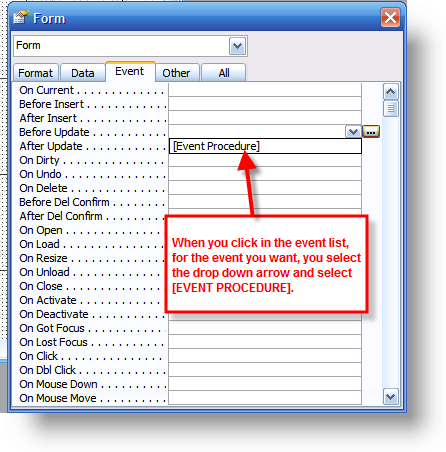
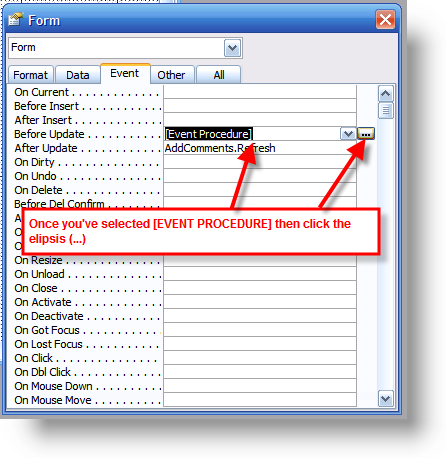
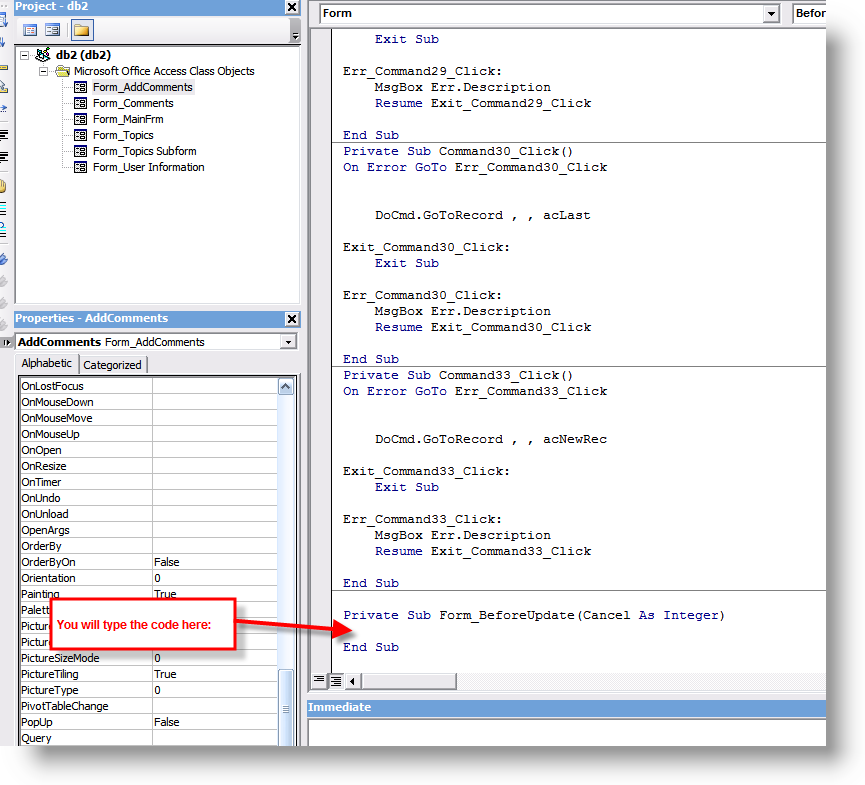
You put the code in the wrong place. The code goes in the VBA IDE window, not the properties of the form. Here's a few screenshots to show you how to get to where you want (remember this sample was built for someone else so it shows the Before Update event and you want the On Timer event, but the concept is the same:
Followed your directions, but when it opened the VBA window, it wasnt an on event sub, at least it did not look like one to me... the Sub (with my code added is below.
Code:
Private Sub Form_Timer()
    Me.Text70 = Format(Now, "hh:nn:ss")
End Sub
It gave me a different error this time.
Run-Tim error 'Buncha Numbers'
You can't assign a value to this object.
I again am assuming I need to change the name of the Sub, but what to exactly? VB has always entered that for me in my very little experience with it.
No, you don't change the name of the Timer - the name is correct. Is that text box an unbound text box? It should be, if it isn't and there should be nothing it it's Control Source property.
Awesome! That is what was wrong.... now I have an additional question or two.
It works, but it shows the time in the 24 hour clock (Ex. 23:34:34) and updates every second. Like you said, using system resources every second. I know how to fix the update every second part... by changing the timer from 1000 to 60000, and I already changed the code to exclude seconds.... BUT... when I went back to the properties window for the "NOW" unbound control... under the EVENTS tab it no longer had either of the timer options shown. I got to the code by opening the VBA window and editting the hh:nn:ss to hh:nn. How can I change the interval though now that the event isnt listed in the properties?
Also, is there a different variable for it to display a 12 hour time rather than the 24 hour one? I dont need the AM or PM, just the 11 instead of 23 for hours.
Awesome! That is what was wrong.... now I have an additional question or two.
It works, but it shows the time in the 24 hour clock (Ex. 23:34:34) and updates every second. Like you said, using system resources every second. I know how to fix the update every second part... by changing the timer from 1000 to 60000, and I already changed the code to exclude seconds.... BUT... when I went back to the properties window for the "NOW" unbound control... under the EVENTS tab it no longer had either of the timer options shown. I got to the code by opening the VBA window and editting the hh:nn:ss to hh:nn. How can I change the interval though now that the event isnt listed in the properties?
Also, is there a different variable for it to display a 12 hour time rather than the 24 hour one? I dont need the AM or PM, just the 11 instead of 23 for hours.
No problem, glad to assist! Oh, I might make mention that the VBA help file has some good info on the format function and how to do it for different data.
Hey Bob, one more quick question. I am using this DB that I did most the basic work on, but as I said my interface is using a switchboard with a form for it.
I have taken several VB classes in school so far, and know how to do enough to actually build a better form with VB, but the thing I dont know about is, would I have to do code detailing every form/report I have in my DB, or can I just call forms, reports, queries, macros and such using easy to learn one or two line commands?
The reason I ask this is that, this DB is used on a LOT of computers... and because I am using a switchboard, I am limited to using my Developer suite from 2001? I think, as it has the built in Run-Time builder. And I have to reinstall that run-time antime a computer problem causes a reinstall to be required. If I did the VB form myself, all Id have to do is have a link for users to download it internally on the network.
Now, I have some code that I have gotten help with, to do specific actions in my VBA, that call a form with only the record active, and stuff like that.
Would that type command work for opening forms that I created using Access, or would I have to rebuild all my forms and reports and such within the VB Program I built to replace my Switchboard?
(EDIT)
Thats confusing as hell!!!
What I mean is, I know hwo to create buttons and the click events on a form. It seems to me all the switchboard is is that. Is the actual VB commands to interact with Access forms and reports and such very confusing?
One example of a code to access a report that I have in my DB is:
Code:
Private Sub SINGLE292_Click()
On Error GoTo Err_SINGLE292_Click

'Save current record prior to button event handler
DoCmd.DoMenuItem acFormBar, acRecordsMenu, acSaveRecord, , acMenuVer70

'Event Handler
    Dim stDocName As String

    stDocName = "Special Housing Unit 292 Alpha Report"
    DoCmd.OpenReport stDocName, acPreview, , "Number = '" & Me.Number & "'"

Exit_SINGLE292_Click:
    Exit Sub

Err_SINGLE292_Click:
    MsgBox Err.Description
    Resume Exit_SINGLE292_Click

End Sub
I guess I'm a little confused. If you are in Access, you will build your forms, queries, reports, etc. within Access and then you can deploy it to run with the runtime, but you have to incorporate good error handling and custom menu/toolbars.
For multiple users you should have a frontend/backend setup with the data tables in the backend and a copy of the frontend on each user's machine.


 .
.