Hello,
I am trying to make some changes to a form in an Access database application designed by someone else. I am also learning Access as I go along.
The form I want to change has a subform that shows contacts for a company. The subform is populated by a query.
I've noticed that I can edit fields in the records that are shown on the subform. I can also add a record.
I also want to be able to delete a record. But if I select a record (by clicking
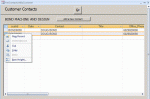
in the record selector column) and then right-click the context menu shows
that "Delete Record" is disabled. (Please see attached image.)
Is there a way to enable the deleting of records in the datasheet? Perhaps there's an option when running the query that allows the records in the resulting datasheet to be deleted?
Thank you.
I am trying to make some changes to a form in an Access database application designed by someone else. I am also learning Access as I go along.
The form I want to change has a subform that shows contacts for a company. The subform is populated by a query.
I've noticed that I can edit fields in the records that are shown on the subform. I can also add a record.
I also want to be able to delete a record. But if I select a record (by clicking
in the record selector column) and then right-click the context menu shows
that "Delete Record" is disabled. (Please see attached image.)
Is there a way to enable the deleting of records in the datasheet? Perhaps there's an option when running the query that allows the records in the resulting datasheet to be deleted?
Thank you.