
Is this possible

Demon2000

Registered User.
Local time
Today, 07:48
Joined
Aug 18, 2003
Messages
18
I have 3 tables RMA, Company and Product which have a replationship to join them.
Company.ID = RMA.Company
Product.ID = RMA.Product
I have a form which populates the RMA table, on which the Company Name is a lookup from the company table and Product is a lookup from the product table.

From the information inputted into the form I need to create a report that displays fields from the RMA table and the Address field from the
company table.

Question, The report I need to create is a delivery note so is there a way to show the Address from the company table by default but also be able to over type it if it needs to be different.

:confused: Have spent may hours trying to get this working :( Please help if you have any ideas. Thanks
 
Do you mean that delivery address needs to be added to the form before the report gathers its data and is opened?

The layout of the report is Invoice address at the top Left hand side and also the right hand side and its the right hand side address that needs to change to the Delivery address if different. It has been suggested that I enter code in the report detail as follows

Private Sub Detail_Format(Cancel As Integer, FormatCount As Integer)
If RMADelivery = "" Then
CompanyAddress.Visible = True
RMADelivery.Visible = False
Else
CompanyAddress.Visible = False
RMADelivery.Visible = True
End If
End Sub

But I get a runtime error saying Object required and in debugging it points to CompanyAddress.Visible = True
 
The record source is a query that returns the results from all three tables including Company.Address and RMA.Delivery which I why I cant understand it sayiing object required pointing to Company.Address.

I wonder if the code is running before the data has been pulled into the report, hence object required.

Really appreciate your help anyway
 
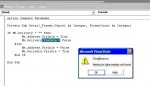
Ok we have got a bit further but now I get a complie error. See Attachment.

Am I right in thinking that you dont need to specify the table in the code i.e.

Me.CompanyAddress.Visible = False

or

Me.Address.Visible = False

Company referes to the table and it seemed to like the code without specifying the table.

But why the compile error?
 
Doesent look like the file attached to last post so I'll try again
 

Attachments

  • e.jpg
    e.jpg
    33 KB · Views: 124
Check your preferences you need to add microsoft DAO 3.6. Let me know.

mr moe.
 
If Me.Delivery = "" Then
Me.Address2.Visible = True
Me.Company2.Visible = True
Me.Delivery = False
Else
Me.Delivery.Visible = True
Me.Address2.Visible = False
Me.Company2.Visible = False
End If

Hallaluya this code seemed to work at least it dosent throw errors. The Only thing now is that at the top of the delivery note the company address should appear side by side, exactly the same field unless the delivery address has been entered then this will appear on the right hand side.

The delivery address appears fine if theres one entered but if not nothing appears on the right hand side (in this case it should be the company address.

This would indicate that the "Then" statement in the code doesent work but why as there are no errors.

grrrrr its one thing after the other
 
Ive tried to specify every change in displaying fields with the following code

If Me.Delivery = "" Then
Me.Address2.Visible = True
Me.Company2.Visible = True
Me.Delivery.Visible = False
Me.Address1.Visible = True
Me.Company1.Visible = True
Else
Me.Delivery.Visible = True
Me.Address2.Visible = False
Me.Company2.Visible = False
Me.Address1.Visible = True
Me.Company1.Visible = True
End If

No errors but wether Delivery is there or not Company2 and Address2 never appear in the report.

Is there something wrong with the code that Im missing?:confused:
 
And this one?
Code:
If Nz(Me!Delivery,"") = "" Then 
  Me.Address2.Visible = True 
  Me.Company2.Visible = True 
  Me.Delivery.Visible = False 
  Me.Address1.Visible = True 
  Me.Company1.Visible = True 
Else 
  Me.Delivery.Visible = True 
  Me.Address2.Visible = False 
  Me.Company2.Visible = False 
  Me.Address1.Visible = True 
  Me.Company1.Visible = True 
End If
good luck,
Bert
 
:)

Wow that is brilliant it seems to have worked a treat

Cheers Mate

I will play around with the layout tomorrow and hope it will put this complicated report to bed.

Im off to bed now.

Thanks again to everyone who has given me help

:rolleyes:
 

Users who are viewing this thread

Back
Top Bottom