

wiklendt
i recommend chocolate
- Local time
- Tomorrow, 03:28
- Joined
- Mar 10, 2008
- Messages
- 1,746
keypress - "T" for 'today' in a date field and "N" for 'now' in time field
hey,
i want to make data entry more user friendly in my date and time fields. i want to create 'shortcut keys' to automatically add today's current date or the current time (depending on which field the user is in).
so i know access 2007 has a built-in calendar for date fields and there is a 'today' button on that pop-up calendar BUT i am maintaining a few databases that are being used in previous versions of access and so must WORK in previous versions of access.
i've tried a few things (see below) but my current code (in the control's "key down" event) looks like this:
this has limited success. when i press "t", the current value is removed and "t" appears in the field rather than the current date. this of course triggers the 'value invalid' error as it's a date field.
any ideas? most of the posts on the forum relate to 'system' keys (like ENTER or SHIFT or CTRL or ALT) or complex combinations. i just want a regular letter to trigger an addition or update of data in a field. in the posts i've found with 'basic' keys capture like mine don't seem to have these errors mentioned...?
access help was unhelpful, of course. i think i may be having issues because i'm wanting to put a DATE into a DATE field using a TEXT key...?
of course, the fields must work to allow the user to add dates/times other than the current date/time. so, will this code (once i get it working) prevent the other keys from making any effect on the value?
appendix
i have tried these codes (on the control's keypress event) without success:
i have also tried with and without KeyPreview = Yes in the form properties.
but upon testing greeted with either these three scenarios:
1) the error message pictured below
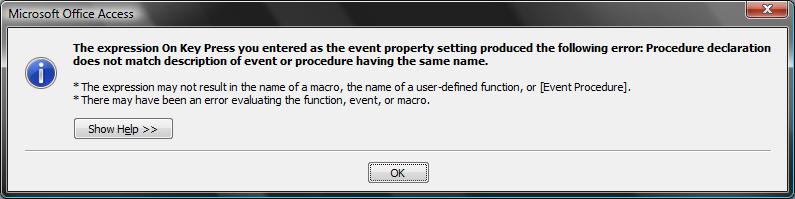
2) "Compile error: End If without block If"
3) no error message, no desired effect in field BUT it does allow "n" to appear in the field, which of course triggers a "value entered isn't valid for this field" error as it's a date/time field.
hey,
i want to make data entry more user friendly in my date and time fields. i want to create 'shortcut keys' to automatically add today's current date or the current time (depending on which field the user is in).
so i know access 2007 has a built-in calendar for date fields and there is a 'today' button on that pop-up calendar BUT i am maintaining a few databases that are being used in previous versions of access and so must WORK in previous versions of access.
i've tried a few things (see below) but my current code (in the control's "key down" event) looks like this:
Code:
Dim strToday As Date

strToday = Date

Select Case KeyCode
Case vbKeyT 'also tried (vbKeyN, 78) & (vbKeyT, 84) with KeyCode
    Me.txtPriceDate.Value = strToday
End Selectany ideas? most of the posts on the forum relate to 'system' keys (like ENTER or SHIFT or CTRL or ALT) or complex combinations. i just want a regular letter to trigger an addition or update of data in a field. in the posts i've found with 'basic' keys capture like mine don't seem to have these errors mentioned...?
access help was unhelpful, of course. i think i may be having issues because i'm wanting to put a DATE into a DATE field using a TEXT key...?
of course, the fields must work to allow the user to add dates/times other than the current date/time. so, will this code (once i get it working) prevent the other keys from making any effect on the value?
appendix
i have tried these codes (on the control's keypress event) without success:
Code:
Private Sub txtPriceDate_KeyPress(KeyAscii As Integer) 'also tried KeyCode as Integer

Select Case KeyAscii
Case 78 'also tried vbKeyN & KeyCode
    Me.txtPriceDate.Value = Date
End Select

End Sub
Code:
Private Sub txtPriceDate_KeyPress(KeyAscii As Integer) 'also tried KeyCode as Integer

If KeyAscii = 78 Then 'also tried vbKeyN & KeyCode
    Me.txtPriceDate.Value = Date
Else
End If

End Subbut upon testing greeted with either these three scenarios:
1) the error message pictured below
2) "Compile error: End If without block If"
3) no error message, no desired effect in field BUT it does allow "n" to appear in the field, which of course triggers a "value entered isn't valid for this field" error as it's a date/time field.


 nice work. i notice the ampersand in the caption is actually the letter that combines with ALT to trigger the command button - very clever!


