Lookups between two tables connected with my SPL

sajarac

Registered User.
Local time
Yesterday, 21:56
Joined
Aug 18, 2015
Messages
126
Hello community. I was wondering if this is possible to do it?

I have an scenario where I get an excel file each month. Every month the file has some updates or change values in some columns. So I need a mirror file where I can keep a copy of the rows plus some information entered by the end users.
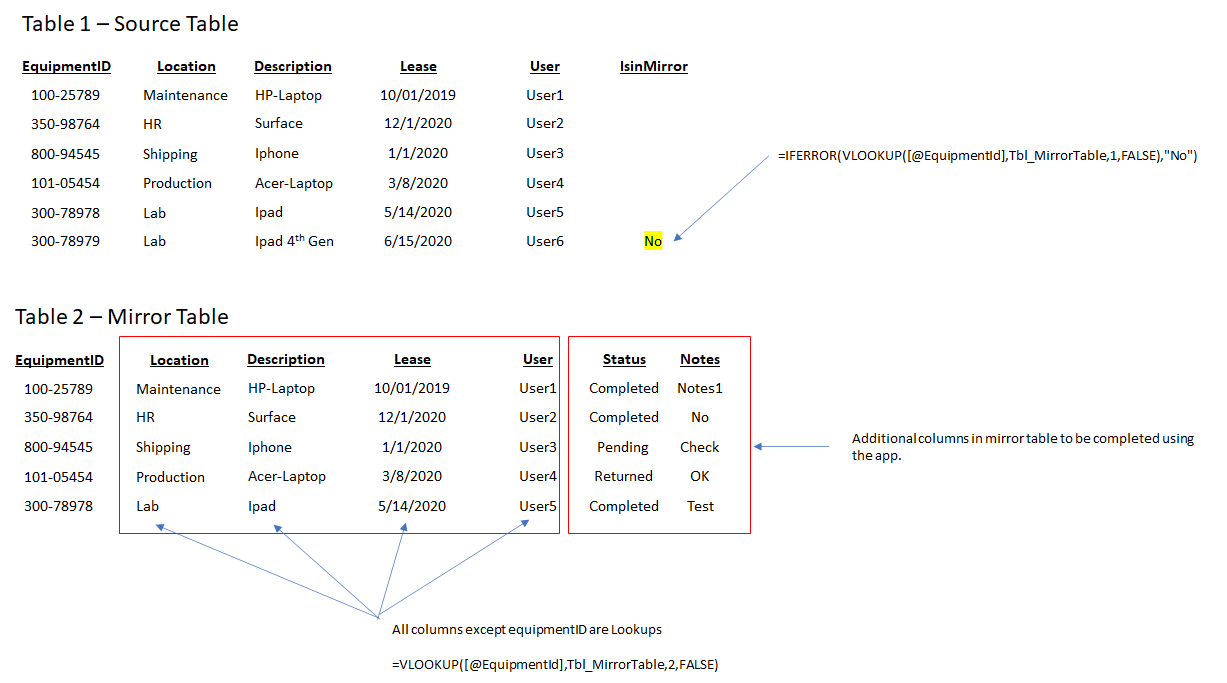
I have this working in an excel file file with the primary table "Table 1 Source" and a secondary table "Table 2 Mirror" with some lookups and is working fine. My question is:
Is possible to have the same formulas in two tables connected with my Share Point list? what I mean or trying to do it is: If I have my Sharepoint list in my access file and I copy / paste the source file in the first table the lookups will work?

If so, how can I do this?

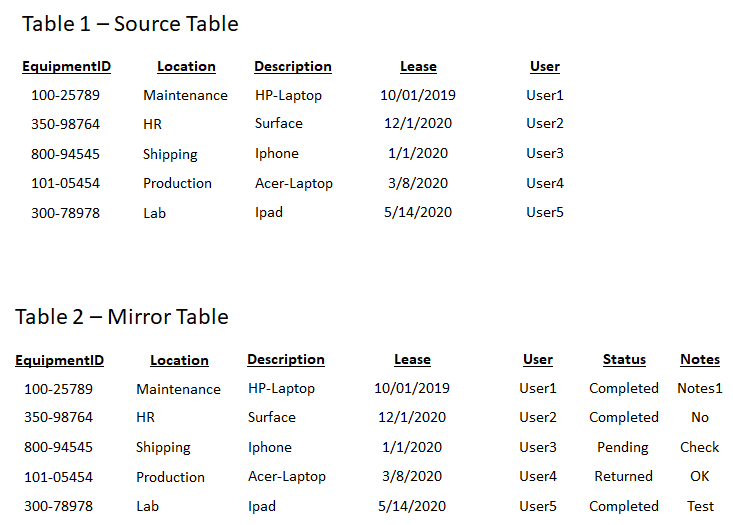
Below are some samples on how the data is:
1628690930418.png


1628690956632.png


Thanks in advance for someone who can point me in the right direction.

Regards,
 
Hi, thank you very much for your prompt response. Let me try to explain better all this messy scenario and please apologize for the mess.
The data came from a Azure Active Directory exported as csv file. The data change frequently but for many reasons I can not get a direct connection with that report. That is why somebody is downloading the file each month as a csv.

Now, I am building a PowerApp. Ideally the powerapp should be connected to that Azure Active Directory report. But it is not possible.

With the data another user needs to add more columns or more fields. that information is not possible to send it back to Azure. That is why we need to create a mirror report.

My initial thought was to have two excel tables :
First table is the report that came from Azure.
The second table is a mirror with exactly the same columns plus the additional columns required. I am connecting my powerapp to this table.

The process that I am doing in this moment is: Once I copy/paste the azure report in the first table the last column "IsinMirror" will tell me if the record exist in the mirror table. If the record is not in the mirror app then I manually copy/paste that Equipment ID into the mirror table.

Now because I have in my mirror app all of the columns set as lookups. the values will be updated with the new values from my azure report.

In this way I have the report with the latest updates plus I can add new information to my records such as "Status", "Notes" etc.

The problem that I have is: Excel is not a reliable datasource for my power apps. Excel is poor in terms of performance and I have most of the time delegation issues and limitations.

That is why I was thinking of change this to a Share point list. I mean put the two excel tables into a share point list and create the lookups. etc.
The problem is: Share point is a point for the lookups. I can not do it in the same way that is done in excel.

Finally after al this problem. I thought that if in my MS Access file I get the external data form online services from my Share point list and create the connection with my two lists. then I can add the columns required and create the lookups that I need it. After that I can just copy paste the new values from my azure report. Refresh and done.

Now in my powerapps I can replace my excel datasource for a share point list and problem solve.

Make sense? Sorry if still not clear.

Thanks again.

Regards.
 
Would you mind to explain me like a baby steps? Sorry I am good in power apps but very limited with MS Access.
 
Thank you very much for your patience and help. I will follow your instructions and if I get stuck I will come back.
Best Regards.
 

Users who are viewing this thread

Back
Top Bottom