
Ms Access Form displaying 2 or more unrelated tables

Local time
Yesterday, 19:47
Joined
Oct 7, 2016
Messages
43
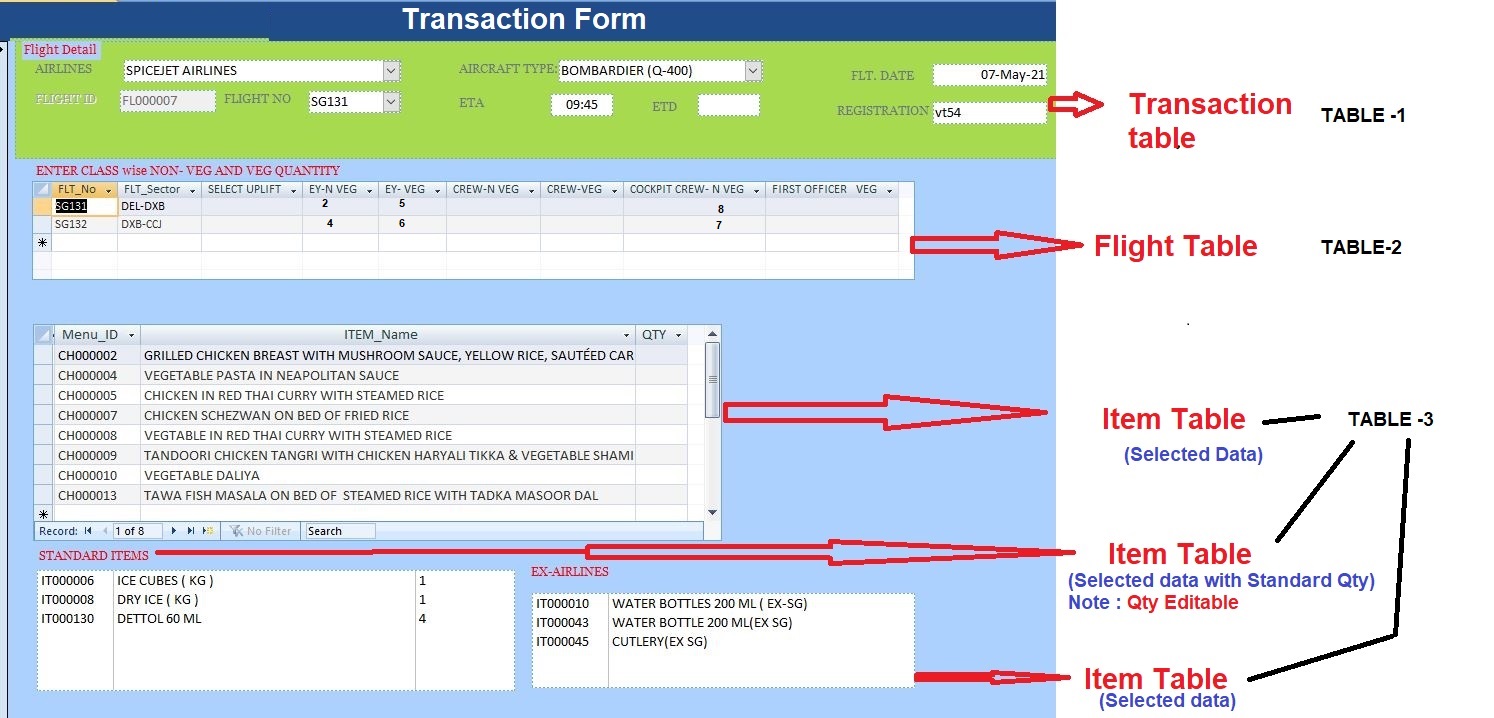
Query 1 : In Ms Access, I Wish to Create transaction Form linked with Multiple unrelated tables (Transaction Table, Flight Master, Item Master). Snapshot attached
Query 2 : Item Master Table Master Item change dynamic and data entered against it thus it should be in Grid Format/ Sub Form

Kindly suggest , How to create the above.


Trns_table.JPG


How to create it.
 
Please find below the requisite details :

Transaction (Table-1)
We are in trying to enter Delivery order(Transaction Form) for In-Flight Catering Services Project, wherein Delivery Order is fed for Meal Order received from SpiceJet Airlines for Specific flight e.g. Flight No. SG131.


Flight Meal Master(Table-2) :

This Table takes the count of Economy Class Non-Veg (EY-N VEG) and EY-VEG Meals like that Crew Meals and Cockpit Crew Meals (N VEG/VEG).


Item Master(Table-3), Category wise data input : i.e Menu's Qty ,Standard Item's Qty and Ex Airlines Item's Qty.

From this table we are feeding our inputs against the items mentioned in the already Dynamic Fed Menu (Menu IDs’e.g. :CH00002, CH0004 Etc). This should save only the menu items against which the quantity is fed in transaction table. And the same should be applied for the Item Master(Table-Standard Items) & Item Master-(Ex Airlines) also.

Query1: How to create Transaction Form( Need to enter data from table1, Table-2 and Table-3),
Flight Meal Master(Table-2) and Table1: Transaction and are related with One to Many Relationship,
but Item Master it not related with any of the above mentioned tables

Query2: Marked in RED
 
Last edited:
you need to Add Master/Child Link Fields to each subform.
 

Users who are viewing this thread

Back
Top Bottom