Hi gang.
This may be 101 to many but my skill set doesnt exactly relate to Db design so need some help from the professionals.
Ive been tasked with creating an Access 2010 Db which contains a listing of all employees in our corporation - detailing HR & IT information per employee.
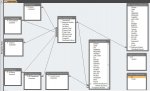
See attached snapshot of relationships.
To ensure data entry uniformity, I included 6 lookup tables (W, X, 2Y, 2Z) with drop down menu's. The data entry clerk will be entering data into 3 tables (A, B, C). The remaining 2 ticket tables may not be used so for now please ignore.
Table 'B' & 'C' connect to Table 'A' in an 1:1 relationship.
Referential Integrity is being enforced w/ cascade updates/deletes for both relationships.
Therefore, I realize these 3 tables could be combined into one but each deals with different subject matter so decided to separate.
When this goes into production, there will be no need to enter 2+ records in table 'B' or 'C' per employee so a 1:1 would seem to work fine.
QUESTION - Is there a better way to link these 3 tables together or should I just combine them into 1?
What leads me to ask that question is ...
2 problems crop up when testing a designed form:
1>
To this single form, Im adding objects bound to table 'A', 'B', and 'C'. I was hoping to use one form to add/modify/remove records in three tables.
In the form, if I create a record and only input data into the objects bound to table 'A' ... its ok, record saves.
If I input data into objects bound to table 'A' and either/both of the other 2 tables, I get an error "Index or PK cannot be a Null value".
Ok - I get that the PK in tables 'B' and 'C' is still null because I didnt create a bound object in form to the PK's in those two tables (ie ... I dont want the clerk to have to enter employee number three times, once per table).
Is there a way to replicate the value put into the PK in table 'A' by the clerk over to PK's in table 'B' & 'C' anytime BEFORE the clerk saves the record in the form?
Note: This question is irrelavant if there is a better way to relationship 'A', 'B', and 'C' together.
and 2>
The only way to begin with that I could enable record entry into the bound objects to table 'C' was to change the form property 'RecordSet Type' from Dynaset to Dynaset (Inconsistent Updates).
I just dont like the sound of that.
Many thanks ahead of time
This may be 101 to many but my skill set doesnt exactly relate to Db design so need some help from the professionals.
Ive been tasked with creating an Access 2010 Db which contains a listing of all employees in our corporation - detailing HR & IT information per employee.
See attached snapshot of relationships.
To ensure data entry uniformity, I included 6 lookup tables (W, X, 2Y, 2Z) with drop down menu's. The data entry clerk will be entering data into 3 tables (A, B, C). The remaining 2 ticket tables may not be used so for now please ignore.
Table 'B' & 'C' connect to Table 'A' in an 1:1 relationship.
Referential Integrity is being enforced w/ cascade updates/deletes for both relationships.
Therefore, I realize these 3 tables could be combined into one but each deals with different subject matter so decided to separate.
When this goes into production, there will be no need to enter 2+ records in table 'B' or 'C' per employee so a 1:1 would seem to work fine.
QUESTION - Is there a better way to link these 3 tables together or should I just combine them into 1?
What leads me to ask that question is ...
2 problems crop up when testing a designed form:
1>
To this single form, Im adding objects bound to table 'A', 'B', and 'C'. I was hoping to use one form to add/modify/remove records in three tables.
In the form, if I create a record and only input data into the objects bound to table 'A' ... its ok, record saves.
If I input data into objects bound to table 'A' and either/both of the other 2 tables, I get an error "Index or PK cannot be a Null value".
Ok - I get that the PK in tables 'B' and 'C' is still null because I didnt create a bound object in form to the PK's in those two tables (ie ... I dont want the clerk to have to enter employee number three times, once per table).
Is there a way to replicate the value put into the PK in table 'A' by the clerk over to PK's in table 'B' & 'C' anytime BEFORE the clerk saves the record in the form?
Note: This question is irrelavant if there is a better way to relationship 'A', 'B', and 'C' together.
and 2>
The only way to begin with that I could enable record entry into the bound objects to table 'C' was to change the form property 'RecordSet Type' from Dynaset to Dynaset (Inconsistent Updates).
I just dont like the sound of that.
Many thanks ahead of time