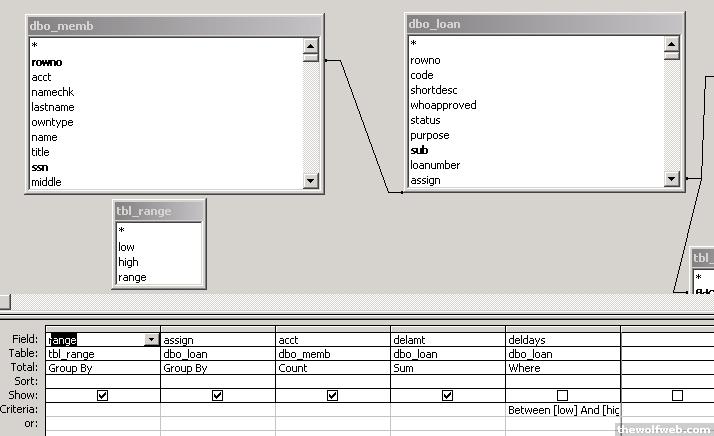
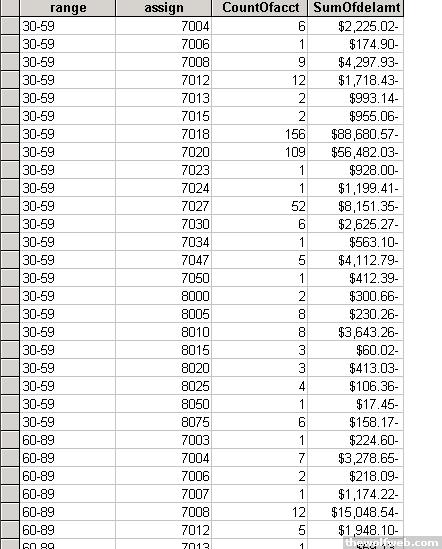
ok,
Ive got a query that returns around 6000 entries. The info is basically items that are checked out from us. Each item is given a number, such as 7000 and a worth. what I want is a report on this query that lists on the left side each type of item, and then details about the number of that certain item that have been out for a certain period of time. basically outlined like this:
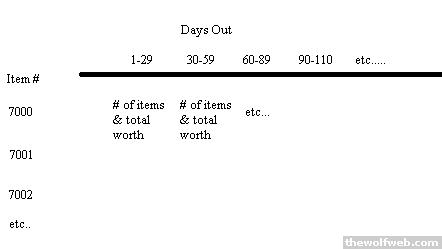
does anyone know how i could achieve this? do i need a really long IF statement? I need some sort of logic that will allow me to group the days something has been out into 1-29, 30-59, etc in a crosstab query or some other way in a report.
Ive got a query that returns around 6000 entries. The info is basically items that are checked out from us. Each item is given a number, such as 7000 and a worth. what I want is a report on this query that lists on the left side each type of item, and then details about the number of that certain item that have been out for a certain period of time. basically outlined like this:
does anyone know how i could achieve this? do i need a really long IF statement? I need some sort of logic that will allow me to group the days something has been out into 1-29, 30-59, etc in a crosstab query or some other way in a report.