Open subform to specific records based of off input from combo boxes

You're looking at the wrong version. Clear your downloads folder and re-download the one in my post.
 
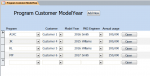
I redownloaded the db you posted and I've attached a screen shot of the form, it's still the same. I'm not sure what I'm missing? :confused:
 

Attachments

  • Screenshot-Mockup.PNG
    Screenshot-Mockup.PNG
    28.1 KB · Views: 151
Click the Open button.
 
OH!!! I see know. When you click the Open button the form it opens is filtered to that lines criteria. I understand know. But that was how it was set up to begin with. What I was trying to do was to filter the records on that first form. bc there are eventually going to be hundreds of records that you can open and I would like to give the user the ability to filter them to get to the ones he/she is working on. If you look at the latest db I posted you'll see that I added combo boxes at the top of the form so you can filter the records on the first form. But that's where I'm having problems. I can't get the Program filter to work properly. The Customer and PKG Engineer seem to be working.
 
Alright, the way you explained your OP gave the impression that you want to open another form that had a subform and base it on the records of the subform in the opening form.

Did Allen Browne's code not work? Now because you have these lookup fields strewn all over the place, and you're not consistent in which Program field to use (i.e. ID or Texrt part) your filter may not work. You need to sort out the lookups part and keep things consistent.

 
Alright, the way you explained your OP gave the impression that you want to open another form that had a subform and base it on the records of the subform in the opening form.
I know, sorry for the confusion. This has been a long and windy thread.

Did Allen Browne's code not work? Now because you have these lookup fields strewn all over the place, and you're not consistent in which Program field to use (i.e. ID or Texrt part) your filter may not work. You need to sort out the lookups part and keep things consistent.
I'm sure the code works (and I have properly given credit:)). I guess, like you said, I just need to sort out which Program field it looks for and figure out if my Row Sources are correct, then it should work like it was designed.
 
I know, sorry for the confusion. This has been a long and windy thread.
It normally doesn't take this long for a trivial question such as this.

...(and I have properly given credit:))...
Great! :D

I guess, like you said, I just need to sort out which Program field it looks for and figure out if my Row Sources are correct, then it should work like it was designed.
Yes, sort that out, and use the ID to filter the form. Always remember the ID and the Text value come as a pair in Combo boxes where the hidden value is the numeric ID that should be saved to the table.

Any concerns or questions, let us know.
 
I finally got it to work!
Yes, I need to clean up the db, sort things out.
Thank you vbaInet for your help in guiding me throught this.
 

Users who are viewing this thread

Back
Top Bottom