Parameter Value Problem

jgamlin777

New member
Local time
Today, 19:16
Joined
Feb 1, 2008
Messages
3
Hi. I am currently working on a project using Access. I have set up a query form which is accessed by entering a parameter value (Forename of a record) which displays Forename and its various information regarding it. I then want to jump to another query form, however i do not want to enter in the same parameter value again to get different information on the record. How can I make my system automatically jump to the record i desire based on the parameter value i entered at the start. Most of my system is based on macros and i have trying to make it work with Name Filter etc, but i cant get it working. I would appreciate any help on this matter. Thank you
 
jgamlin777,

I may not understand exactly what you're trying to do but whenever you open a form using the button wizard it will ask you what field you want to use to open the form, if you want to call the other form without pressing a button then copy and paste the code from the button click event and add it to another event, i.e. the form load event, this will trigger the other form to open automatically when the first form is opened.

I hope this is what you meant!

Gadjet
 
Im sorry i dont think i worded my problem correctly, that is my fault.
I hope this will make it clear what im having trouble with:

1.jpg


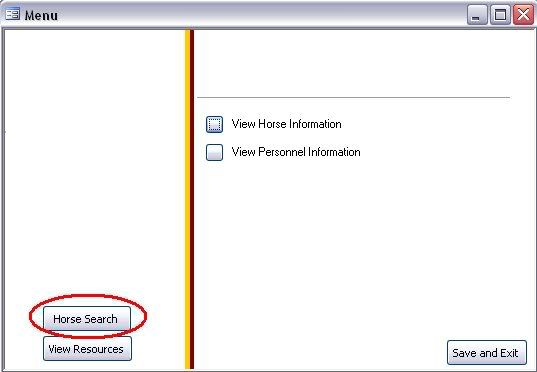
This is my system, it is a small project i am doing for a friend and is a little bit blank at the moment. After clicking on "horse search"...

4.jpg


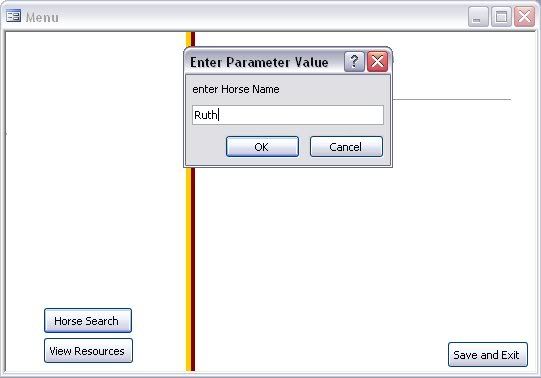
A parameter value is required in the search which is normal and expected as i need this so that the end user can enter in the horse name such as ruth, then some data on this horse is displayed.

3.jpg


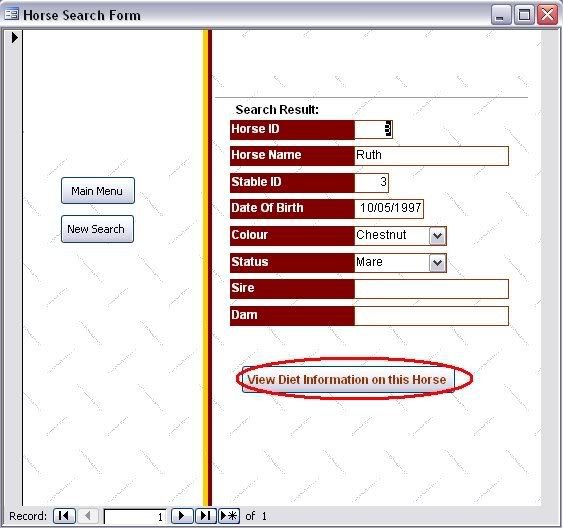
Now this is where the problem starts, i want to access a similar form to this that has the same field (Horse Name), but gives different data about the horse that is being searched (Parameter Value). I could do it so that i have to enter the horse's name again when prompted for a Parameter Value but i would like it so that when the other form is opened it goes straight to the horse that was searched in the first parameter value. I hope this makes my problem alot clearer. Thank you again.
 
When you added the button the wizard should have asked you what you wanted to do and you then select Frm_dietInfo or whatever you called the form then it would ask you if you want to display specific data or all data, if you select specific data then you get a dialog that asks you to select the field to match. Here you should select the fiel "horses name" fron your open form and link it to horses name field on your diet form.

This should then open your diet information for the horse you originally entered into your parameter.

You may not get the wizard if the diet form doesn't exist yet and of course you should have a field on the diet form containing the horses name.

I hope that makes sense
 
Query Parameter Problem

You are using the Query Paramater Option. Every time you access the Query it will ask for the parameter value.

Try this alternative method. Create a Text Box above the Command Buttons on the left side of the screen. Change its name property to qryParam. Open the form in Normal View and keep it minimized. Open the Query in Design View. Right-Click on the criteria cell and click the Build ... button. When the dialog control opens, select Forms-> loaded forms and click on your form's name. At the right side you will see the text box's name qryparam. Click on it and click the paste button above. The reference to the text box will be pasted on the window above. Click OK to come back to the Query Criteria cell with the qryparam reference on the form. Don't forget to remove the Query Parameter you have defined.

On the Command Button's on-click event add a line Me.requery, before opening the Form with the details,to refresh the Main Form after you enter the Horse's Name on the text box.

Both Forms you will be able to open without the parameter prompt from the Query.

a.p.r. pillai
http://www.msaccesstips.com
 
Thank you very much to apr pillai for your concern to my problem, but thank you Gadjet as follwing your advice fixed my problem, and now my linked search works properly, im not sdaying that apr pillai's method didnt work. I didnt try it to be honest as Gadjet's was posted first i tried that first. but thank you both for your help. Much appreciated.
 
Thank you very much to apr pillai for your concern to my problem, but thank you Gadjet as follwing your advice fixed my problem, and now my linked search works properly, im not sdaying that apr pillai's method didnt work. I didnt try it to be honest as Gadjet's was posted first i tried that first. but thank you both for your help. Much appreciated.

You're very welcome.
 

Users who are viewing this thread

Back
Top Bottom