Populate four tables from one entry

Angel1974

Registered User.
Local time
Today, 13:47
Joined
Jan 1, 2009
Messages
16
I have a database which relies heavily on a scanned item number (non repeating and NOT a primary key) which needs to be entered into 4 tables, to save time I was wondering if it can be entered into the main table and autopopulated into the remaining three tables?

I am very new to access so please be gentle with your explaination

Thank you in advance,

Angel :)
 
Research cascading update and delete under relationships. You'll need to assign a primary key for each of the 4 tables to accomplish it though.
 
May I (gently) ask: why do you need to store the same value in four different places? Why not store it in the main table, then look it up, using the key fields to link to the main table.
 
Well to be honest I have no idea why I need it to work like this, it just sounded the easiest way. However, if you know an easy way by all means we'll go that route.

I've posted the database so you can see where I'm at and you will have some idea of what I'm talking about. There are now 5 tables to use the value.

The way I currently understand it is that to use the value in the other tables it cannot be a lookup value as the value doesn't really exist except on another table??

What I want is each table (Appraisal, Finance, Postal, Buyer & Seller) to be populated by the item number when entered into the item table (main table) so each table has an entry linked to the main item and an open entry in the table (earmarked) as each entry will be filled in at some point within a few weeks.

Now, from my point of view (as a collectable dealer) I can only see one way forward, but as you guys are much more knowledgeable than me I'll let myself be guided by you and your infinite wisdom ;)

Thanks

The databse is access 2007 renamed to .mdb so I can attach it.It also isn't anywhere near finished but is roughly all there in the right sections. The native file extension for the db is .accdb (?!?) which I have been told is difficult to work with but I don't know how to change it.
 

Attachments

Hi Pat, I thought this myself but I don't seem to have that option when I choose 'save as', all I have is .accdb and when I try to save in earlier versions it tells me I can't because of the options I am using in my tables.

If somebody cam tell me how to save the database in .mdb I will do it immediately and upload it.
 
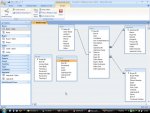
Good idea, here is the scrren cap of the relationship tables (others removed as they aren't used in this scenario).

I would like to be able to add the item number into the items table and have it automatically add the same value to the tables for finance postal and appraisal.

There are no relationships for postal and finance right now because I was trying to get one table working first - probably the wrong way though! Also postal has a few more fields needed, including the item #

Any help is very much appreciated, this is a BIG learning curve.

Many thanks
 

Attachments

  • relationship.jpg
    relationship.jpg
    92.2 KB · Views: 146
Thanks Pat, I thought I had constructed them correcty based on a lydia tutorial but I obviously mis-understood what they were trying to teach, it was a bit technical for a beginner.

So if I understand this correctly, the relational database is one HUGE table (not physically of course but in theory), which is split into more manageable parts. If all of the parts were to be put together to make the theoretical table, there would be no duplicate column labels, and each (section) table would be linked by a unique ID (primary) to a foreign key in it's linked (section) table, i.e. Item ID (primary) links to Item ID (foreign).

Also, that each link must be unique, not using one link for two sections?

So I can use Buyer ID in it's own table as primary, and in items as foreign but not in anything else.

I will have to re-do the database anyway, so the question is this; if I re-do it in access 2003 can I save it as .mdb and can I still use embedded pictures the same way as in 2007?

Phew, too much to think about this early in the morning.

Once again thanks for your continued help on this matter, it really is frustrating to have a basic understanding but little else.


:)
 
Ah that could be a problem as each item would have a minimum of three images! Although I could code the database in regular access (97 is it?) for the actual database so I can share it here and get the main thing done and then I assume I can convert it to 2007 in access?? If so I can add the image part then as it isn't linked to anything other than the one table.

I think I understand how it works now, so basically it is to avoid negative space in the database when the records are recalled. Using each 'section' as a mini database to store the information so it can be collated when needed.

Is that close?

lol
 
Just a quick thought, I've started laying out the tables in Access 2000 and I have added the tables to the relational window.

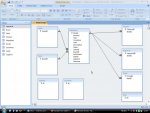
Question; can I use the primary key for the maintable to link three other tables for the foreign key? See attached image.
 

Attachments

  • screen.jpg
    screen.jpg
    81.7 KB · Views: 131
Last edited:
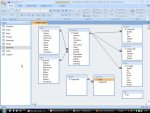
Ok, I have added the fields to the tables that are being used here. The Data table is just for lookups and has no repeating values, and the Saundries and Supplier tables are not linked in any way to the other tables and also have no repeating values.

There is one thing however, in the relationship window as you will see the tables to the right are all 1 to many but there cannot be more than one record for each item in each table, how can I change this to 1/1?

Anyway, here is the new screenshot of the relationship window, does this look any better than before and can you see any obvious errors I have missed?

Thanks :)
 

Attachments

  • screen.jpg
    screen.jpg
    91.9 KB · Views: 107
Ah yes, that solved it. If I have the other ID's in the maintable though, does that mean I will need to manually add the relative ID to link the tables?

Anyway, database attached if somebody would kindly look over it to see how I'm doing.

Thanks.
 

Attachments

Users who are viewing this thread

Back
Top Bottom