
Query criteria error message

El Jagang

Registered User.
Local time
Today, 14:31
Joined
Aug 21, 2015
Messages
24
In the query I've created, I want only the records that show an [End Date] that is greater than today's date to come up. Thus, I've entered >Date() in the criteria under Design View.

When I clicked on that column to sort the date while in Datasheet View, I get this pop-up (except my expression is called 'End Date', this is the closest example I could find online).
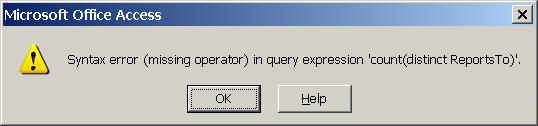
access-distinct-count1.jpg


It doesn't seem to cause any real problems; I can still get the info sorted as I want it, but I don't like not knowing why this pops up.

Any help would be appreciated.

EDIT: It should be noted that another query I've created with <Date() as a criteria does not give the error message, hence my confusion.
 
Last edited:
Please post the full SQL of your query.
 
SELECT [Non-HS Positions].[Posn #], [Non-HS Positions].[Employing Unit], [Non-HS Positions].[REO #], [Non-HS Staffing].SN, [Non-HS Staffing].[Last Name, First Init], [Non-HS Staffing].Rank, [Non-HS Staffing].[MOS ID], [Non-HS Staffing].[Start Date], [Non-HS Staffing].[End Date], [Non-HS Staffing].URS, [Non-HS Staffing].Comments
FROM [Non-HS Positions] LEFT JOIN [Non-HS Staffing] ON [Non-HS Positions].[Posn #] = [Non-HS Staffing].[Posn #]
WHERE ((([Non-HS Positions].[Currently Filled])="Yes") AND (([Non-HS Staffing].[End Date])>Date()));
 
That query has no relation to the error message you posted.

Also, you've got a mess of SQL there.

1. You should only use alphanumeric characters and underscores in table and field names. You should remove all those spaces and weird characters (#, -). It will make writing code in the future easier.

2. You've undone your LEFT JOIN by placing criteria on it. When you apply criteria to a field ([End Date]) in a table ([Non-JS Staffing]) that is LEFT JOINed, you make it an INNER JOIN. Don't know if it matters to you, but that LEFT JOIN isn't acting like a LEFT JOIN.

Again, though, the error message you posted does not relate to this query.
 
1. Thanks for the tip. I'll see about making those changes (and keep the weird characers for the captions instead of actual field names).

2. For the query to pull the information I need, that criteria is necessary (at least as far as my admittedly limited knowledge of Access goes). My schooling in Access has been very basic and I haven't had much time for self-teaching.

Oddly enough, I've just opened that database again and I'm not getting the error message when trying to sort the [End Date] anymore.
 

Users who are viewing this thread

Back
Top Bottom