
diannebcgray
New member
- Local time
- Yesterday, 17:09
- Joined
- Aug 9, 2022
- Messages
- 13
Hi,
I am struggling to reference a field name in a query in VBA. I want to use this field name to set my current form text box's value to that value when a client name is picked from a combobox. The query will look through my table and pick the client's information from the most recent record naming that client.
I know there are several other help pages on this:
First Example
Second Example
Third Example
But I still keep getting the error message
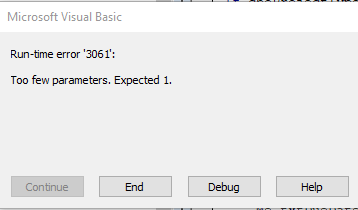
My two attempts doing this are:
and
But both methods still give me the error.
The actual query content is as follows (created in Design View, and fully functional):
What do I need to do in my VBA to reference the query successfully?
I am struggling to reference a field name in a query in VBA. I want to use this field name to set my current form text box's value to that value when a client name is picked from a combobox. The query will look through my table and pick the client's information from the most recent record naming that client.
I know there are several other help pages on this:
First Example
Second Example
Third Example
But I still keep getting the error message
My two attempts doing this are:
Code:
Dim SavedQry As DAO.QueryDef
Dim rs As DAO.Recordset

Private Sub cboClientName_AfterUpdate()
Set SavedQry = CurrentDb.QueryDefs("Get Client Info - PIF New Project")
Set rs = SavedQry.OpenRecordset()
txtContactName = rs.Fields("Client Contact Name")
End Sub
and
Code:
Dim rs As New ADODB.Recordset

Private Sub cboClientName_AfterUpdate()
Set rs = CurrentDb.OpenRecordset("Get Client Info - PIF New Project")
txtContactName = rs.Fields("Client Contact Name")
End Sub
But both methods still give me the error.
The actual query content is as follows (created in Design View, and fully functional):
Code:
SELECT TOP 1 [Projects].[Client Contact Name], [Projects].[Client Address Unit], [Projects].[Client Street Name], [Projects].[Client City], [Projects].[Client Province], [Projects].[Client Postal Code], [Projects].[Client Phone], [Projects].[Client Extension], [Projects].[Client Alternative Phone], [Projects].[Client Fax], [Projects].[Client E-mail], [Projects].[Client Notes], [Projects].[Purchase Order Number], [Projects].Opened, [Projects].[Client Name]

FROM [Projects]

WHERE ((([Projects].[Client Name])=[Forms]![PIF - New Project]![cboClientName]))

ORDER BY [Projects].Opened DESC;
What do I need to do in my VBA to reference the query successfully?


