report heading help

Feprincess

Registered User.
Local time
Today, 02:45
Joined
Jul 30, 2007
Messages
31
I'm making a report from a query.
I have 8 schools with 8 school numbers, but when I make the report only the first school number comes up?
I've sorted by school number before hand.
Thanks
 
Did you make sure to "group by" school and have the school number in the GROUP header and not the page or report header?
 
Do I "group by" after I make the report or during?
 
There is a feature to select your grouping when making the report, which is easier. You CAN do it afterwards but it defnitely takes a couple of other steps.

To do so afterwards, go to VIEW Sorting and Grouping and then select the field to group on in the dropdown and then make sure the correct sort is selected (either ascending or descending) and then in the bottom, of the dialog box that appears, there will be a place to say GROUP HEADER Yes and then select that and then you can move your field into it.

But, it is way easier just to pay close attention to the wizard when making your report as you can select which field, or fields, you want to group on just before you get the sorting one.
 
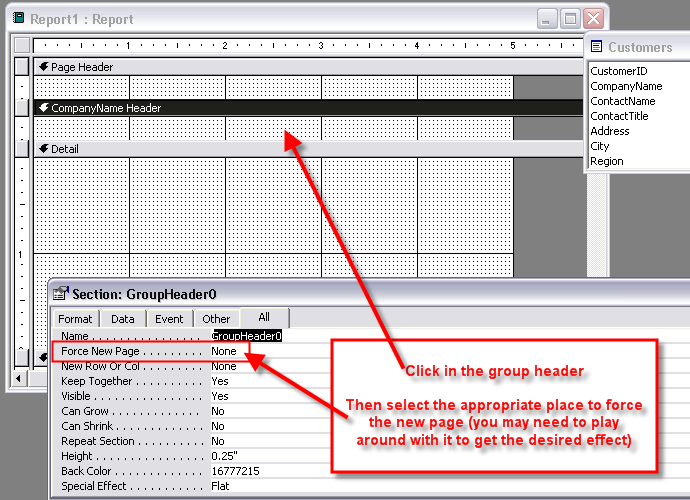
How can I have each school number start on their own page?
 
Click in the group header and look in the properties dialog for FORCE NEW PAGE and select YES.
 
ok, only one more question I swear...
Can I calculate for totals of each school after I make my report or should I made new fields on the query beforehand.
Thanks a lot too.
 
Yep (I was wrong about the "YES" portion though. Play around with the settings to get your desired effect)

forcenewpage01.png
 
Hi again, can I preform a calculation and have it show up on my report. I'm adding together totals per school.
Thanks boblarson, I almost have my report totally formatted!
 
Depending on where you want the calculation to be and what you want calculated, you can place your text box with the formula in it in the group header or footer if you want the calculation for each group, or in the page header/footer for a calculation based on each page, or in the report header/footer for a calculation based on the entire report. You can also create it in one of those places and just copy the control and paste it into the other place to get the same functionality for each section without having to go through typing the calculation in a new text box each time.
 

Users who are viewing this thread

Back
Top Bottom