runtime error 28 out of stack space

Prosper98

New member
Local time
Today, 23:35
Joined
Apr 26, 2022
Messages
2
Hello! I'm a beginner at the use of Excel. So, I decided to follow a specialization in Coursera. But, I was driven to activate the developer option of Excel and use Macros. I recorded the first Macro and applied it. But the second time, when I wanted I recorded a new Macro and applied it, it didn't work, then the app gave me the above message. I don't know how to solve this problem. I tried to install an upgraded version of Microsoft office, but it didn't solve the problem. Please, I need your help.

 
Usually you get stack space errors from VBA code that attempts something like recursive subroutine calls or when you create a subroutine with huge local arrays. A true Macro does not involve code, so the only other possibility that immediately comes to mind would be a recursive Macro.

I can't see your Macro, of course, so I can't tell what it is doing. Is there a chance that this macro somehow activates itself? I.e. does the Macro attempt to call or activate something that would trigger the same macro again?
 
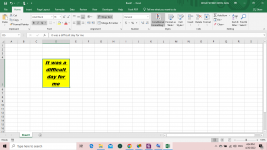
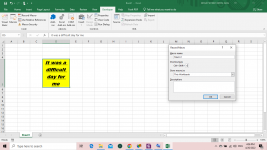
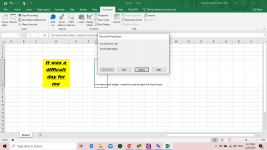
I redid it in order that you see it.

1- Creation of a background and font style
2- Record it as a Macro
3- And try to apply it to 'I'm very tired today. I need to rest at least for five hours.
4- It gives me: ''Runtime error '28' out of stack space''

Below are the images.
 

Attachments

  • 1rst.PNG
    1rst.PNG
    95.1 KB · Views: 150
  • 2nd.PNG
    2nd.PNG
    100.1 KB · Views: 155
  • 3rd.PNG
    3rd.PNG
    99.1 KB · Views: 200

Users who are viewing this thread

Back
Top Bottom