OK, so I can't really test anything in your sample application because the tables are still Sharepoint links that I don't have access to. I was able to gather the fields that are in each table just by looking at the queries, etc. but that's about it. If you do regular development updates on this application, you might want to keep a separate test copy with local web tables that are structurally the same as your Sharepoint lists with some dummy data. That way you can test things without worrying about any potential effects on the real app, plus you could post it for help when needed and the person helping you would have access to the tables.
Having said that, I am uploading a different sample db that I put together. You should be able to duplicate this functionality in your app. This sample has one web table, one web query and two web forms (a search form and a results form).
The web query (qrySearch) uses parameters for the values that come from the form. The parameters are called in the criteria of the query, but they also need to be defined in the Parameters section of the query. To define the parameters you just need to provide a name and data type. See the illustrations below for an example.
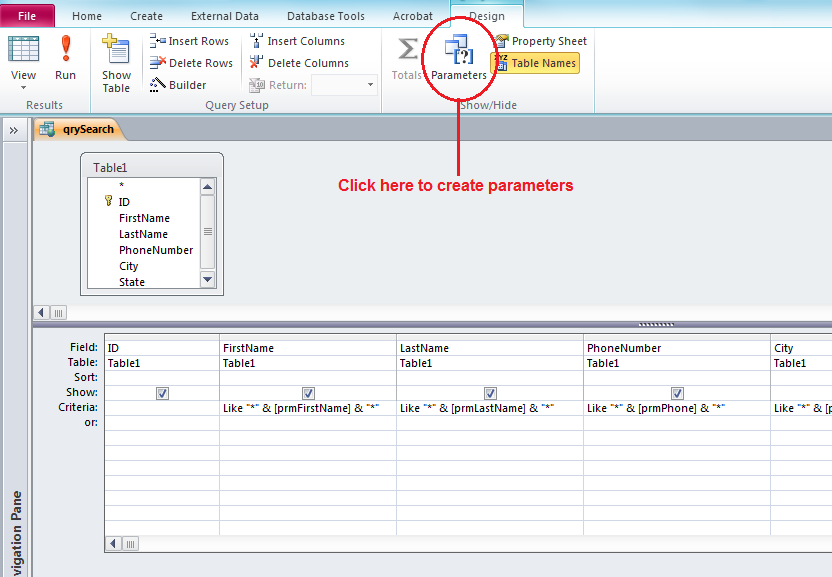
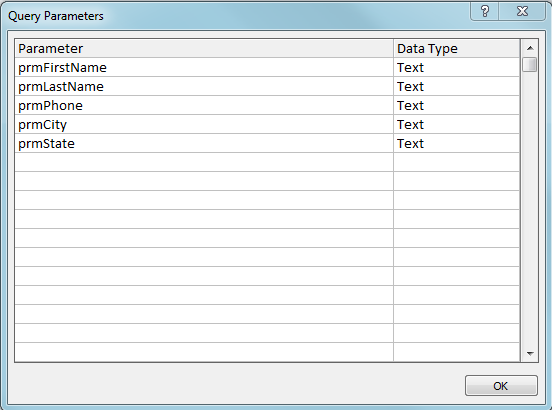
Moving on to the forms, we have the search form (frmSearch) and the results form (frmResults). The search form is unbound, with five unbound text boxes and two command buttons. The results form is bound to the query. The command buttons on the search form each have an embedded macro in the Click event. The macro for the "Search" button opens frmResults and provides the values for the parameters. Since frmResults is based on a query with defined parameters, then when we call frmResults using the OpenForm or BrowseTo method in a macro, we automatically get prompts for the parameter values. This is where we place the reference to the form controls that the values come from.
Since I mentioned both the OpenForm and BrowseTo methods above, this is a good time to point out the difference. The OpenForm method will open the form in a separate pop up window, with the calling form in the background. This is normal and controllable behavior when running in the Access client (within Access itself), because you can just close the pop up form when you're done with it and you are back to the original form.
However, when using the OpenForm method when a web form is running
in a browser window, this is
not necessarily the behavior we want. Using the OpenForm method in this scenario will cause the called form to open in a new, separate, browser window. This can be problematic because you can't really control what happens when the new browser window is closed (i.e. you can't really be sure where it will return to). Plus, this can end up with a multitude of open browser windows, which can be confusing for the user. This is where the BrowseTo method comes in. This method was created for operating in a browser (which is the general intent of web forms to begin with). When using the BrowseTo method, the new form will open in the same browser window and you can then just use the browsers back button to return to the original form. This is more along the lines of the behavior we expect to see in a web environment.
However, when using the BrowseTo method
inside the Access client, then we might get behavior that we
don't normally expect. The original form is just closed and then the new form is opened. So now, to go back to the original form we have to re-open it. So you have to choose which behavior you would prefer, but since web forms are designed to be run in a browser, then the BrowseTo method would be the one we would normally want to use. That is the method I chose to use in the example, but you can change to the OpenForm method if you don't like the behavior.
Anyway, here is a screenshot of the embedded macro in the Click event of the "Search button on frmSearch;
Then we have the macro in the Click event of the "Clear" button, which just sets the values of the unbound text boxes back to nothing;
Check out the sample db and post back if you have questions.



