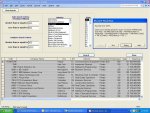
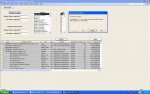
I am receiving the following error message and must be missing something. Any help would be appreciated. I have attached the error message and pasted the code below.
Thanks in advance for your help.
________________________________________________________________
Private Function BuildFilter() As Variant
Dim varWhere As Variant
Dim varState As Variant
Dim varIndustry As Variant
Dim varItem As Variant
Dim intIndex As Integer
varWhere = Null ' Main filter
varState = Null ' Subfilter used for State
varIndustry = Null ' Subfilter used for Industry
' Check for min sales
If Me.SalesGreaterThan > "" Then
varWhere = varWhere & "[Sales (USD mil)] > " & Me.SalesGreaterThan & " AND "
End If
' Check for max sales
If Me.SalesLessThan > "" Then
varWhere = varWhere & "[Sales (USD mil)] < " & Me.SalesLessThan & " AND "
End If
' Check for min employees
If Me.EmployeesGreaterThan > "" Then
varWhere = varWhere & "[Number of Employees] > " & Me.EmployeesGreaterThan & " AND "
End If
' Check for max employees
If Me.EmployeesLessThan > "" Then
varWhere = varWhere & "[Number of Employees] < " & Me.EmployeesLessThan & " AND "
End If
' Check for State in multiselect list
For Each varItem In Me.StateList.ItemsSelected
varState = varState & "[State] = """ & _
Me.StateList.ItemData(varItem) & """ OR "
Next
' Test to see if we have subfilter for State...
If IsNull(varState) Then
' do nothing
Else
' strip off last "OR" in the filter
If Right(varState, 4) = " OR " Then
varState = Left(varState, Len(varState) - 4)
End If
' Add some parentheses around the subfilter
varWhere = varWhere & "( " & varState & " )"
End If
' Check if there is a filter to return...
If IsNull(varWhere) Then
varWhere = ""
Else
varWhere = "WHERE " & varWhere
' strip off last "AND" in the filter
If Right(varWhere, 5) = " AND " Then
varWhere = Left(varWhere, Len(varWhere) - 5)
End If
' Check for Industry in multiselect list
For Each varItem In Me.IndustryList.ItemsSelected
varIndustry = varState & "[Industry] = """ & _
Me.IndustryList.ItemData(varItem) & """ OR "
Next
' Test to see if we have subfilter for State...
If IsNull(varIndustry) Then
' do nothing
Else
' strip off last "OR" in the filter
If Right(varIndustry, 4) = " OR " Then
varIndustry = Left(varIndustry, Len(varIndustry) - 4)
End If
' Add some parentheses around the subfilter
varWhere = varWhere & "( " & varIndustry & " )"
End If
' Check if there is a filter to return...
If IsNull(varWhere) Then
varWhere = ""
Else
varWhere = "WHERE " & varWhere
' strip off last "AND" in the filter
If Right(varWhere, 5) = " AND " Then
varWhere = Left(varWhere, Len(varWhere) - 5)
End If
End If
BuildFilter = varWhere
End If
End Function
Thanks in advance for your help.
________________________________________________________________
Private Function BuildFilter() As Variant
Dim varWhere As Variant
Dim varState As Variant
Dim varIndustry As Variant
Dim varItem As Variant
Dim intIndex As Integer
varWhere = Null ' Main filter
varState = Null ' Subfilter used for State
varIndustry = Null ' Subfilter used for Industry
' Check for min sales
If Me.SalesGreaterThan > "" Then
varWhere = varWhere & "[Sales (USD mil)] > " & Me.SalesGreaterThan & " AND "
End If
' Check for max sales
If Me.SalesLessThan > "" Then
varWhere = varWhere & "[Sales (USD mil)] < " & Me.SalesLessThan & " AND "
End If
' Check for min employees
If Me.EmployeesGreaterThan > "" Then
varWhere = varWhere & "[Number of Employees] > " & Me.EmployeesGreaterThan & " AND "
End If
' Check for max employees
If Me.EmployeesLessThan > "" Then
varWhere = varWhere & "[Number of Employees] < " & Me.EmployeesLessThan & " AND "
End If
' Check for State in multiselect list
For Each varItem In Me.StateList.ItemsSelected
varState = varState & "[State] = """ & _
Me.StateList.ItemData(varItem) & """ OR "
Next
' Test to see if we have subfilter for State...
If IsNull(varState) Then
' do nothing
Else
' strip off last "OR" in the filter
If Right(varState, 4) = " OR " Then
varState = Left(varState, Len(varState) - 4)
End If
' Add some parentheses around the subfilter
varWhere = varWhere & "( " & varState & " )"
End If
' Check if there is a filter to return...
If IsNull(varWhere) Then
varWhere = ""
Else
varWhere = "WHERE " & varWhere
' strip off last "AND" in the filter
If Right(varWhere, 5) = " AND " Then
varWhere = Left(varWhere, Len(varWhere) - 5)
End If
' Check for Industry in multiselect list
For Each varItem In Me.IndustryList.ItemsSelected
varIndustry = varState & "[Industry] = """ & _
Me.IndustryList.ItemData(varItem) & """ OR "
Next
' Test to see if we have subfilter for State...
If IsNull(varIndustry) Then
' do nothing
Else
' strip off last "OR" in the filter
If Right(varIndustry, 4) = " OR " Then
varIndustry = Left(varIndustry, Len(varIndustry) - 4)
End If
' Add some parentheses around the subfilter
varWhere = varWhere & "( " & varIndustry & " )"
End If
' Check if there is a filter to return...
If IsNull(varWhere) Then
varWhere = ""
Else
varWhere = "WHERE " & varWhere
' strip off last "AND" in the filter
If Right(varWhere, 5) = " AND " Then
varWhere = Left(varWhere, Len(varWhere) - 5)
End If
End If
BuildFilter = varWhere
End If
End Function