Services Template help

SJS66

Registered User.
Local time
Today, 15:35
Joined
Aug 8, 2017
Messages
26
Hi, second post on forum so pls bear with me. I am not a programmer and a new user of Access. I wasn't sure how to best communicate my problem but after researching this forum and realizing I know very little about Access or programming, I thought using a screenshot and attaching the Sample Services Template I created, would be the easiest way to start.

I'm trying to use the Access Services Template. I've created a sample version of the Services Template for this forum (attached as zip file) and took a screenshot showing the Quote it generates. I'd like to change "Fax" (circled in red) to read "Email".

Just wondering how I change this part of the quote? Hope this isn't too big an ask for my first thread request.
 

Attachments
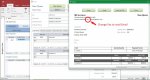
  • SJS_ServicesTemplate_QuoteFax.jpg
    SJS_ServicesTemplate_QuoteFax.jpg
    99 KB · Views: 149
  • ServicesSampleSJS.zip
    ServicesSampleSJS.zip
    904 KB · Views: 136
Last edited:
Right click on the Quotes macro and choose 'Design View'

Expand the SubMacro 'ViewQuote'

Look for the line that starts "SetTempVar (tmpMyContactInfo, " and change the word Fax to Email

Save Macro
 

Attachments

  • Capture.jpg
    Capture.jpg
    88.3 KB · Views: 143
Right click on the Quotes macro and choose 'Design View'

Expand the SubMacro 'ViewQuote'

Look for the line that starts "SetTempVar (tmpMyContactInfo, " and change the word Fax to Email

Save Macro

Thanks Peter, worked perfectly. Legend!
Should of joined forum weeks ago :banghead:
I live & learn....eventually.
 

Attachments

  • SJS_ServicesTemplate_QuoteFixed.jpg
    SJS_ServicesTemplate_QuoteFixed.jpg
    96.3 KB · Views: 120
One other small thing I've noticed which is also quite annoying is the Window that the quote opens in, is slightly to big for my display. The "Refresh Total" button/link (sorry) at the bottom is behind my Taskbar so I have to drag it across to my second display to be able to click on it.

How hard would it be to resize this window? I wouldn't even know where to start looking for this info on how to do this. I'm hoping it's as easy a fix as the fax header thing. Hope is good.
 

Users who are viewing this thread

Back
Top Bottom