
Stock Control Query

Seph

Member
Local time
Today, 21:38
Joined
Jul 12, 2022
Messages
72
Hi everyone!

Please can you shed some light on my storm of confusion.

I want to create a stock control method wherby when a stock item reflects 0 quantity items then it shouldn't be able to be selected for future allocations.

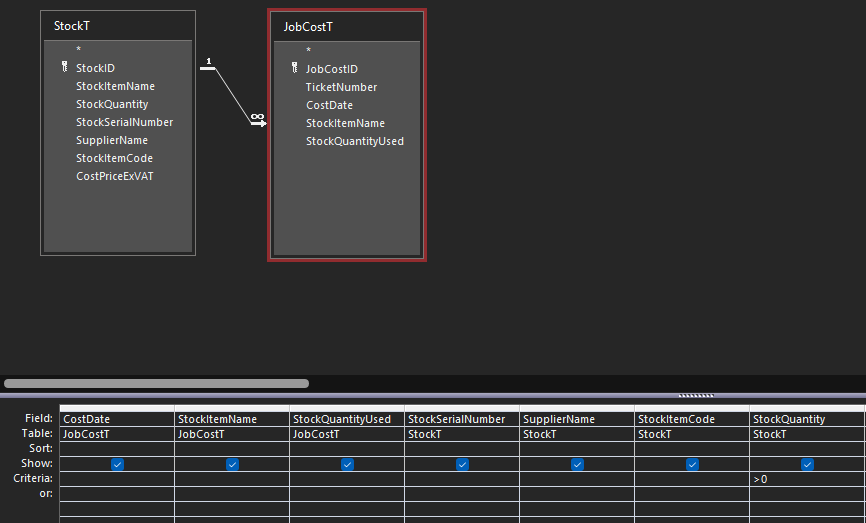
I have 2 tables "StockT" & JobCostT".

The tables are joined by a One-To-Many relationship.

I created a query that looks as follows:
1659530316858.png


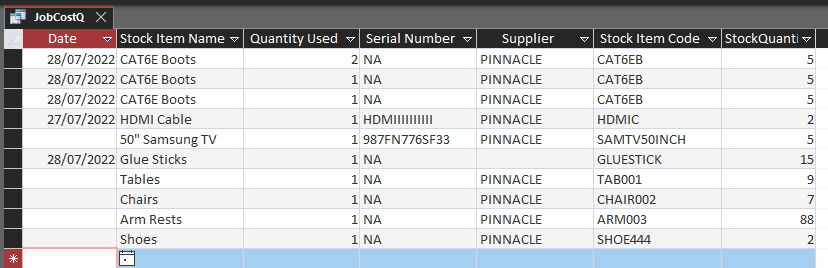
When I run the query, it works as instructed.
1659530757149.png


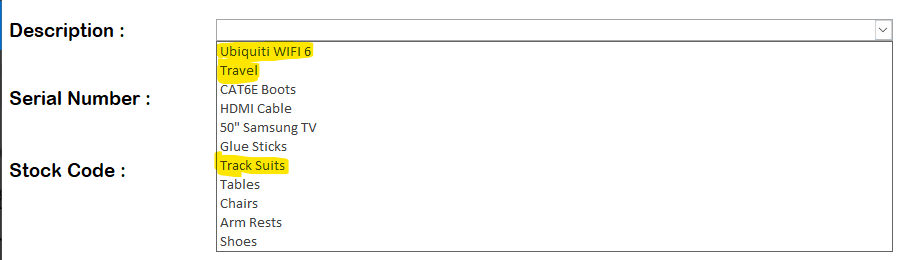
However in a form, I can still select stock items that have a 0 quantity value
1659530822882.png


Any Ideas would really help.

Thanks!
 
So apply the same criteria to the combo?
 
You will also likely be advised not to store stock quantity, but to calculate it on the fly, with incoming, outgoing, audits etc, but first things first.
 
Thanks for the suggestion, I didn't know that Combo box's could be filtered. I'll look into that!

Thanks again everyone. For anyone else who would like to know what this look like, below are some screenshots.
FYI this is called a Relational Combo Box:

Create the Query
1659715335980.png

Add a Combo Box to your Form

Untitled.png

Screenshot 2022-08-05 173849.png

Then point the Combo Box to your Query

Screenshot 2022-08-05 173911.png
 
If the combo is on a continuous form, you probably don't want to restrict the list this way. It will make the product name "disappear" whenever the quantity goes to zero for an existing item.

A better solution is to add code in the control's BeforeUpdate event to check the quantity there and not allow the item to be selected if the quantity is not >0

Code:
If Me.cboStockID.Column(2) < 1 Then
    Msgbox "This item is not currently available.",vbOKOnly
    Cancel = True
    Me.cboStpclID.Undo
    Me.cboStockID.SetFocus
    Exit sub
End If

You also need similar code in the quantity event to ensure that you don't order more than is available.

The .Column property of the combo's RowSource is a zero based array. So the first item is Me.mycombo.Column(0). This is the same as Me.mycombo.Value and Me.mycombo (preferred). The second column of the RowSource is Me.mycombo.Column(1), etc. I selected .Column(2) assuming the quantity was third - ProductID, ProductName, QOH.

PS, Storing the on hand quantity is not recommended. It is better to calculate it on the fly. Create a totals query that totals the transaction values and you can use that query rather than the table as the RowSource for the combo. It may seem like it is simpler to just keep the on hand value in a table, but it really, really isn't. There is too many ways for it to go bad and without an audit trail, you can't figure out what has been affected.
Thank you for this solution. I like this approach.

Just a quick one, why is it not recommended to store the quantity in a table?

I was thinking of adding a method whereby quantity items are removed at the Invoicing stage.

This way I can keep track of item's allocated to which job, when, which supplier I procured it from and what their serial number is.

This is so in future if the item is faulty, then I know when it was purchased and where.

Is this possible or am I making things too complicated..
 

Users who are viewing this thread

Back
Top Bottom